
Archive
Azure Automation: Calling a PowerShell from a WebApp
I am working on a project that requires an Azure PowerShell to be called from a WebApp. Without entering in the details of the app, I faced a problem when writing the PowerShell script when it came to the authentication and running the PowerShell script from the Azure Automation portal is not my scenario.
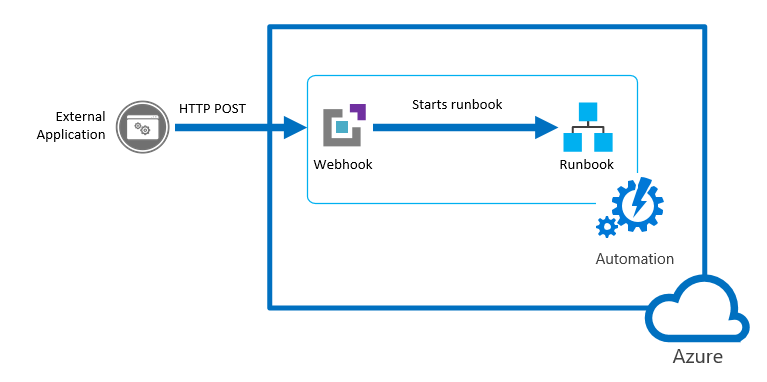
Automation: The figure shows an External App calling a Microsoft Azure Webhook to starts a runbook
Before I start, let’s have a look on the authentication Methods. The following table summarizes the different authentication methods for each environment supported by Azure Automation and the article describing how to setup authentication for your runbooks.
| Method | Environment | Article |
| Azure AD User Account | Azure Resource Manager and Azure Service Management | Authenticate Runbooks with Azure AD User account |
| Azure AD Service Principal object | Azure Resource Manager | Authenticate Runbooks with Azure Run As account |
| Windows Authentication | On-Premises Datacenter | Authenticate Runbooks for Hybrid Runbook Workers |
| AWS Credentials | Amazon Web Services | Authenticate Runbooks with Amazon Web Services (AWS) |
So, what methods I found to start the PowerShell from my WebApp?
- Option 1: Webapp calling a PowerShell Azure RM Automation Runbook.
- Option 2: Webapp calling an Azure Automation webhooks. Great way of doing it. A webhook allows you to start a particular runbook in Azure Automation through a single HTTP request. The webhook would allow external services such as my custom application to start runbooks.
- Option 3: Webapp calling a PowerShell script. The issue here becomes the authentication.
Let’s start with Option 1. I will discuss the other options in the next posts
Option 1: Webapp calling a PowerShell Azure RM Automation Runbook
You can use PowerShell Workflow (recommended as you can use parallel processing to perform multiple actions in parallel) or PowerShell Script. More info here.
Note: You can’t convert runbooks from one type to another.
Create an Azure automation account
1.1. Log in to the Azure portal.
1.2. Click New > Management > Automation Account
1.3. In the Add Automation Account blade, configure your Automation Account details (e.g. Name)
1.4. From your automation account, click the Assets part to open the Assets blade to create a new credential.
1.5. Click the Credentials part to open the Credentials blade.
1.6. Click Add a credential at the top of the blade.
1.7. Complete the form and click Create to save the new credential. For more info see Credential assets in Azure Automation
Create a PowerShell script/workflow with the commands required for your solution (for example: get a list of VM’s)
$cred = Get-AutomationPSCredential –Name “Replace with the Crendential NAME”
Add-AzureRMAccount –Credential $cred Select-AzureSubscription –SubscriptionName “replace your Subscription NAME”
Get-AzureVM
Create an Azure Automation Runbook
1.8. In the Azure Portal, click on Automation Accounts and select the Automation account you created previously
1.9. Click on the Runbooks tile to open the list of runbooks.
1.10. Click on the Add a runbook button and then Import.
1.11. Click Runbook file to select the file to import
1.12. If the Name field is enabled, then you have the option to change it. The runbook name must start with a letter and can have letters, numbers, underscores, and dashes.
1.13. Select a runbook type taking into account the restrictions listed above.
1.14. The new runbook will appear in the list of runbooks for the Automation Account.
1.15. You must publish the runbook before you can run it.
Alternatively, to import a runbook from a script file with Windows PowerShell:
$AutomationAcct = “Your Automation Account Name”
$runbookName = “TestRunbook”
$scriptPath = “c:\MyRunbooks\TestRunbook.ps1”
Set-AzureAutomationRunbookDefinition -AutomationAccountName $AutomationAcct -Name $runbookName -Path $ scriptPath -Overwrite
Publish-AzureAutomationRunbook -AutomationAccountName $AutomationAcct –Name $runbookName
Create an ASP.NET website which will call a PowerShell command.
The Webapp should call the following PowerShell:
Start-AzureAutomationRunbook –AutomationAccountName “replace with your Automation Account NAME created in step 1.3″ –Name ” replace with your runbook name. for eample:MyGetVMRunbook ”
For more info, click here
Next Post: Option 2 and 3….
Supercharging performance of your Hyper-V
If you are an expert in Hyper-V or just started playing with it, I recommend you download the Hyper-V ebook provided by Altaro.
The ebook is divided in 2 sections: (1) Diagnosing and Remediating Performance Issues and (2) Planning is Better than Remediation.
It will help you better plan your next Hyper-V deployment and how could you make the most of your existing deployment, through practical hands-on tips as well as background information you will learn how Hyper-V (and virtualization in general) affects performance and how to find issues in storage, CPU, memory and network components. This is followed by a look at planning hosts, VMs, storage, networking and management for maximum performance.
What the book covers:
- Diagnosing and remediating Storage, CPU, Memory, and Network performance issues
- Using Windows Performance Monitor and PAL to facilitate system and VM monitoring
- Manage planning of Hosts, VMs, Storage, Networking, to minimize the risk of performance issues

Overcome the challenges of Managing IT in a hybrid cloud world – FREE WHITEPAPER
– What are the different forces that are driving adoption and deployment of hybrid cloud architectures?– What are the major trends that make today the most innovative environment ever for business, and also the most challenging IT management environment?– What is the current state of hybrid cloud management offerings?
System Center Universe 2016: Australia. Still time to register
One day event on March 11th will be showcasing upcoming System Center solutions and Cloud Technologies with integration of the latest Windows 10
You still have time to register. You can use the promotion code “MVPPRO” to be entered on the registration page enabling you to get 10% off the current ticket price.
I will be presenting the following session:
Azure RemoteApp management and configuration.
In this session learn more about the different management capabilities, deployment options, and administrative configurations along with best practices for Azure RemoteApp. We will dive into best practices for creating template images in order to deploy line-of-business applications to include how to verify applications function properly within a RemoteApp deployment. We’ll discuss and provide overview of the different authentication models available and what O365 integration is possible along with how to perform monitoring, configure redirection for USB devices, printers, and drive mapping. Lastly, we’ll explain how the Azure RemoteApp service operates and scales.
Check out the sessions : http://systemcenteruniverse.asia/australia/sessions/
Secure in the Cloud
Time has gone when businesses owned their applications, the underlying infrastructure and were also responsible for their own security.
Enterprises from every imaginable sector are transitioning their infrastructure, applications and data into the cloud. Cloud technologies could cut cost and risk, if well planned.
Now as you progressively migrate to cloud you could think that you are safe: You transferred the burden of the IT infrastructure to the cloud service provider (CSP), migrated your applications and the CSP should now be solely responsible for the security. Well, you will need to re-think that.
Recommended: recently, Websense published an whitepaper 2016 Cybersecurity Predictions, which you can check at http://www.websense.com/assets/reports/report-2016-cybersecurity-predictions-en.pdf
Migration of legacy applications continue to be a primary cloud focus, but the development of new applications optimized to operate within cloud environments are getting traction.
Cloud applications will account for 90% of worldwide mobile data traffic by 2019. Source: Cisco Visual Networking Index: Global Mobile Data Traffic Forecast Update, 2014–2019
As we move applications and confidential data to the cloud, security challenges data loss and potential outages will increase – Security should be a consistent and important item on your agenda.
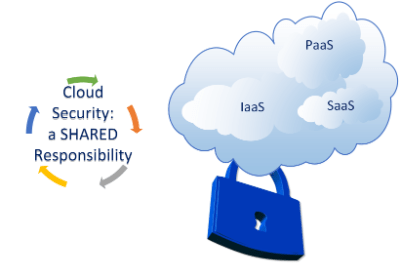
Security in the cloud is a shared responsibility and organisations needs to understand that – In the cloud era, security is not owned solely by one party (CSP or customer). Both, the CSP and the customer are responsible for data security in the cloud.
The image below, extracted from the Microsoft MVA course, illustrates the distributed accountability in adopting the cloud.
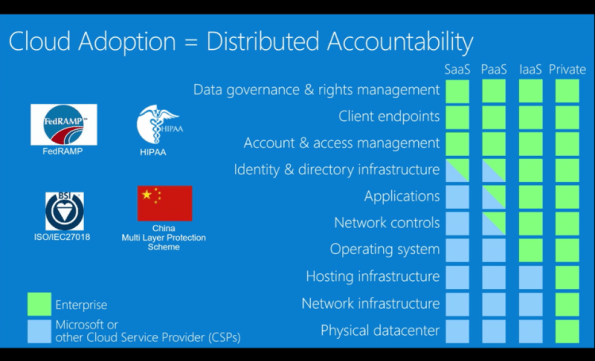
You can learn how Microsoft can help you meet global compliance requirements, such as ISO 27001 / 27018, FedRAMP, PCI, and HIPAA, with new security controls ranging from at-rest data encryption, key management, virtual machine protection, logging and monitoring, to anti-malware services, identity management, access controls, and much more by checking out this MVA session at https://mva.microsoft.com/en-US/training-courses/secure-the-cloud-14037?l=lQIkkst0B_5300115881
Image Source: Microsoft MVA
Simplify Data Center Management with Microsoft Operations Manager Suite
Modern data centers need extra care with simplified management and strong analytical capabilities to predict and prevent disasters that would have a negative business impact on your organization. Savision’s published a whitepaper, written by Microsoft MVP Janaka Rangama, focuses on monitoring Linux workloads with OMS for analytics, proactive monitoring and resource utilization in your heterogeneous data center environment.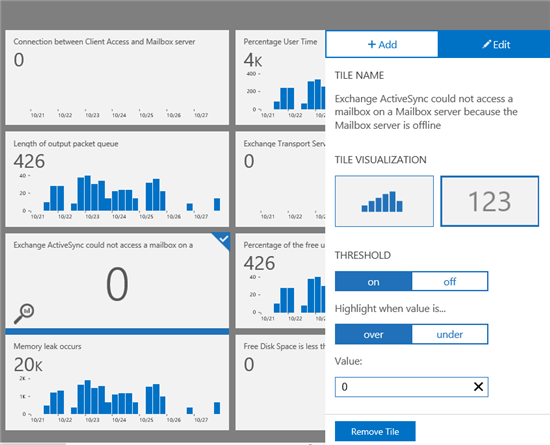
Monitoring Exchange Workloads in OMS
Learn how to simplify your datacenter management in Savision’s new whitepaper, entitled: ‘Born in the Cloud: Monitoring Linux Workloads with OMS’. The whitepaper provides insights on how organizations can combine the existing System Center Operations Manager (SCOM) environments with OMS.
Find out how to gain control over modern hybrid clouds and how to extend OMS with business service management information.
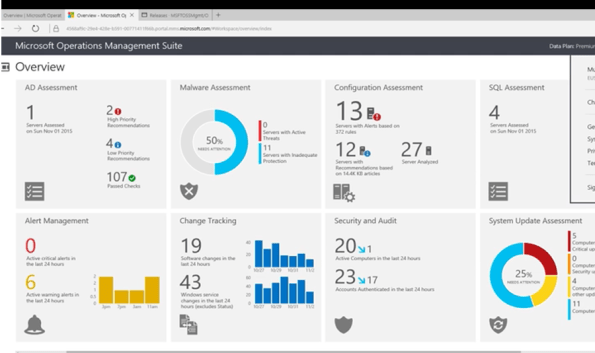
This whitepaper will focus on:
- What is Microsoft Operations Management Suite? How can it simplify data center management?
-
How can you leverage OMS Log Analytics to analyze, predict and protect your Linux workloads?
-
How can you integrate System Center Operations Manager with OMS for extended monitoring?
-
How can you harness the power of Business Service Management using Savision Live Maps Unity and Microsoft OMS?
Download the whitepaper now and learn how you can directly know how all that detailed log data impacts your business and service levels. You can download your copy of the whitepaper here: bit.ly/1NfEagJ
Security: Impunity leads to cyber crime to operate widely free in Brazil
There are evidences that Brazilian cyber criminals are cooperating with the Eastern European gangs involved with ZeuS, SpyEye and other banking Trojans, sharing know-how and exchanging favours.
With almost no legislation and very few arrests, the Brazilian cyber-criminals are motivated on ripping off their own fellow nationals and local businesses.
Sadly, the Brazilians are bracing for another tough year. With a high level of corruption in all levels of the government, no investments in education and with an legislation from the stone age, the cyber criminals have the certain of no punishment and are making many victims.
See 6 tips for staying safer online
A global survey conducted by ESET revealed that between January and November 2015, Brazil had the highest levels of global spread of some of the major banking Trojans, corresponding for 82% of all global detections of the TrojanDowloader.Banload, 72% of the Spy.Bancos and 52% of the Spy.Banker.
In 2014 Brazil was ranked the most dangerous country for financial cyber-attacks. As shocking as it sounds, sensitive data about almost every Brazilian citizen in the open.
As a safe measure, make sure you check the source of the document before you click and download it to your device – The Win32 / TrojanDownloader.Banload is a family of malware that focuses on breaking into the security solutions and perform download other malicious code aimed at stealing bank details.
To minimize the risks, at the personal level, make sure you use strong passwords, don’t share personal information on social network and use multi-authentication factor allied with an updated anti-virus and host firewall.
Many of these malicious codes are based on social engineering and pose as a trusted document in order to deceive their victims – This particular threat (Win32 / TrojanDownloader.Banload) pretends to be an Office document, however, has a double extension .docx_.scr. Its propagation occurs, especially through e-mails, where users believe that this is a Word document, when it is actually an executable file.
No matter your size or the size of your organisation. No one is too small to be a target for cyber criminals.
Do you think that you are safe here in Australia or anywhere in the world? The cyber criminals have no borders. According to the ESET Virus Radar, the number 1 threat is the Win32/Bayrob, followed by the JS/Exploit.Agent.NKZ.
My personal note to you: Start 2016 by making sure your systems are up to date, that you have an anti-virus and host firewall installed and updated and that you follow the basics of security. Visit the Microsoft Safety and Security Center at https://www.microsoft.com/security/default.aspx
If you interested in learn more about the cyber crime, there is an interesting white paper published by Trend Micro, which I recommend.
Sources:
- http://www.welivesecurity.com/2015/05/07/cpl-malware-brazil-white-paper-now-available/
- https://securelist.com/files/2015/11/KLReport_CyberUnderground_Brazil_eng.pdf
- https://www.trendmicro.com/cloud-content/us/pdfs/security-intelligence/white-papers/wp-ascending-the-ranks.pdf
- http://www.virusradar.com/?utm_source=virus_radar&utm_medium=infohub&utm_campaign=virus_radar
Image: Freedigitalphotos/Stuart Miles
Azure ASR’s SLA-backed enhanced VMware to Azure solution is now ready to replicate your on-premises workloads to Azure
You heard right. Microsoft has launched an enhanced version of its Azure Site Recovery (ASR) targeted especially for VMware customers.

The concept of ASR is very simple: organisations will be able to replicate their VMware virtual machines (VMs) to Azure, update and then run them in Azure as a disaster recovery option. They will be charged a small amount by VM but won’t have to pay for compute or storage until the VM is up and running in Azure.
To note, Azure Site Recovery, as part of Microsoft Operations Management Suite (OMS), enables your organisation to gain control and manage your workloads no matter the source: Azure, AWS, Windows Server, Linux, VMware or OpenStack.
Some of the key ASR characteristics:
- With non-disruptive recovery testing, you can easily test the failover of your VMware virtual machines to Azure within minutes, and validate your workload’s performance in Azure, without impacting on-going replication or the production workload.
- With ASR-integrated failback, start replicating your Azure virtual machines back to your on-premises ESXi environment, and failback to the original or an alternate location when your on-premises site is once again available for use.
- Heterogeneous workload support, automated VMware vCenter Server discovery
- Continuous data protection (CDP), one-click failovers with ASR Recovery Plan
- Rich health monitoring and e-mail notifications.
I’ve been working with ASR for a while and I definitely recommend it.

Source:https://azure.microsoft.com/en-us/documentation/articles/site-recovery-vmware-to-azure-classic/
Ready to start using ASR? Check out additional product information, to start replicating your workloads to Microsoft Azure using Azure Site Recovery today. You can use the powerful replication capabilities of Site Recovery for 31 days at no charge for every new physical server or virtual machine that you replicate.
You can read the announcement at https://azure.microsoft.com/en-us/blog/ga-enhanced-migration-and-disaster-recovery-for-vmware-virtual-machines-and-physical-servers-to-azure-using-asr/
Technologies that work together to create Microsoft’s SDN solutions
With the upcoming Windows 2016 and System Center 2016, there will be many technologies that will work together to create Microsoft’s Software Defined Networking (SDN) solutions and the best part is that you can already check them by downloading and deploying Windows 2016 and System Center 2016 Technical Preview.
- Hyper-V Network Virtualization, which enables virtualization of tenant networks on top of a shared physical network infrastructure. , which are being performed by hardware appliances (such as load balancers, firewalls, routers, switches, and so on) are increasingly being virtualized as virtual appliances. Microsoft has virtualized networks, switches, gateways, NATs, load balancers, and firewalls.
- Network Controller, which provides a centralized, programmable point of automation to manage, configure, monitor, and troubleshoot virtual and physical network infrastructure in your datacenter.
- RAS Gateway for High Availability and failover, which can be deployed in multitenant mode to provide network traffic routing to and from virtual and physical networks, including the Internet.
- Software Load Balancing (SLB) for SDN, which can be used to evenly distribute tenant and tenant sub-networks traffic among virtual network resources. The Windows Server SLB enables multiple servers to host the same workload, providing high availability and scalability.
- Datacenter Firewall. A new service. It is a network layer, 5-tuple (protocol, source and destination port numbers, source and destination IP addresses), stateful, multitenant firewall. When deployed and offered as a service by the service provider, tenant administrators can install and configure firewall policies to help protect their virtual networks from unwanted traffic originating from Internet and intranet networks.
- Remote Direct Memory Access (RDMA) and Switch Embedded Teaming (SET). When you use a converged NIC to combine both RDMA and Ethernet traffic using a single network adapter, it will help you reduce the capital expenditures that are associated with each server in your datacenter, because you need fewer network adapters to manage different types of traffic per server. The converged NIC allows you to use a single network adapter for management, Remote Direct Memory Access (RDMA)-enabled storage, and tenant traffic. SET is a NIC Teaming solution that is integrated in the Hyper-V Virtual Switch. SET allows the teaming of up to eight physical NICS into a single SET team, which improves availability and provides failover.
- Border Gateway Protocol (BGP). When configured Border Gateway Protocol (BGP) provides you with the ability to manage the routing of network traffic between your tenants’ VM networks and their remote sites. BGP reduces the need for manual route configuration on routers because it is a dynamic routing protocol, and automatically learns routes between sites that are connected by using site-to-site VPN connections.
- System Center. VMM can be used to deploy Software Defined Networks
Source: https://technet.microsoft.com/en-us/library/mt590952.aspx
System Center and Cloud Technologies showcase at SCU Australia
For the FIRST time ever, System Center Universe is coming to Australia in 2016! This is a first-class community conference where you can mingle with experts and fellow industry professionals to explore new technologies. The conference has been running for many years in Asia, typically Singapore and Malaysia and also in Europe and USA.
This one days event will be showcasing upcoming System Center solutions and Cloud Technologies with integration of the latest Windows 10!
Who should attend SCU?
System Center Universe Australia is a technical conference for administrators, engineers, architects, project managers and other technical-oriented people that are focused on Microsoft products and technologies. Less technical oriented people can still benefit from the conference by getting a broad overview of problem-solving solutions and of course by connecting to exhibitors and community specialists.
Why is SCU different from other conferences?
SCU is a first-class community conference that lives from inputs and ideas from people who are part of the community and knows about real-world requirements and solutions. That said, we are not marketing-driven but to present the latest and greatest content with the best speakers. Sessions are presented with lots of live demos and can go technically deep, mainly down to level 300 or 400 (advanced and expert). Attending SCU gives you ready-to-use knowledge and allows you to connect and build long-term relations with speakers and attendees from all over the world.
Conference Date
March 11, 2016
Conference Venue
Crown Promenade Melbourne, Australia
Conference Language
English
Recommended Books


System Center 2012 R2 Virtual Machine

System Center Virtual Machine Manager 2012 Cookbook


 Cloudtidings.com