
TechEd New Zealand : my sessions
This year I have just about 2 sessions at TechEd New Zealand.
DCIM315 – Implementing Enterprise-Scale Disaster Recovery with Azure Site Recovery, Network Virtualization, and Microsoft System Center 2012 R2
In this session we cover different aspects of Hyper-V Recovery Manager, an enterprise-scale Disaster Recovery solution to provide a single click failover in case of disaster (e.g., automation of overall DR workflow using with sequencing, manual actions, etc. to provide both application and site level DR). Learn how to enable Azure as a Disaster Recovery point in a secure manner and seamless management of failover, failback type activities using Azure IaaS VM. Network connection—back to datacenter and to the clients—is one of the top challenges in setup of your DR infrastructure and we cover how to simplify networking for disaster recovery setup. The session also covers enhancements to the solution for the private datacenter to the private datacenter scenario.
PCIT313 – Azure RemoteApp
Bring scale, agility and global access to your business applications. Azure RemoteApp helps employees stay productive anywhere, and on a variety of devices – Windows, Mac OS X, iOS, or Android. Integrate Azure RemoteApp with your company’s existing on-premise infrastructure and bring your own Remote Desktop Session Host, or deploy Azure RemoteApp using our pre-built app collections for a stand-alone cloud service. Quickly ramp up and provide seasonal workers, vendors, or large groups of new employees access to company applications without paying for new servers and expensive on-premise infrastructure.
NEW book: System Center 2012 R2 Virtual Machine Manager #SysCtr #MVPBuzz #HyperV
That’s on. After months of writing and reviews, my new book System Center 2012 R2 Virtual Machine Manager is now released.
Covering : Windows 2012R2 aand Hyper-V new features, System Center 2012 R2 VMM, Operations Manager, App Controller and Azure integration as well Veeam Management Pack.
- Plan and design a VMM architecture for real-world deployment
- Configure network virtualization, gateway integration, storage integration, resource throttling, and availability options
- Integrate Operations Manager (SCOM) with VMM to monitor your infrastructure
- Integrate SC APP Controller (SCAC) with VMM to manage private and public clouds (Azure)
- Deploy clusters with VMM Bare Metal
- Create and deploy virtual machines from templates
- Deploy a highly available VMM Management server
- Manage Hyper-V, VMware, and Citrix from VMM
- Upgrade from previous VMM versions
Order now at http://bit.ly/1pZ5VoQ
Create, deploy, and manage datacenters and private and hybrid clouds with hybrid hypervisors using VMM 2012 R2. Integrate and manage fabric (compute, storages, gateways, and networking), services and resources, and deploy clusters from bare metal servers. Explore VMM 2012 R2 features such as Windows 2012 R2 and SQL 2012 support, converged networks, network virtualization, live migration, Linux VMs, and resource throttling and availability
#Azure Roadshow: Cloud Challenges, Opportunities and Migration Strategies
Summary
Cloud opportunities and offerings that will benefit organisations, as well as the challenges and Migration Strategies to help overcome these.
Topics covered:
- Microsoft Azure PaaS and IaaS offerings:
◦Application Lift & Shift Scenarios
◦Cloud-born Applications that Leverage Office 365 & Yammer
◦Cloud Identity - Cloud-enabled Mobile Device Management with Windows InTune
- Hybrid Cloud deployment model involving Hyper-V and System Center
◦Network Integration - Migration strategies to Public Cloud
◦Driving SaaS Adoption
Target Audience:
Decision Makers, CTO’s, CIO’s, IT Managers, Dev Managers
Time, Date, Venue and Registrations:
Registrations open at 8.30am. A light breakfast will be provided. Presentations will commence at 9am sharp and finish at 11am.
- Sydney :29 August 2014 – Sydney, NSW – REGISTER HERE
- Melbourne : 31 Jul 2014 – Microsoft | Level 5, 4 Freshwater Place, Southbank, Melbourne – REGISTER HERE
- Brisbane : 05 August 2014 – Cliftons | Brisbane – REGISTER HERE
- Perth : 19 August 2014 – Microsoft | Level 3, 100 St Georges Terrace, Perth – REGISTER HERE
For more Information about the events, see http://readify.net/events/
About READIFY : http://readify.net/about-us/
About the Presenters
Alessandro Cardoso | Readify National Manager – Platform Solutions
Alessandro Cardoso is a passionate technology evangelist and a subject matter expert in cloud, virtualization and management. He recently published his book; ‘Microsoft System Center Virtual Machine Manager 2012 Cookbook’ http://wp.me/p15Fu3-mK, and has reviewed 5 other books. Alessandro is a speaker at key technical events in Australia and New Zealand and has been a Microsoft Most Valuable Professional since 2009 leading major Cloud, Virtualization, UC&C, AD and Exchange projects for large customers in APJ.
Mitch Denny | Readify Platform Technology Specialist
Mitch Denny has been working with the .NET platform since the year 2000 when the first alpha releases shipped. Since then he has been awarded MVP status nine times in ASP.NET and more recently Microsoft ALM. Currently Mitch is working as Readify’s Platform Technology Specialist – focusing on bringing exciting new products and services to market and working with technical specialists to continually refine our technical vision.
Azure: Security
Microsoft published an infographic about security in Azure. The Infographic is an overview of security, privacy, and compliance in Azure and it is a great place to start if you are unsure about security in the Cloud space.

You can download the infographic here : http://azure.microsoft.com/en-us/documentation/infographics/cloud-security/
You can find more about Security in Azure here:
- Security, Privacy, and Compliance Whitepaper. New whitepaper details how Azure helps customers achieve the economic benefits of the cloud while furthering security and compliance.
- Privacy Overview Whitepaper.New whitepaper describes how Azure helps safeguard the privacy of customer data in the cloud.
- And much more on the newAzure Trust Center Resourcespage.
No Surprise: Microsoft a Leader in Gartner Magic Quadrant: Cloud Infrastructure as a Service (IaaS)
No surprise, Microsoft landed in the Leader Quadrant in the Gartner IasS Magic Quadrant report.
The Gartner Cloud Infrastructure as a Service (IaaS) Magic Quadrant published with Microsoft landing in the Leader Quadrant. This report evaluates Microsoft Azure Infrastructure Services, and overall, Gartner validates Microsoft’s technology and vision, as well as its platform execution and customer momentum. In the report, Gartner states, “Microsoft has a vision of infrastructure and platform services that are not only leading stand-alone offerings, but also seamlessly extend and interoperate with on-premises Microsoft infrastructure (rooted in Hyper-V, Windows Server, Active Directory and System Center) and applications, as well as Microsoft’s SaaS offerings. Its vision is global, and it is aggressively expanding into multiple international markets. “
Migrating a Hyper-v VM to Azure. What about the static IP Address?
When you have an on premises environment you normally configure the virtual machines with static IP’s ( at least in most cases ). But what happens when you want migrate to Azure?
Well some things will need to ensure first:
- The Hyper-V Virtual Machine was created as Generation 1 VM.
- The Hyper-V Virtual Machine disk was created with VHD disk and not VHDX (if you have a VHDX, convert it with the Convert-VHD Windows PowerShell cmdlet) and confirm it sizes is less than 1023GB.
- The Hyper-V Virtual Machine has only ONE network adapter and that it is of type synthetic and NOT legacy.
- The network connection is configured to obtain its IP address automatically (static IP addresses within the VM will not work).
Last February Microsoft announced the support for static IP’s on the Virtual Machines. The Virtual Network static IP feature is now available through Windows Azure PowerShell (available at the Window Azure website.) . For the steps to install Windows Azure PowerShell, see: http://www.windowsazure.com/en-us/documentation/articles/install-configure-powershell/
The commands to setup the IP are:
#Get the Virtual Machine name
PS C:\> $VM = Get-AzureVM -ServiceName YourCloudServiceName -Name VMWeb01
#Update the Virtual Machine (in my case VMWeb01) with a static IP (10.1.2.30)
PS C:\> Set-AzureStaticVNetIP -VM $VM -IPAddress 10.1.2.30 | Update-AzureVM
Also ,
#Get the assigned IP address of a Virtual Machine
PS C:\> Get-AzureStaticVNetIP -VM $VM
#Removes the static IP address of the VM
Remove-AzureStaticVNetIP – VM $VM
#Confirm availability of a certain static IP address
Test-AzureStaticVNetIP -VNetName WebServersVNet -IPAddress 10.1.2.30
syntax: Test-AzureStaticVNetIP -VNetName <network name> -IPAddress <IP address string>
NOTES :
- The virtual machine guest operating system still have to be configured to get IP from DHCP (obtain IP address automatically)
- The configuration of a static IP address can only be done by using Windows Azure PowerShell. There is no GUI
- The Virtual Machine must be part of an Azure Virtual Network.
- As oppose of what many blogs says, you can specify the static IP at any time as long as the VM is stopped. The information that you can only configure a static IP address in the context of the CREATION of the Virtual Machine is not correct
Also Microsoft is now offering VIP Reservation for a virtual Machine, which means that the virtual IP address (public IP) won’t change for example if you move the VM to a different region (e.g. USA to Singapore) or removing and redeploying the services. This together with the ExpressRoute MPLS connections, will open many scenarios like SharePoint Hybrid, External Monitoring, Database backend…
Extend your Datacenter: Integrate your on premises Hyper-V with Azure with no public Internet traffic using ExpressRoute
Microsoft announced the general availability of the Azure ExpressRoute service.
ExpressRoute allows you to connect your existing datacenters to Azure without having to flow any traffic over the public Internet, and enable–guaranteed network quality-of-service and the ability to use Azure as a natural extension of an existing private network or datacenter.
It can also be a cost-effective option for transferring large amounts of data such as datasets for high performance computing applications or moving large VMs between your dev/test environment in Azure and on-premises production environment
Microsoft is also offering enterprise SLA for the service, as well as a variety of bandwidth tiers.
Several provider partnerships with ExpressRoute are in place, including: AT&T, Equinix, Verizon, BT, Level3, TelecityGroup, SingTel and, Zadara.
Here you can find pricing details about the service: http://azure.microsoft.com/en-us/pricing/details/expressroute/
ExpressRoute will allow you to build applications that span on-premises infrastructure and Azure without compromising security or performance. For example, you can have your corporate front end intranet application running in Azure (SharePoint for example) and the back end using an on-premises SQL Server, serving all corporate users without traffic ever routing through the public Internet. This can also be used to guarantee, if you have data sovereignty policies that your data will always stays in the country.
You can get more information on the ExpressRoute website.
Virtual Machines. Security Extensions : Built-in Anti-Virus Support
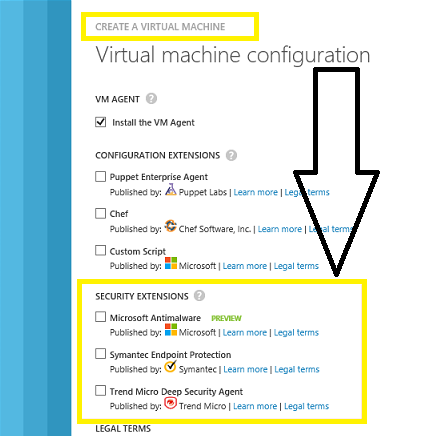
Microsoft announced during TechEd NA 2014 the release of 3 new security extensions that enable Built-in Anti-Virus Support via the VM Agent for Azure Virtual Machines:
- Microsoft Antimalware
- Symantec Endpoint Protection
- TrendMicro’s Deep Security Agent
The VM Agent is a lightweight and unobtrusive process that you can optionally enable to run inside your Windows and Linux VMs. The VM Agent can then be used to install and manage extensions, which are software modules that extend the functionality of a VM and help make common management scenarios easier.
These extensions enable you to add richer security protection to the Virtual Machines hosted in Azure using industry security products.
To enable it, in the Azure Management Portal, in the Virtual Machine Configuration, check Install VM Agent and then select the desired Anti Virus protection:
You can also use the command line (PowerShell) to enable it.
Windows Server 2012 Update – released today
Today is a big day with the release of Windows Server 2012 R2 Update!
Windows Server 2012 R2 Update is a cumulative update of every hotfix released for Win2012 R2 to date. This just radically simplified our set of recommended hotfixes.
New Win2012 R2 Cluster Recommended hotfixes:
1. Windows RT 8.1, Windows 8.1, and Windows Server 2012 R2 Update April, 2014
http://support.microsoft.com/kb/2919355
2. CSV snapshot file is corrupted when you create some files on the live volume
Springboard Series Insider – Spotlight of the month. @MSSpringboard
Microsoft Windows releases a monthly newsletter called Springboard Series Insider. This is a vastly popular online publication targeting IT Pros and anyone interested in Windows.
Only a few are listed in the Springboard Series Insider. So I am really happy and proud for this recognition. Thank you!
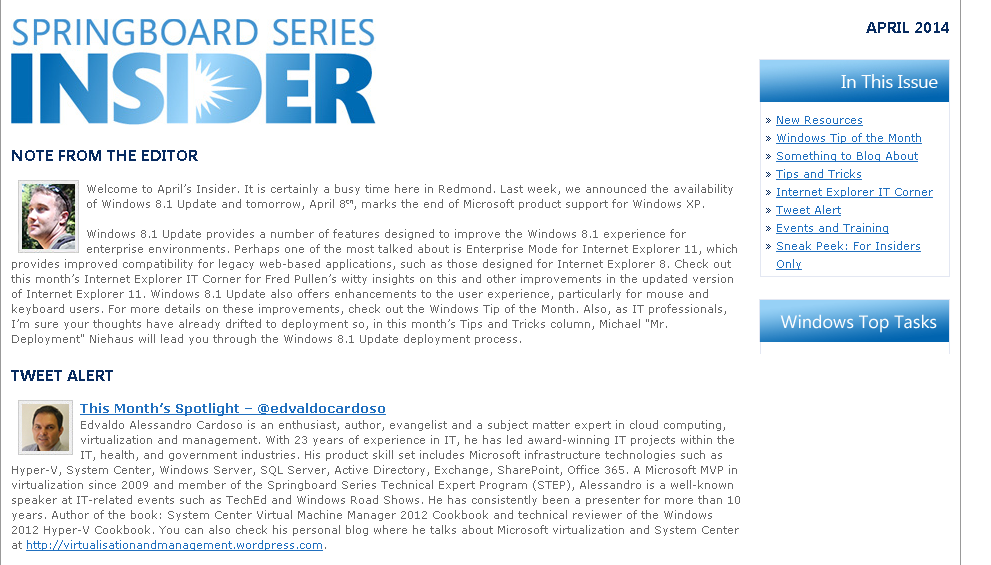
The Insider provides their subscribers with
- New Resources
- Windows Tip of the Month
- Something to Blog About
- Tips and Tricks
- Internet Explorer IT Corner
- Tweet Alert
- Events and Training
- Sneak Peek: For Insiders Only
This month the main theme is Windows 8.1 updates, which provides a number of features designed to improve the Windows 8.1 experience for enterprise environments.
If you haven’t signed up yet, now it is time :

Note: As always, if you have any suggestions on content you’d like to see or resources you need, please reach out to Microsoft anytime at springboard@microsoft.com. In the meantime, enjoy this month’s edition of the Springboard Series Insider and be sure to try out Windows 8.1 Update!
Recommended Books


System Center 2012 R2 Virtual Machine

System Center Virtual Machine Manager 2012 Cookbook


 Cloudtidings.com