
Archive
What’s New in 2012 R2: Why is it so important for IT Pros to understand how modern applications are built
A great post by Microsoft Brad Anderson covering :
- Windows Azure Pack and it ability to build an application once and then deploy and operate it in any Microsoft Cloud – private, hosted or public.
- Windows Azure Service Bus, integrated experience as a part of the Windows Azure Pack, with the goal of bringing a self-service tenant experience that is consistent with the one that currently exists in Windows Azure.
- and lots of scenarios:
- Scenario 1: Application Messaging Patterns with Service Bus
- Scenario 2: Manage Messaging Entities Across Clouds
- Scenario 3: Hosting Alternatives with Service Bus
To read the blog series, follow http://blogs.technet.com/b/in_the_cloud/archive/2013/08/21/what-s-new-in-2012-r2-enabling-modern-apps-with-the-windows-azure-pack.aspx
Next Steps
- Service Bus 1.1 for Windows Server
Learn more about Service Bus features, components, and functionality in this deep technical overview on MSDN.
- Service Bus homepage
Check out the video tutorials, downloads, and other info on the Windows Azure site.
- AMQP 1.0 Support in Windows Azure Service Bus
Additional information on how to build a cross-platform, hybrid application using an open standard protocol.
- Service Bus Forums
rad’s
Microsoft announced date for Windows 8.1 RTM
Microsoft announced that Windows 8.1 will be available to consumers and businesses worldwide on October 18, 2013. At 12:00am on October 18th in New Zealand(4:00am October 17th in Redmond)
I’m excited to announce that, on the same day, eligible customers will be able to download Windows Server 2012 R2 and System Center 2012 R2, as well as the latest update to Windows Intune! .
Keep learning about the 2012 R2 releases via our “What’s New in 2012 R2” series, and also download the preview bits if you haven’t already done it.
Windows 8.1 and Windows RT 8.1 will begin rolling out worldwide as a free update for consumers with Windows 8 or Windows RT devices through the Windows Store. Windows 8.1 will also be available at retail and on new devices starting on October 18th by market. So mark your calendars!
More info:
Networking enhancements in the Windows 2012 R2 based on customer feedbacks
With Server 2012 and VMM 2012 SP1, Microsoft enabled new foundational scenarios from Continuous Availability (with in-box NIC Teaming) to building blocks for Software Defined Networking (with the extensible Hyper-V Virtual Switch and Hyper-V Network Virtualization [HNV]) to IP Address Management (IPAM).
Now with Server and VMM 2012R2, Microsoft is targeting the reduction of networking Capital Expenditures (CapEx), by enabling customers to maximize utilization of their existing resources and reduce the need for specialized hardware over time.
Microsoft got the feedback from customers advising that they want choice and flexibility in both the networking vendors they use and the cloud in which their workloads run. They need the ability to plug and play between vendors without having to change management software, processes, or knowledge, plus the ability to deploy any workloads across any cloud provider.
The other feedback received by Microsoft is that network automation is key. Automation is required across the Service Provider’s network, the tenant’s network, and network infrastructure services (load balancing, firewall, etc.).
As you can see in the figure below, the feedback is giving notably results to the customers with many features that further enhance Microsoft end-to-end capabilities:

Recommended articles:
IaaS Innovations in Windows 2012R2
To deliver smooth end-to-end scenarios in the Windows Server 2012 R2 release, Microsoft is focusing on two important aspects of delivering IaaS:
- Continuing to drive innovation into the infrastructure itself to ensure network, compute, and storage are not only low-cost, but also easy to operate through rich integration with System Center.
- Delivering a delightful experience for the IaaS and customer of the Service Provider (tenant administrators) using IaaS.
Microsoft is targeting specifically Service Providers and enterprises that want to act as Service Providers for their users.
To Download Windows 2012 R2 and System Center 2012 R2: http://technet.microsoft.com/en-US/evalcenter/dn205295.aspx?CR_CC=200142594
To read Microsoft published IaaS articles :
Resource outage when moving physical disc when using DPM to backup an HyperV Cluster.
Microsoft just released a critical fix for hyper cluster that have been backed up by System Center DPM
“Physical Disk resource move during the backup of a Cluster Shared Volume (CSV) may cause resource outage”.
If you have configured a Windows Server 2012-based Hyper-V failover cluster CSV and your backup software perform the backup by using snapshots and the Physical Disk resource is moved to another node in the cluster, the Physical Disk resource may fail to come online if the backup of the CSV is in progress. As a result, virtual machines that rely on the CSV may crash.
A supported hotfix is available from Microsoft. However, this hotfix is intended to correct only the problem that is described in this article. Apply this hotfix only to systems that are experiencing this specific problem.
More info :http://support.microsoft.com/kb/2869923
- Windows Server 2012 Datacenter
- Windows Server 2012 Essentials
- Windows Server 2012 Foundation
- Windows Server 2012 Standard
A Modern Approach to IT Infrastructure for Forward Thinking Businesses
| 3 June – A Modern Approach to IT Infrastructure for Forward Thinking Businesses You may not know it, but tech savvy, forward thinking organisations like yours can benefit from the same enterprise-grade IT infrastructure large organisations use – the kind that can grow as your business does, yet retain the flexibility to move with market shifts. |
||||||
| This session will explore the ways you can simplify your IT management with limited IT budget and staff, and establish a solid platform for growth. We’ll outline Microsoft’s modern approach to IT infrastructure – including server consolidation and virtualisation, storage management, disaster recovery, cloud-ready IT and simplified administration. | ||||||
| Speakers: Mike Heald – Windows Server Product Manager, Microsoft Australia Alessandro Cardoso – Insight Practice Manager, Microsoft MVP, Microsoft APAC |
||||||
| About our Webinars Hosted by a Microsoft expert, each fortnightly bite-sized session unpicks the current challenges and proposes ways in which Microsoft solutions can improve productivity, profitability and competitive advantage. |
||||||
| Each session includes a live chat feature so you can get answers to your tough questions. And it’s a great way to kick-start the conversation in your organisation.
Please ensure Silverlight is installed on your device to attend the Webinars on their live dates. Download here. |
||||||
Register NOW
|
||||||
Private Cloud & Virtualisation Strategy Event – MELB/BRIS/SYD – All you need to know
VIP Event. Few seats available.
NEW CONTENT Added : What’s new in Windows 2012R2. Come and see what is coming!
Help your business gain maximum competitive advantage with minimal risk.

You are invited to an exclusive event, as well the exclusive book launch of Alessandro Cardoso’s book System Center Virtual Machine Manager 2012 Cookbook.
Private Could and Virtualisation strategy with Insight, Microsoft and Veeam.
Mobile. Social. Big data. The cloud. These trends are all impacting how businesses engage with their customers, partners, and employees in order to better compete. We also know that for many modern CIOs and technology leaders, the cloud presents an opportunity to redefine the role IT plays in implementing business strategy.
Why attend?
Envisioning Your Private Cloud: Participate in a scenario based discussion.
- Make more of your existing investments. Learn how to:
- Take existing resources and skills to the private and public cloud
- Use a single toolset to manage traditional and cloud environments
- Use a common identity infrastructure to mitigate risk
- Use a common platform to maximise IT and developer efficiency
Embrace the right IT for your business
- Get maximum control with the private cloud
- Obtain maximum agility and scalability with the public cloud
- Get the best of both by extending private to public
Register now at: http://au.insight.com/events/private-cloud-virtualisation-event/
Dates and Locations
Melbourne: Wednesday 29th May – 2:00 – 5:00pm
Microsoft – Level 5, 4 Freshwater place, Southbank, VIC, 3006
Brisbane: Thursday 30th May- 8:30 – 11:30am
Microsoft – The North Stradbroke Island Room Level 28, 400 George Street, Brisbane, QLD, 4000
Sydney: Thursday 13th June – 8:30 – 11:30am
Microsoft – 1 Epping Road, North Ryde NSW 2113,
Windows 2012 : Hyper-V Network design scenarios and setup – Part 1
I am starting a series of blogs to talk about Network in Windows 2012 Hyper-V
I will be covering the following scenarios, but of course there are many more possibilities :
- Scenario 1 : 4 (or more) 10GB Nic’s + 2 ISCSI/FC connectivity
- Scenario 2 : 2 (or more) 10GB Nic’s (converged network)
- Scenario 3 : 6 (or more) Nic’s 1GB Nic’s
Let’s start with scenario 1. We will create 2 teams : one for management/csv/live migration (MGMT-LM-CSV-TEAM) and other for vm external traffic (VM-TEAM).
1. First of all, I recommend you to rename the physical nic’s. We will create the teams as per bellow:
a) 2 nic’s, teamed to be used for management + csv + live migration utilisation= MGMT-LM-CSV-TEAM
b) 2 (or more) nic’s teamed to be used for VM traffic only ( external traffic ) = VM-TEAM
c) 2 ISCSI or Fiber Channel connectivity. You will need to install the MPIO feature ( DO NOT TEAM)
As for the team VM-TEAM we can use the GUI to create the virtual switch:
- Click on Server Manager, then click on Local Server
- Click on Nic Teaming. Click on Task and then click on NEW TEAM
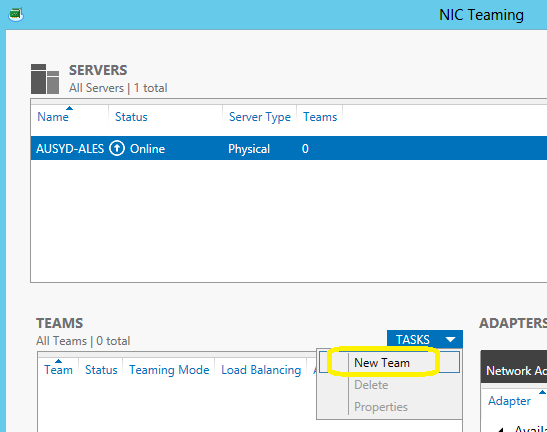
Select the NIC’s that will be part of the team. Make sure you select NIC’s from different Physical interfaces. Done
But for the MGMT-LM-CSV-TEAM, we need to use the Powershell as the GUI does not allow us to create multiples Virtual Switches for the same team and then we will also, configure the QoS.
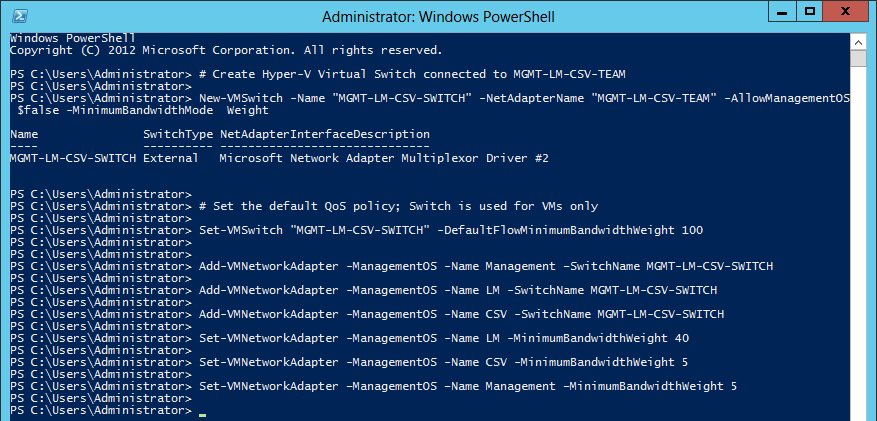
Here is the PowerShell command
# Create Hyper-V Virtual Switch connected to VM-TEAM
New-VMSwitch -Name “External” -NetAdapterName “VM-TEAM” -AllowManagementOS $false
# Create Hyper-V Virtual Switch connected to MGMT-LM-CSV-TEAM
New-VMSwitch -Name “MGMT-LM-CSV-SWITCH” -NetAdapterName “MGMT-LM-CSV-TEAM” -AllowManagementOS 0 -MinimumBandwidthMode Weight
# Set the default QoS policy; Switch is used for VMs only
Set-VMSwitch “MGMT-LM-CSV-SWITCH” -DefaultFlowMinimumBandwidthWeight 100
Add-VMNetworkAdapter -ManagementOS -Name Management –SwitchName MGMT-LM-CSV-SWITCH
Add-VMNetworkAdapter -ManagementOS -Name LM -SwitchName MGMT-LM-CSV-SWITCH
Add-VMNetworkAdapter -ManagementOS -Name CSV -SwitchName MGMT-LM-CSV-SWITCH
Set-VMNetworkAdapter -ManagementOS -Name LM -MinimumBandwidthWeight 40
Set-VMNetworkAdapter -ManagementOS -Name CSV -MinimumBandwidthWeight 5
Set-VMNetworkAdapter –ManagementOS –Name Management –MinimumBandwidthWeight 5
Now let’s have a look back on the GUI (NIC Team):

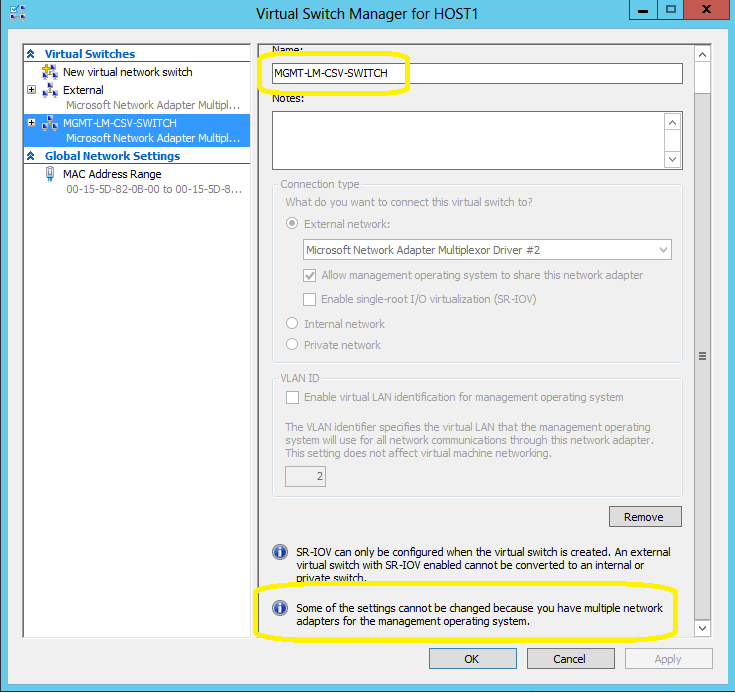
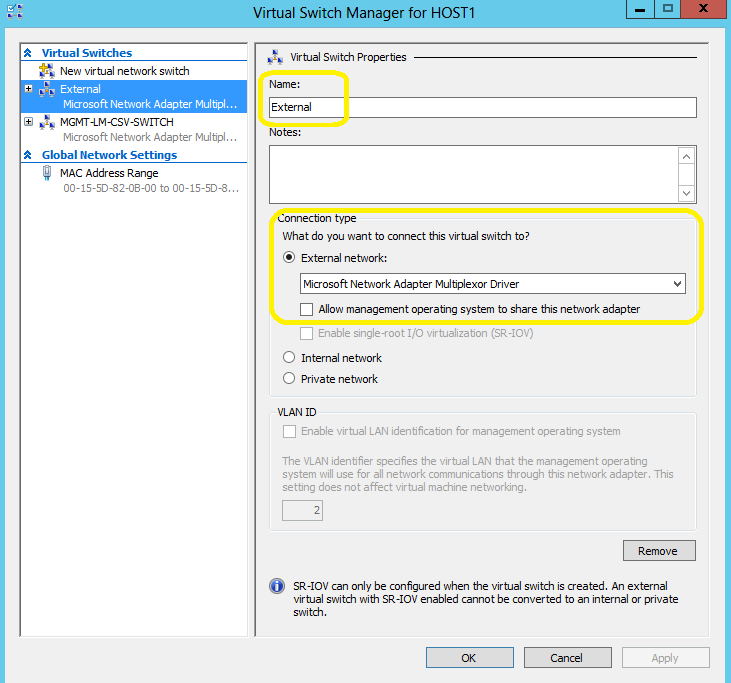
And let’s have a look in the Hyper-V Manager Console, on the properties of the Virtual Switch’s:
Management, Live Migration and CSV switch: MGMT-LM-CSV-SWITCH.
Note that you won’t be able to change any setting using the GU
I as we created 3 virtual network adapters (mgmt,lm,csv).
VM external traffic switch: External
to be continue….
Microsoft released updates for System Center 2012 SP1
Microsoft released an update rollup for some of the System Center 2012 SP1 family products.
To automatically install the updates,
check the Microsoft Update or
To manually download the following update packages :
App Controller (KB2815569): http://catalog.update.microsoft.com/v7/site/Search.aspx?q=2815569
Operations Manager (KB2826664): http://catalog.update.microsoft.com/v7/site/Search.aspx?q=2826664
Operations Manager – UNIX and Linux Monitoring (Management Pack Update) (KB2828653): http://catalog.update.microsoft.com/v7/site/Search.aspx?q=2828653
Service Manager (KB2828618): http://catalog.update.microsoft.com/v7/site/Search.aspx?q=2828618
Orchestrator (KB2828616): http://catalog.update.microsoft.com/v7/site/Search.aspx?q=2828616
Data Protection Manager (KB2822782): http://catalog.update.microsoft.com/v7/site/Search.aspx?q=2822782
More info: http://support.microsoft.com/kb/2802159
new job as Practice Manager for Cloud and Emerging Technologies
This blog post is to share that on Monday, March 25th, I am starting on a new job, as Practice Manager for Cloud and Emerging Technologies for APAC at Insight.
Also, on Tuesday, my book will be on sale. So hurry up and pre-order your own copy now at http://www.packtpub.com/microsoft-system-center-virtual-machine-manager-2012-cookbook/book
Thank you for reading my blog posts and getting in touch with me.
About Insight
Insight is one of the world’s leading single source providers of IT products and services. From competitively priced computers, hardware and software to services ranging from basic configuration to advanced design implementation and financing; we solve the IT needs of businesses and organisations of all sizes.
- Offices in 24 countries
- Trading in 170 countries
- Trading in 13 currencies
- Communications in 17 languages
Recommended Books


System Center 2012 R2 Virtual Machine

System Center Virtual Machine Manager 2012 Cookbook


 Cloudtidings.com