
Archive
Windows 2012 R2 and Windows 8.1 released to MSDN and TechNet subscriptions
A few hours ago, Microsoft released an communication starting that today (September 10/09/2013) , Windows 8.1, Windows 8.1 Pro and Windows Server 2012 R2 RTM builds are now available for download to the developer and IT professional communities via MSDN and TechNet subscriptions. You can download it here: http://www.msdn.com
More on Windows 2012 R2:
- What’s New in Hyper-V in Windows Server 2012 R2
This topic describes the new and changed functionality of the Hyper-V role in Windows Server 2012 R2 Preview. - What’s New in Hyper-V Network Virtualization in Windows Server 2012 R2
This topic describes the new or changed features and functionality in Hyper-V Network Virtualization in Windows Server 2012 R2 Preview. - What’s New in Hyper-V Virtual Switch in Windows Server 2012 R2
This topic provides information about the new features in Hyper-V Virtual Switch in Windows Server 2012 R2 Preview
The Windows 8.1 RTM Enterprise edition will be available through MSDN and TechNet for businesses later this month.
My Microsoft Teched Australia 2013 speaking sessions
This year I will be presenting 4 ILL sessions at TechEd Australia, but you can also find me at the Microsoft Showcase : Datacenter and at the Insight booth in the Exhibition Centre.
Take time to visit Insight booth and learn about what we can do to help your business and to enter on a draw to win a Microsoft Surface or a signed copy of my book: System Center 2012 VMM.
My Sessions:
| AZR-I201
Wednesday 11:15 – 12:45 |
Getting to Know Windows Azure IaaS, Part 1
Whether you build apps or support the infrastructure that runs the apps, the cloud can be a really big place. For some, it’s a natural evolution for their application and infrastructure to embrace the power and scale of the cloud. For others, it’s a journey that has to begin with a single step. Windows Azure provides that first step with a scalable, flexible platform for deploying your applications your way. With our Infrastructure as a Service platform (IaaS) called Windows Azure Virtual Machines, you get the flexibility to choose between Windows and Linux with full control over the operating system configuration and installed software, matched with the portability of Hyper-V disk images. Windows Azure Virtual Machines provide the perfect environment for meeting all of your Infrastructure-as-a-Service needs. To learn more about our Infrastructure as a Service platform, we invite all developers and IT professionals to join Matt Hester as he introduces you to the Microsoft Cloud Platform, dives deep into Windows Azure Virtual Machines, and helps walk you through a hands-on demonstration of the power of IaaS on the Windows Azure platform. This is part 1 of 2. Please plan on attending both WAD-IL201 and WAD-IL202 to complete the lab. The lab requires you to connect to the Windows Azure Portal, where you will provision three separate virtual machines in the cloud and configure them each via a Remote Desktop client connection. All participants need to have access for Windows Azure prior to the lab. You can register for a FREE 90-day trial of the Windows Azure prior to the lab. You can sign up for your FREE trial here: http://aka.ms/IaasBootCamp. |
| AZR-I202
Wednesday |
Getting to Know Windows Azure IaaS, Part 2
Whether you build apps or support the infrastructure that runs the apps, the cloud can be a really big place. For some, it’s a natural evolution for their application and infrastructure to embrace the power and scale of the cloud. For others, it’s a journey that has to begin with a single step. Windows Azure provides that first step with a scalable, flexible platform for deploying your applications your way. With our Infrastructure as a Service platform (IaaS) called Windows Azure Virtual Machines, you get the flexibility to choose between Windows and Linux with full control over the operating system configuration and installed software, matched with the portability of Hyper-V disk images. Windows Azure Virtual Machines provide the perfect environment for meeting all of your Infrastructure-as-a-Service needs. To learn more about our Infrastructure as a Service platform, we invite all developers and IT professionals to join Matt Hester as he introduces you to the Microsoft Cloud Platform, dives deep into Windows Azure Virtual Machines, and helps walk you through a hands-on demonstration of the power of IaaS on the Windows Azure platform. This is part 2 of 2. In order to attend this session you need to attend WAD-IL201 first. The lab requires you to connect to the Windows Azure Portal, where you will provision three separate virtual machines in the cloud and configure them each via a Remote Desktop client connection. All participants need to have access for Windows Azure prior to the lab. You can register for a FREE 90-day trial of the Windows Azure prior to the lab. You can sign up for your FREE trial here: http://aka.ms/IaasBootCamp. |
| MDC-I315
Friday |
Microsoft System Center 2012 – Orchestrator: Overview and Automation of IT Process
This lab guides you through several process automation examples, providing hands-on experience with the concepts explained in the course manual and provides real-world context. In this exercise, you are introduced to the interfaces available with Orchestrator. Create a Runbook to perform actions such as working with File Management Objects, monitor a folder for the accumulation of more than 5 log files, move the files to an archive folder and log an event for each file archive operation, using the Runbook Tester Console to Validate Runbooks. This lab also covers the creation of a Runbook to perform the actions, such as automate recovery of a Windows Service based on alert detection from a unit monitor in System Center Operations Manager to address the intermittent Windows service failures. It also highlights advanced concepts and techniques that can be employed when creating runbooks in Orchestrator. |
| MDC-I321
Thursday |
Microsoft System Center 2012: Network Virtualization
This lab provides a step-by-step description for how to build, configure and implement Hyper-V Network Virtualization using Windows Server 2012 and System Center 2012 SP1. You create a multi-tenant virtual network on shared physical network including multiple subnets and virtual routes using the NVGRE configuration. |
A Modern Approach to IT Infrastructure for Forward Thinking Businesses
| 3 June – A Modern Approach to IT Infrastructure for Forward Thinking Businesses You may not know it, but tech savvy, forward thinking organisations like yours can benefit from the same enterprise-grade IT infrastructure large organisations use – the kind that can grow as your business does, yet retain the flexibility to move with market shifts. |
||||||
| This session will explore the ways you can simplify your IT management with limited IT budget and staff, and establish a solid platform for growth. We’ll outline Microsoft’s modern approach to IT infrastructure – including server consolidation and virtualisation, storage management, disaster recovery, cloud-ready IT and simplified administration. | ||||||
| Speakers: Mike Heald – Windows Server Product Manager, Microsoft Australia Alessandro Cardoso – Insight Practice Manager, Microsoft MVP, Microsoft APAC |
||||||
| About our Webinars Hosted by a Microsoft expert, each fortnightly bite-sized session unpicks the current challenges and proposes ways in which Microsoft solutions can improve productivity, profitability and competitive advantage. |
||||||
| Each session includes a live chat feature so you can get answers to your tough questions. And it’s a great way to kick-start the conversation in your organisation.
Please ensure Silverlight is installed on your device to attend the Webinars on their live dates. Download here. |
||||||
Register NOW
|
||||||
Private Cloud & Virtualisation Strategy Event – MELB/BRIS/SYD – All you need to know
VIP Event. Few seats available.
NEW CONTENT Added : What’s new in Windows 2012R2. Come and see what is coming!
Help your business gain maximum competitive advantage with minimal risk.

You are invited to an exclusive event, as well the exclusive book launch of Alessandro Cardoso’s book System Center Virtual Machine Manager 2012 Cookbook.
Private Could and Virtualisation strategy with Insight, Microsoft and Veeam.
Mobile. Social. Big data. The cloud. These trends are all impacting how businesses engage with their customers, partners, and employees in order to better compete. We also know that for many modern CIOs and technology leaders, the cloud presents an opportunity to redefine the role IT plays in implementing business strategy.
Why attend?
Envisioning Your Private Cloud: Participate in a scenario based discussion.
- Make more of your existing investments. Learn how to:
- Take existing resources and skills to the private and public cloud
- Use a single toolset to manage traditional and cloud environments
- Use a common identity infrastructure to mitigate risk
- Use a common platform to maximise IT and developer efficiency
Embrace the right IT for your business
- Get maximum control with the private cloud
- Obtain maximum agility and scalability with the public cloud
- Get the best of both by extending private to public
Register now at: http://au.insight.com/events/private-cloud-virtualisation-event/
Dates and Locations
Melbourne: Wednesday 29th May – 2:00 – 5:00pm
Microsoft – Level 5, 4 Freshwater place, Southbank, VIC, 3006
Brisbane: Thursday 30th May- 8:30 – 11:30am
Microsoft – The North Stradbroke Island Room Level 28, 400 George Street, Brisbane, QLD, 4000
Sydney: Thursday 13th June – 8:30 – 11:30am
Microsoft – 1 Epping Road, North Ryde NSW 2113,
Microsoft released updates for System Center 2012 SP1
Microsoft released an update rollup for some of the System Center 2012 SP1 family products.
To automatically install the updates,
check the Microsoft Update or
To manually download the following update packages :
App Controller (KB2815569): http://catalog.update.microsoft.com/v7/site/Search.aspx?q=2815569
Operations Manager (KB2826664): http://catalog.update.microsoft.com/v7/site/Search.aspx?q=2826664
Operations Manager – UNIX and Linux Monitoring (Management Pack Update) (KB2828653): http://catalog.update.microsoft.com/v7/site/Search.aspx?q=2828653
Service Manager (KB2828618): http://catalog.update.microsoft.com/v7/site/Search.aspx?q=2828618
Orchestrator (KB2828616): http://catalog.update.microsoft.com/v7/site/Search.aspx?q=2828616
Data Protection Manager (KB2822782): http://catalog.update.microsoft.com/v7/site/Search.aspx?q=2822782
More info: http://support.microsoft.com/kb/2802159
Linux Support on System Center 2012 SP1
If you are looking into running Linux on Hyper-V, here are the current Linux versions supported
| Linux | UNIX | ||||||||
| Red Hat | SUSE | CentOS | Ubuntu | Debian | Oracle | AIX | HP-UX | Solaris | |
| Operations Manager |
X |
X |
X | X |
X |
X | X | X | X |
| Configuration Manager |
X |
X |
X |
X |
X |
||||
|
Endpoint Protection |
X | X | X | X | X | X | |||
| Virtual Machine Manager |
X |
X |
X |
X |
|||||
System Center 2012 SP1 : Public beta available. What’s new in SCVMM?
System Center 2012 SP1 beta has just been public released
Here is what is new in System Center Virtual Machine 2012 SP1
Windows Server 2012 and SQL Server 2012 Support
With this Beta release, all System Center 2012 SP1 components are now enabled to manage and run in a Windows Server 2012 environment. System Center 2012 SP1 also now supports the use of SQL Server 2012.
Network Virtualization
With System Center 2012 SP1 you can take advantage of the Virtual Machine Manager’s ability to manage Hyper-V network virtualization across multiple hosts, simplifying the creation of entire virtual networks.
Plus,
- Extend the VMM console with Add-ins
- Support for Windows Standards-Based Storage Management Service, thin provisioning of logical units and discovery of SAS storage
- Ability to convert VHD to VHDX, use VHDX as base Operating System image
- Support for vSphere 5.0 and Citrix XenServer 6.0
- Performance enhancement
And much more!…But to know it you will need to download and install it to find out 🙂 and keep me updated on what you find out!
Begin your evaluation of System Center 2012 SP1 with Windows Server 2012 today:
- Download the Beta
- Visit the TechNet System Center 2012 SP1 Beta library for technical documentation to support your evaluation
20th Australian System Administrators’ Conference
The 20th Australian System Administrators’ Conference (a milestone event for Systems Administration in Australia) will be held 2 – 5 October in the Hilton Cairns Hotel.
This is the premier Systems Administration event in the Asia-Pacific region.
The Technical Program is being held 2-3 October 2012; followed by two days of Tutorials on 4 and 5 October 2012
I will be presenting the session : Private Cloud with Windows 2012 Hyper V and System Center VMM 2012
Registratiosn are now open : http://conference.sage-au.org.au/files/registration-form_31052012
More info : http://conference.sage-au.org.au/
See you there!!
Determine Windows Server 2012 readiness : MAP Toolkit v7.0 Beta now available. Find out about more new features
Key Features for a detailed insight to address an upgrade, migration, virtualization :
- Understand your readiness to deploy Windows in your environment with Windows readiness assessments
- Determine Windows Server 2012 Beta readiness
- Investigate how Windows Server and System Center can manage your heterogeneous environment through VMware migration and Linux server virtualization assessments
- Size your desktop virtualization needs for both Virtual Desktop Infrastructure (VDI) and session-based virtualization using Remote Desktop Services
- Ready your information platform for the cloud with the SQL Server 2012 discovery and migration assessment
- Evaluate your licensing needs with usage tracking for Lync 2010, active users and devices, SQL Server 2012 and Windows Server 2012 Beta
You can use the MAP Toolkit to accomplish the following tasks:
- Desktop and server migration to a Windows Operating System such as Windows 8, Microsoft Office 2010, Microsoft Office 365, and Windows Server 2012, Windows 7 and Windows Thin PC.
- Assess and identify computers running Windows Server operating systems in your environment.
- Assess and identify computers running virtual technologies in your environment.
- Discover and report on computers running Microsoft, VMware, HP-UX and Linux platforms, including the Linux, Apache, MySQL, and PHP (LAMP) application stacks in your environment.
- Assess and identify computers that have outdated or no security-based software (antispyware, antivirus, and firewall products) in your environment.
- Discover and report on computers that are virtual machine candidates.
- Assess and inventory Microsoft SQL Server® instances, databases, and components in your environment.
- Discover MySQL, Oracle, and Sybase databases in your environment and assess the ability to migrate to Microsoft SQL Server.
- Dual-core 1.5GHz processor, 2 GB RAM (Itanium processors are not supported)
Operating system. Any of the following:
- Windows Server 2012, W2008R2 SP2, W2008 SP2 (x86 or x64 versions)
- Windows 7 SP1 (x86 or x64 versions)
- Windows Vista SP2 (x86 or x64 versions)
Software pre-req
- Windows Installer 4.5 (download from http://go.microsoft.com/fwlink/?LinkId=129687)
- .NET Framework 3.5SP1 (3.5.30729.01) (download from http://go.microsoft.com/fwlink/?LinkId=129686)
- .NET Framework 4.0 (Full) (download from http://go.microsoft.com/fwlink/?LinkId=186913)
- Update 2 for Microsoft.NET Framework 4.0 (download from http://support.microsoft.com/kb/2544514). Full download http://go.microsoft.com/fwlink/?LinkId=207290
- By default, the MAP Toolkit will install SQL Server 2012 Express LocalDB during setup.
Note: if you create an instance named “MAPS” before running the MAP Toolkit installer, you may also use an existing installation of SQL Server 2008, SQL Server 2008 R2, or SQL Server 2012 . The MAP Toolkit requires the collation order of the database engine to be set to “SQL_Latin1_General_CP1_CI_AS”.
Recommendations
- Do no install on a domain controller.
- Close all open applications before running the setup wizard.
- If your firewall doesn’t accept listing a service like WMI or Remote Administration, you will also need to open ports 135 and 1024-65535. The reason for this has to do with the way RPC works. WMI uses DCOM to communicate with remote machines, and DCOM uses RPC extensively
- If the computer is in a workgroup, you must manually change the “Network access: Sharing and security model for local accounts” policy setting from Guest only to Classic on the local computer
- To connect remotely and perform the WMI inventory, you will need to provide accounts that are members of the local Administrators group on the computer being inventoried
Collectors by Inventory Scenario:
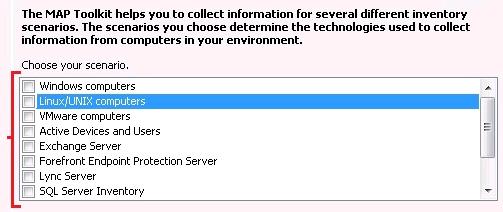
- Windows computers – WMI
- Linux/UNIX computers – SSH
- VMware computers – VMware
- Active Devices and Users – Active Directory, WMI
- Exchange Server – Active Directory, WMI
- Forefront Endpoint Protection Server – PowerShell, WMI
- Lync Server – PowerShell, SQL Native, SQL Windows, WMI
- SQL Server Inventory – WMI
- SQL Server with Database Details – SQL Native, SQL Windows, WMI
- Windows Azure Platform Migration – Oracle, SQL Native, SQL Windows, SSH, WMI
- MySQL, Oracle and Sybase – Oracle, SSH, WMI
download from http://go.microsoft.com/fwlink/?LinkId=219165
System Center 2012 Pre-Release Products : Download
Download link : http://technet.microsoft.com/en-au/evalcenter/hh505660
Available System Center 2012 Products:
- System Center 2012 Configuration Manager RC provides comprehensive configuration management for the Microsoft platform that can help you empower users with the devices and applications they need to be productive while maintaining corporate compliance and control.
System Requirements >>
Available in these languages: English - System Center 2012 Endpoint Protection RC, built on System Center Configuration Manager, provides industry-leading threat detection of malware and exploits as part of a unified infrastructure for managing client security and compliance that can help you simplify and improve endpoint protection.
System Requirements >>
Available in these languages: English - System Center Operations Manager 2012 RC provides deep application diagnostics and infrastructure monitoring that can help you ensure the predictable performance and availability of vital applications and offers a comprehensive view of your datacenter, private, and public clouds.
System Requirements >>
Available in these languages: English - System Center Data Protection Manager 2012 Beta provides unified data protection for Windows servers and clients that can help you deliver scalable, manageable, and cost-effective protection and restore scenarios from disk, tape, and off premise.
System Requirements >>
Available in these languages: English - System Center Orchestrator 2012 RC provides orchestration, integration, and automation of IT processes through the creation of runbooks that can help you to define and standardize best practices and improve operational efficiency.
System Requirements >>
Available in these languages: English - System Center Virtual Machine Manager 2012 RC provides virtual machine management and services deployment with support for multi-hypervisor environments that can help you deliver a flexible and cost effective private cloud environment.
System Requirements >>
Available in these languages: English - System Center App Controller 2012 Beta provides a common self-service experience across private and public clouds that can help you empower application owners to easily build, configure, deploy, and manage new services.
System Requirements >>
Available in these languages: English - System Center Service Manager 2012 Beta provides flexible self-service experiences and standardized datacenter processes that can help you integrate people, workflows, and knowledge across enterprise infrastructure and applications.
System Requirements >>
Available in these languages: Chinese (Simplified), English, French, German, Italian, Japanese, Portuguese (Brazil), Russian, Spanish
Recommended Books


System Center 2012 R2 Virtual Machine

System Center Virtual Machine Manager 2012 Cookbook


 Cloudtidings.com