
Archive
Hyper-V : Virtual Hard Disks. Benefits of Fixed disks
When creating a Virtual Machine, you can select to use either virtual hard disks or physical disks that are directly attached to a virtual machine.

My personal advise and what I have seen from Microsoft folks is to always use FIXED DISK for production environment, even with the release of Windows Server 2008 R2, which one of the enhancements was the improved performance of dynamic VHD files.
The explanation and benetifts for that is simple:
1. Almost the same performance as passthroug disks
2. Portability : you can move/copy the VHD
3. Backup : you can backup at the VHD level and better, using DPM you can restore at ITEM level ( how cools is that! )
4.You can have Snapshots
5. The fixed sized VHD performance has been on-par with the physical disk since Windows Server 2008/Hyper-V
If you use pass-through disks you lose all of the benefits of VHD files such as portability, snap-shotting and thin provisioning. Considering these trade-offs, using pass-through disks should really only be considered if you require a disk that is greater than 2 TB in size or if your application is I/O bound and you really could benefit from another .1 ms shaved off your average response time.
Disks Summary table:
| Storage Container | Pros | Cons |
| Pass-through DisK |
|
|
| Fixed sized VHD |
|
|
| Dynamically expanding or
Differencing VHD
|
|
|
SCVMM 2008 R2 SP1 : available for download. Support for DM and Remote FX
With support for new features of Windows Server 2008 R2 SP1
- Dynamic Memory: Windows Server 2008 R2 SP1 Hyper-V supports Dynamic Memory enabling customers to better utilize the memory resources of a Hyper-V host. VMM 2008 R2 SP1 allows administrators to create and deploy Virtual Machines onto Windows Server 2008 R2 SP1 Hyper-V hosts and will report on the memory currently in use for these VMs where Dynamic Memory is enabled. Using Dynamic Memory for supported VMs allows for more efficient utilization of memory, with consistent performance, and higher consolidation ratios.
- Microsoft RemoteFX: Windows Server 2008 R2 SP1 introduces a new set of end user experience enhancements with Microsoft RemoteFX. VMM 2008 R2 SP1 allows administrators to create and deploy Virtual Machines with RemoteFX enabled to qualified Windows Server 2008 R2 SP1 Hyper-V hosts. This enables a rich, local-like desktop environment over the network.
SCVMM 2012: Private Cloud Management. Got it!?
It’s great pleasure to see how far Microsoft SCVMM went with the SCVMM 2012.
Belevie me, it’s a whole new product.
So, if you are seriuos about Private Cloud Management, that’s the product you will look into.
•Fabric Management
◦Hyper-V and Cluster Lifecycle Management – Deploy Hyper-V to bare metal server, create Hyper-V clusters, orchestrate patching of a Hyper-V Cluster
◦Third Party Virtualization Platforms – Add and Manage Citrix XenServer and VMware ESX Hosts and Clusters
◦Network Management – Manage IP Address Pools, MAC Address Pools and Load Balancers
◦Storage Management – Classify storage, Manage Storage Pools and LUNs
•Resource Optimization
◦Dynamic Optimization – proactively balance the load of VMs across a cluster
◦Power Optimization – schedule power savings to use the right number of hosts to run your workloads – power the rest off until they are needed.
◦PRO – integrate with System Center Operations Manager to respond to application-level performance monitors.
•Cloud Management
◦Abstract server, network and storage resources into private clouds
◦Delegate access to private clouds with control of capacity, capabilities and user quotas
◦Enable self-service usage for application administrator to author, deploy, manage and decommission applications in the private cloud
•Service Lifecycle Management
◦Define service templates to create sets of connected virtual machines, os images and application packages
◦Compose operating system images and applications during service deployment
◦Scale out the number of virtual machines in a service
◦Service performance and health monitoring integrated with System Center Operations Manager
◦Decouple OS image and application updates through image-based servicing.
◦Leverage powerful application virtualization technologies such as Server App-V
Note: The SCVMM 2012 Beta is NOT Supported in production environments.
Download SCVMM 2012 Beta Now
Microsoft MVP Summit: System Center MVP IT Pro Day
Today I am in Redmond for the Microsoft MVP Summit.
Although is freezing here in Seattle, in fact is quite warm here at the MS Buildings.
I am currently attending the System Center MVP IT Pro Day.
BTW, as we talking about Clould initiative do we really understand what private Clould means? It’s not just about a private virtual environment, it’s more. Let’s talk about more here….
Virtualisation:Go beyond doing more with less
Source : Microsoft Technet
Go beyond doing more with less and reducing your carbon footprint; virtualization enables a more agile, responsive infrastructure and lays the foundation for cloud services.
By Mitch Irsfeld
With IT departments wedged between limited budget growth in 2011 and the expectations for new services–especially cloud computing–getting in the virtualization game has become a virtual no-brainer. The reason: Running enterprise workloads on virtual machines not only positions your existing IT infrastructure for cloud services, it delivers substantial savings over physical servers and enables a more agile, scalable and resilient server environment…
To read the comple article go to : http://technet.microsoft.com/en-au/magazine/gg591293.aspx
Microsoft Hyper-V Cloud Fast Track with Dell technology
Curious about Cloud ?
- Should you use public cloud offerings from providers, build your own private cloud, or develop a hybrid of both?
- What cloud-based services are right for you?
- What are the best practices and proven process for implementing cloud technologies that minimize risk and maximize success?
Microsoft in partnership with Dell
Microsoft Hyper-V Cloud Fast Track is a reference architecture for building private clouds that combines Dell technology, including servers, networking and storage, with Microsoft software, technical guidance and validated configurations.
Hyper-V Cloud Fast Track solutions offer a turnkey approach to delivering scalable, preconfigured, validated infrastructure platforms for on-premises private cloud implementations. With local control over data and operations, your IT can dynamically pool, allocate, secure and manage resources for agile IaaS. Likewise, business units can deploy line-of-business applications with speed and consistency using self-provisioning and automated data center services in a virtualized environment.
Hyper-V Cloud Fast Track solutions offer:
- Faster deployment — Rich features and support make private clouds easy to deploy.
- Reduced risk — Validated configurations mean you can implement with confidence.
- Dell advantage — Dell provides business-ready configurations for virtualization that are optimized for Microsoft Hyper-V.
Dell Business-Ready Configurations for Microsoft Hyper-V Cloud Fast Track
Dell offers a range of pre-engineered, business-ready configurations that conform to Microsoft’s Hyper-V Fast Track reference architecture:
- Business-Ready Configurations: Hyper-V, Rack Servers, 10 Gigabit Ethernet (GbE) Internet SCSI (iSCSI)
Designed for large-enterprise deployments using 10 GbE iSCSI storage - Business-Ready Configurations: Hyper-V, Rack Servers, iSCSI Storage
Designed for small and medium deployments - Business-Ready Configurations: Hyper-V, Rack Servers, PowerVault Internet SCSI (iSCSI)
Designed for small, medium and remote deployments - Business-Ready Configurations: Hyper-V, Blades, Fibre Channel (FC) Storage
Designed for a range of deployment sizes using FC storage
Hyper-V Cloud. Links to download the Deployment Guides
As many are requesting the links to download the Microsoft Hyper-V Cloud Deployment guides.
Building Private Clouds With Hyper-V Cloud and the Windows Server Platform
Windows Server 2008 R2, Microsoft’s server platform, already delivers comprehensive virtualization and management capabilities through Windows Server 2008 R2 Hyper-V. These technologies, along with Microsoft System Center, provide the components organizations need to implement private clouds. With the new Hyper-V Cloud Fast Track program, Microsoft and its partners will deliver a broad choice of predefined, validated configurations for private cloud deployments, comprising compute, storage, networking resources, virtualization and management software. These programs and offerings help reduce the risk and increase the speed of private cloud deployments.
here are the links. ( Right click -> Save as )
What Is Private Cloud?
http://download.microsoft.com/download/F/A/5/FA5B09CA-D020-45A2-9ED5-84BBB7FB4F33/Hyper-V_Private_Cloud-Datasheet-Final.pdf
http://download.microsoft.com/download/D/9/6/D9688623-02EE-4546-9996-640DBA4543DA/HVC_Deployment_Guides_Module_1-Architecture.pdf
http://download.microsoft.com/download/D/9/6/D9688623-02EE-4546-9996-640DBA4543DA/HVC_Deployment_Guides_Module_2-Deployment.pdf
http://download.microsoft.com/download/D/9/6/D9688623-02EE-4546-9996-640DBA4543DA/HVCDeploymen%20GuidesModule4-ProjectValidationWorkbook.xls
More information on Hyper-V Cloud and additional details on how Dell, Fujitsu, Hitachi, HDS, HP, IBM and NEC are participating in the program can be found at http://www.microsoft.com/privatecloud
Private Cloud Solutions : Hyper-V Cloud Deployment Guides
Private cloud is the implementation of cloud services on resources that are dedicated to your organization, whether they exist on-premises or off-premises with the benefits of public cloud computing—including self-service, scalability, and elasticity and the additional control and customization.
Build your own private cloud and you will have a dynamic, virtualized infrastructure with advantages including:
- Pools of compute resources
- Automated management
- High-availability
- Scale-out capabilities
- Multi-tenancy
- Self-service provisioning
To learn more how to build your own private cloud with Windows Server 2008 R2 Hyper-V, System Center, and the Virtual Machine Manager Self-Service Portal 2.0 using the Hyper-V Clould Deployment Guide:
Hyper-V Cloud Program
To help you deploy commercial private and public clouds based on Windows Server 2008 R2 Hyper-V, System Center, and related products, Microsoft offers a set of programs and initiatives called Hyper-V Cloud. These programs can help you:
- Build your own private cloud with help from the Hyper-V Cloud Deployment Guides and Hyper-V Cloud partners.
- Get a pre-validated private cloud configuration from Hyper-V Cloud Fast Track OEM partners. Hyper-V Cloud Fast Track partners have worked with Microsoft to combine hardware and software offerings based on a reference architecture for building private clouds.
- Find a service provider in the Hyper-V Cloud Service Provider Program who can host a dedicated private cloud for you.
Microsoft is also investing in a set of engagements to help customers with IaaS assessments, proofs-of-concept, and deployments with help from our partners or Microsoft Services. The investments are designed to help reduce the risk, cost, and time associated with testing and deploying a cloud environment.
Hyper-V Cloud Fast Track Partners
Get an infrastructure as a service private cloud with a pre-validated configuration from server partners in the Hyper-V Cloud Fast Track. Offerings from the Fast Track program combine Microsoft software; consolidated guidance; validated configurations from OEM partners for compute, network, and storage; and value-added software components.
Hyper-V Cloud Fast Track partner offerings provide flexibility and choice while reducing risk and increasing the speed of deployment. Read the solution briefs below to learn about the available options from each partner.
For Dell solution, click here
Hyper-V R2 : Storage/Network Design for High Availability
By converting your physical servers to virtual ones, you immediately get extra capabilities that make them less likely to go down and easier to bring back up when they do:
- · Snapshots enable you to go back in time when a software update or configuration change blows up an otherwise healthy server.
- · Virtual hard disks consolidate the thousands of files that comprise a Windows server into a single file for backups, which significantly improves the reliability of those backups.
- · Volume Shadow Copy Service (VSS) support, which is natively available in Hyper-V, means that applications return from a restore with zero loss of data and immediately ready for operation.
- · Migration capabilities improve planned downtime activities by providing a mechanism for relocating the processing of virtual machines to new hosts with little to no disruption in service.
- · Failover clustering means that the loss of a virtual host automatically moves virtual machines to new locations where they can continue doing their job.
What’s become much more critical is that the servers/application/services to keep on working.
To Provide High Availability, we need to design properly our environment. With the right combinations of technology, you can inexpensively increase the availability of your environment.
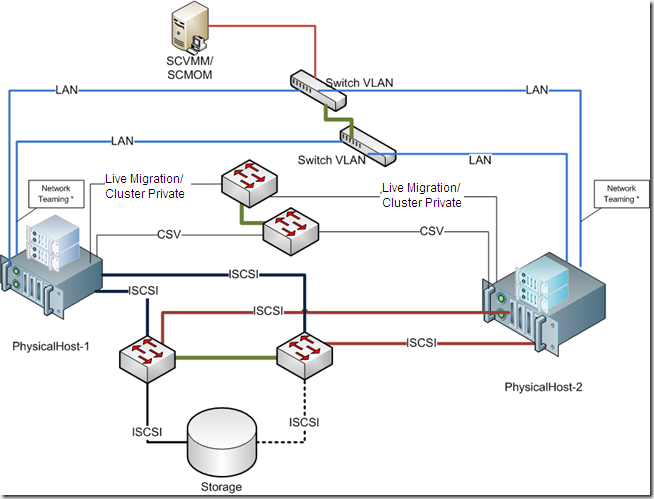
The best practices are based on the following design principles:
- · Redundant hardware to eliminate a single point of failure
- · Load balancing and failover for iSCSI and network traffic
- · Redundant paths for the cluster, Cluster Shared Volume (CSV), and live migration traffic
- · Separation of each traffic type for security and availability
- · Ease of use and implementation
Remember: Windows Server 2008 R2 Enterprise or Windows Server 2008 R2 Datacenter must be used for the physical computers. These servers must run the same version of Windows Server 2008 R2, including the same type of installation. That is, both servers must be either a full installation or a Server Core installation
Also, Hyper-V requires an x64-based processor, hardware-assisted virtualization, and hardware-enforced Data Execution Prevention (DEP). Specifically, you must enable the Intel XD bit (execute disable bit) or AMD NX bit (no execute bit).
Servers
Server-class equipment. The use of equipment that is not listed in the Windows catalog can impact supportability and may not best meet the needs of your virtual machines. Moving to tested and supported server-class equipment will ensure full support in the case of a problem. ). The Windows Server catalog is available at the Microsoft Web site http://go.microsoft.com/fwlink/?LinkId=111228
iSCSI Storage
I would recommend Dell Equalogic, Compellent, IBM NetApp, EMC, but you should evaluate others vendors.
iSCSI Software
If you need to use software-based iSCSI, look carefully at the features available. Microsoft clustering requires iSCSI to support SCSI Primary Commands-3, specifically the support of Persistent Reservations. Most for-cost iSCSI software currently supports this capability, but there is very little support for it in most open source software packages.
One inexpensive and easy-to-use software package is the StarWind iSCSI Target from StarWind Software. There is a free version of StarWind iSCSI target allowing multiple connections. You cannot get it filling automatic form on their site. You have to ask support@starwindsoftware.com for free NFR unlock key manuallyNetwork
How about the network configuration? Here is my proposal and this is what I am using in terms of NICs/Ports:1 management2 private: 1 for cluster private/CSV primary, 1 for live migration primary2 for network (in teaming)2 for iSCSI2 Dedicated (NIC/Ports) for the Network traffic configured as teaming.The failover cluster should be disabled from managing this network.
Provided by establishing the Hyper-V virtual switch on a network team. The team can provide load balancing, link aggregation, and failover capabilities to the virtual network
NIC teaming is the process of grouping together several physical NICs into one single logical NIC, which can be used for network fault tolerance and transmit load balance. The process of grouping NICs is called teaming. Teaming has two purposes:• Fault Tolerance: By teaming more than one physical NIC to a logical NIC, high availability is maximized. Even if one NIC fails, the network connection does not cease and continues to operate on other NICs.• Load Balancing: Balancing the network traffic load on a server can enhance the functionality of the server and the network. Load balancing within network interconnect controller (NIC) teams enables distributing traffic amongst the members of a NIC team so that traffic is routed among all available paths.2 Dedicated (NIC/Ports) for the CSV. (Minimum 1Gb). I personally recommend 10Gb. One a 2 nodes you can use cross-over, but if you plan to use more, than you need a switch. If you choose 10GB it means that your switch needs to be 10GB.
A feature of failover clusters called Cluster Shared Volumes is specifically designed to enhance the availability and manageability of virtual machines. Cluster Shared Volumes are volumes in a failover cluster that multiple nodes can read from and write to at the same time. This feature enables multiple nodes to concurrently access a single shared volume.CSV will provide many benefits, including easier storage management, greater resiliency to failures, the ability to store many VMs on a single LUN and have them fail over individually, and most notably, CSV provides the infrastructure to support and enhance live migration of Hyper-V virtual machines.Cluster private traffic will flow over the private network with the lowest cluster metric (typically has value of 1000). To view the cluster network metrics that have been assigned, run the following PowerShell command:
To view the cluster network metric settings, run the following Power Shell commands:Import-Module FailoverClusters
Get-ClusterNetwork | ft Name, Metric, AutoMetricIf the automatically assigned metrics are not the desired values, then the following Power Shell commands can be executed to manually set the metric values:Get-ClusterNetwork | ft Name, Metric, AutoMetricNote the name of the networks that you want to set the values on (used for next command)$cn = Get-ClusterNetwork “<cluster network name>”
$cn.Metric = <value>Cluster private/CSV should have a value of 1000
Live migration should have a value of 11002 Dedicated (NIC/Ports) for the iSCSI traffic.( Minimum 1Gb). I personally recommend 10Gb ( the difference in price will be about 10% more).Btw, remember: If you choose 10GB it means that your switch needs to be 10GB, also the Storage.
The mass-storage device controllers that are dedicated to the cluster storage should be identical. They should also use the same firmware version.Isolating iSCSI traffic to its own network path isolates that traffic to its own network segment, ensuring its full availability as network conditions change.A multipath I/O software needs to be installed on the Hyper-V hosts to manage the disks properly. This is done by first enabling Hyper-V-based MPIO support which is not installed by default.Also, Enable Jumbo frames on the two interfaces identified for iSCSI1 (NIC/Port) for the Management. External management applications (SCVMM, DMC, Backup/Restore, etc) communicate with the cluster through this network.Resuming :
Recommended Books


System Center 2012 R2 Virtual Machine

System Center Virtual Machine Manager 2012 Cookbook


 Cloudtidings.com