
MVP Comm Camp : System Center 2012R2 Operations Manager slide decks
Hi
For those who were able to attend the MVP Community Camp last Saturday, a big thank you attending and for the positive feedbacks.
Great to hear that more and more you are utilizing System Center.
System Center 2012R2 Operations Manager – Comprehensive monitoring of physical, virtual, and cloud infrastructure. Operations Manager offers key capabilities, monitoring diverse environments, assuring physical, virtual, and cloud infrastructure health, ensuring reliable workload configurations

Through this discussion, we hope you see how System Center uniquely delivering on the key areas :
As promised, here is the slide deck for Monitoring with Operations Manager – Overview
MVP Comm Camp : System Center 2012R2 Virtual Machine Manager slide decks
Hi
For those who were able to attend the MVP Community Camp last Saturday, a big thank you attending and for the positive feedbacks.
Great to hear that more and more you are utilizing System Center.
System Center enables robust management of heterogeneous datacenters, reduce datacenter complexity and enables common management that spans Windows Server and Windows Azure environments., be it provisioning, self-service or monitoring
Through this discussion, we hope you see how System Center uniquely delivering on the key areas :
As promised, here is the slide deck for VMM System Center VMM 2012R2 – Overview
Cheers
MVP Comm Camp : Windows Server 2012R2 Hyper-V slide decks
Hi
For those who were able to attend the MVP Community Camp last Saturday, a big thank you attending and for the positive feedbacks.
The session was all about understanding the various technologies in Windows Server 2012R2 that can reduce downtime for a private cloud deployment
As promised, here is the Hyper-V – Windows 2012 R2 – Overview slide deck.
Cheers!
Software-Defined Networking with Windows Server and System Center Jump Start
Software-Defined Networking with Windows Server and System Center Jump Start
Free online event with live Q&A with the networking team: http://aka.ms/SftDnet
Wednesday, March 19th from 8am – 1pm PST
Are you exploring new networking strategies for your datacenter? Want to simplify the process? Software-defined networking (SDN) can streamline datacenter implementation through self-service provisioning, take the complexity out of network management, and help increase security with fully isolated environments. Intrigued? Bring specific questions, and get answers from the team who built this popular solution!
Windows Server 2012 R2 and System Center 2012 R2 are being used with SDN implementations in some of the largest datacenters in the world, and this Jump Start can help you apply lessons learned from those networks to your own environment. From overall best practices to deep technical guidance, this demo-rich session gives you what you need to get started, plus in-depth Q&A with top experts who have real-world SDN experience. Don’t miss it!
Register here: http://aka.ms/SftDnet
Check out the www.MicrosoftVirtualAcademy.com for other free training and live events.
FREE Microsoft MVP Event Australia and New Zealand. March 2014. Register Now
The FREE MVP Community Camp (ComCamp) is a six-day event with both Live Webcasts and In-Person Seminars. MVPs from nine countries will deliver webcasts available to anyone anywhere to learn trends and techniques from these industry leaders; the in-person seminars will be available in 22 cities across seven countries with tracks providing opportunities to connect with others in the same expertise/interest area and to have a number of technology hands-on experiences.
Delivered by MVPs who not only possess the expert knowledge in their field but also have been influential technical leaders to IT community and audiences. Each session is 60 minutes long and includes Q&A to help you get an instant feedback on questions you have had during the session. Between each session, 15 minutes break is given for MVPs and community members to network, share their thoughts on topics presented and share technical experiences.
There are sessions happening in the principal cities of Australia : Sydney, Brisbane, Melbourne, Perth and Adelaide and New Zealand. Make sure you register early to secure your spot.
Registration links:
Monitoring Hyper-V and VMware workloads. Integrating SCVMM with SCOM. Veeam MP
The System Center 2012 VMM cookbook has a Chapter 10 (as a plus for the readers), which is not on the paperback/Kindle version. It is mentioned in the “What This Book Covers” section of the book and if you brought the book you will be able to download the chapter for free.
Chapter 10, Integration with System Center Operations Manager 2012 SP1, provides tips and techniques to allow administrators to integrate SCOM 2012 with SCVMM when monitoring the private cloud infrastructure.
In a hybrid hypervisor environment (for example, Hyper-V, VMware), using Operations Manager management packs (MPs) (for example, Veeam MP), you can monitor the Hyper-V hosts and the VMware hosts, which allow you to use only the System Center Console to manage and monitor the hybrid hypervisor environment
What we cover in chapter 10 :
- In this chapter, we will cover:
- Installing System Center Operations Manager 2012 SP1
- Installing management packs
- Managing Discovery and Agents
- Configuring the integration between Operations Manager 2012 and VMM 2012
- Enabling reporting in VMM
- Monitoring VMware vSphere infrastructure from the Operations Manager using management packs
With management packs, you can extend Operations Manager (OpsMgr) and its possibilities. On a hybrid hypervisor environment, where there is a mix of Hyper-V and VMware ESXi servers, the Veeam MP extends the OpsMgr for monitoring, alerting, and for undertaking remedial actions on VMware vSphere. Veeam MP uses vSphere API to gather information to allow monitoring and reporting against all layers of the VMware stack, which include layers from the underlying hardware though network, storage, hosts, clusters, datacenters, up to vCenter. Examples of the key metrics for the VMware admins include latency, CPU ready, disk and memory pressure against a host.
For the Chapter 10, Veeam Management Pack for VMware (SCOM) s required. There is a new version 6.5 which can download from here: http://www.veeam.com/vmware-microsoft-esx-monitoring-resources.html
Enjoy reading !
To buy the book
http://www.packtpub.com/microsoft-system-center-virtual-machine-manager-2012-cookbook/book
Windows Azure now in Japan. Australia next?
Toda Microsoft announced the general availability of Windows Azure Japan Geo, including Japan East and Japan West region:
“Today we are announcing the general availability of two new Windows Azure regions: Japan in the Tokyo metropolitan area (Saitama Prefecture) and Japan West (Osaka Prefecture). These regions were brought online to meet growing demand for Windows Azure services and help our customers satisfy performance needs. ”
It is expected that Microsoft will release the Australia region this year as well. I’ve heard rumours for the release on Q3, but there is no official communication yet.
Do you expect the cloud adoption to increase once it comes to your region?
Hyper-V is the #1 Hypervisor in Latin America
Hyper-V is ranked number one in Latin America for x86 virtualization. The graphic below shows the adoption since 2008. Looking at that, I can see that it will grow more and more, as Windows 2012/R2 roll out increases.
Best-in-class features, performance, flexibility, simplified IT administration and cloud ready OS, allied with costs saving , I am sure are the drivers behind this adoption. Plus when you add System Center, you can take advantage of unified compute resources, data storage and networking administration which span physical, virtual and cloud environments.
Microsoft has closed the gap with its closest competitor : VMware. The adoption of IT virtualization infrastructure is an example of how Latin America is one of the emerging markets that will shape what IDC calls the “Third IT Platform.”

According to IDC, in 2014 emerging markets will see almost 100% more smart connected devices shipped than in developed markets. They will also see their cloud computing spending increase seven-fold, and, in terms of Big Data, they will account for more than 40% of the ‘digital universe’ in 2014.
Virtualizing your Data Center with HyperV and System Center
Hyper-V and Jumbo Frames in 3 steps
As we start working with 10GB nic’s and Hyper-V There are 3 required steps necessary to ensure JUMBO FRAMES proper configuration:
Important to understand: Jumbo Frames needs to be enable from end to end to work properly.
– Enable JUMBO FRAMES in all physical hardware that are interconnected : switches, storage and servers. They must support jumbo packets and this feature must be enabled. Note: Almost all switches requires a reboot after jumbo frames have been configured.

– Enable JUMBO FRAMES in the Hyper-V’s virtual switch. Hyper-V’s virtual switches are no different than any other TCP/IP implementation.
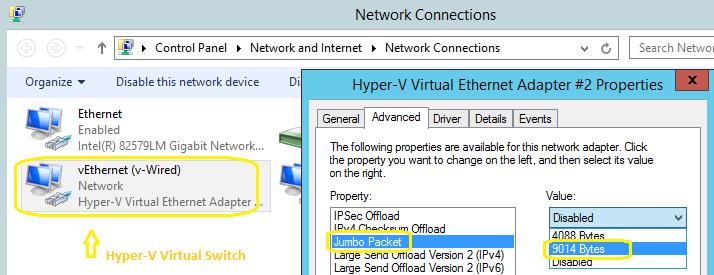
-Enable JUMBO FRAMES inside the VM (Guest OS). You can use PowerShell or use the GUI in Windows 2012 R2:
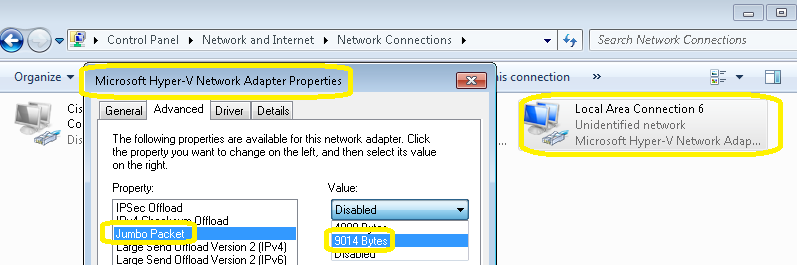
After the reboot you can test jumbo frames.
Use the ping command to test it, pinging from the VM to the switch for example.
eg. ping -f -l 8000 10.1.1.200
Notes:
The -f parameter does not allow packets to be fragmented.
The -l parameter specifies the size of the packet.
Also remember to enable VMQ to improve performance But it DOES help to reduce CPU cycles in that case
Recommended Books


System Center 2012 R2 Virtual Machine

System Center Virtual Machine Manager 2012 Cookbook


 Cloudtidings.com