
Archive
Backing Up Virtual Machines on CSV with Hardware VSS Providers, Set to Register KEY
If you are using a hardware VSS provider, you can back up multiple virtual machines from the same CSV/node in the cluster.
To allow a maximum of three backups to run concurrently on each node, specify the number of concurrent backups that can run from a node.
Set the following registry key:
Key
HKLMSoftwareMicrosoftMicrosoft Data Protection Manager2.0ConfigurationMaxAllowedParallelBackups
Value Microsoft Hyper-V
Data 3
Type DWORD
Microsoft does not recommend that you do not use a value greater than 3 for optimal performance
Backing Up Virtual Machines on CSV with the System VSS Provider : Recommendations
If your SAN vendor does not have hardware VSS providers, you can use software snapshots to back up your virtual machines.
We recommend that virtual machines deployed on CSV should be backed up serially.
There are two aspects to serialization of backup jobs in a CSV environment:
- Serializing virtual machine backups on a per node basis.
To ensures that only one backup job will run at a time on a Hyper-V host, create the following registry key on the DPM server:
|
Key |
HKLMSoftwareMicrosoftMicrosoft Data Protection Manager2.0ConfigurationMaxAllowedParallelBackups |
|
Value |
Microsoft Hyper-V |
|
Data |
1 |
|
Type |
DWORD |
- Serializing virtual machine backups on a per CSV LUN basis.
This form of serialization limits the number of virtual machine backups happening on a single CSV LUN. This is done by creating a DataSourceGroups.xml file and placing it in the DPM server at %PROGRAMFILES%Microsoft DPMDPMConfig. This file provides DPM with information about the CSV virtual machine deployment configuration/distribution on the various CSV LUN so as to serialize the backups that happen per CSV LUN.
For more information about how to generate the file http://technet.microsoft.com/en-us/library/ff634192.aspx
Microsoft is looking for a few good IT Pros. It’s for you!!!
Microsoft is building a worldwide community of IT Pros who want to share their frank opinions about our products (primarily Windows Server, Microsoft System Center, and Microsoft Forefront). We call it the International Customer Advisory Board (ICAB), and by the end of this year, we will be 1000 IT Pros strong.
The ICAB discusses Microsoft technology, troubleshoots one another’s technical issues, and weighs in on innovations in content and community—on a public blog, a Connect page (coming soon)m and/or a private, invitation-only Facebook group.¹ (Facebook participation is not required to be a member of the ICAB.)
Members may be invited to exclusive events at conferences like Tech Ed, the MVP Summit, and Management Summit and during customer visits in their home cities.
Interested?
If so, email icabnom@microsoft.com with your name and business card details
Visit : http://msicab.com/ for more info
Windows Aero and also rich media support including Silverlight and 3D graphics, remotely ? Yes. Will be possible with 2008 R2 SP1
Also Microsoft announced a collaboration agreement with Citrix, which will enable Citrix to integrate and use Microsoft RemoteFX within its XenDesktop suite of products and HDX.
SCOM 2007 R2 : The System Center Management service terminated with service-specific error 2147500037 (0x80004005).
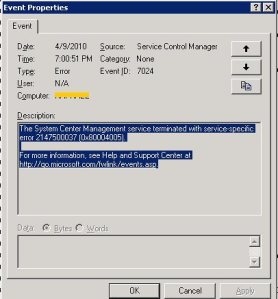
incorrect or create a new String Value (Reg_SZ) if missing and set it to the correct path
Hyper-V R2 : Storage/Network Design for High Availability
By converting your physical servers to virtual ones, you immediately get extra capabilities that make them less likely to go down and easier to bring back up when they do:
- · Snapshots enable you to go back in time when a software update or configuration change blows up an otherwise healthy server.
- · Virtual hard disks consolidate the thousands of files that comprise a Windows server into a single file for backups, which significantly improves the reliability of those backups.
- · Volume Shadow Copy Service (VSS) support, which is natively available in Hyper-V, means that applications return from a restore with zero loss of data and immediately ready for operation.
- · Migration capabilities improve planned downtime activities by providing a mechanism for relocating the processing of virtual machines to new hosts with little to no disruption in service.
- · Failover clustering means that the loss of a virtual host automatically moves virtual machines to new locations where they can continue doing their job.
What’s become much more critical is that the servers/application/services to keep on working.
To Provide High Availability, we need to design properly our environment. With the right combinations of technology, you can inexpensively increase the availability of your environment.
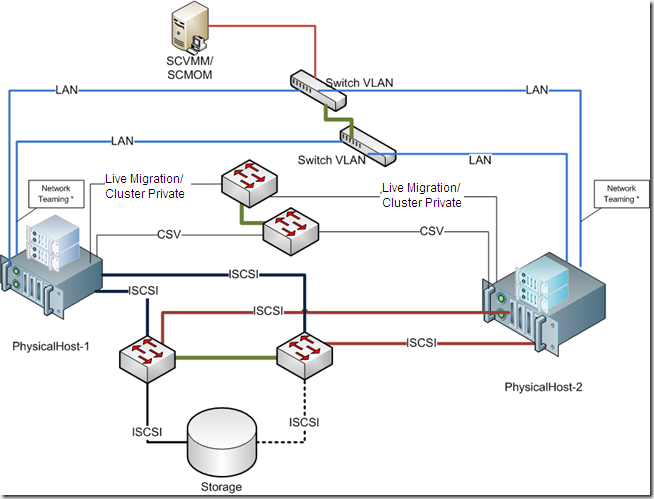
The best practices are based on the following design principles:
- · Redundant hardware to eliminate a single point of failure
- · Load balancing and failover for iSCSI and network traffic
- · Redundant paths for the cluster, Cluster Shared Volume (CSV), and live migration traffic
- · Separation of each traffic type for security and availability
- · Ease of use and implementation
Remember: Windows Server 2008 R2 Enterprise or Windows Server 2008 R2 Datacenter must be used for the physical computers. These servers must run the same version of Windows Server 2008 R2, including the same type of installation. That is, both servers must be either a full installation or a Server Core installation
Also, Hyper-V requires an x64-based processor, hardware-assisted virtualization, and hardware-enforced Data Execution Prevention (DEP). Specifically, you must enable the Intel XD bit (execute disable bit) or AMD NX bit (no execute bit).
Servers
Server-class equipment. The use of equipment that is not listed in the Windows catalog can impact supportability and may not best meet the needs of your virtual machines. Moving to tested and supported server-class equipment will ensure full support in the case of a problem. ). The Windows Server catalog is available at the Microsoft Web site http://go.microsoft.com/fwlink/?LinkId=111228
iSCSI Storage
I would recommend Dell Equalogic, Compellent, IBM NetApp, EMC, but you should evaluate others vendors.
iSCSI Software
If you need to use software-based iSCSI, look carefully at the features available. Microsoft clustering requires iSCSI to support SCSI Primary Commands-3, specifically the support of Persistent Reservations. Most for-cost iSCSI software currently supports this capability, but there is very little support for it in most open source software packages.
One inexpensive and easy-to-use software package is the StarWind iSCSI Target from StarWind Software. There is a free version of StarWind iSCSI target allowing multiple connections. You cannot get it filling automatic form on their site. You have to ask support@starwindsoftware.com for free NFR unlock key manuallyNetwork
How about the network configuration? Here is my proposal and this is what I am using in terms of NICs/Ports:1 management2 private: 1 for cluster private/CSV primary, 1 for live migration primary2 for network (in teaming)2 for iSCSI2 Dedicated (NIC/Ports) for the Network traffic configured as teaming.The failover cluster should be disabled from managing this network.
Provided by establishing the Hyper-V virtual switch on a network team. The team can provide load balancing, link aggregation, and failover capabilities to the virtual network
NIC teaming is the process of grouping together several physical NICs into one single logical NIC, which can be used for network fault tolerance and transmit load balance. The process of grouping NICs is called teaming. Teaming has two purposes:• Fault Tolerance: By teaming more than one physical NIC to a logical NIC, high availability is maximized. Even if one NIC fails, the network connection does not cease and continues to operate on other NICs.• Load Balancing: Balancing the network traffic load on a server can enhance the functionality of the server and the network. Load balancing within network interconnect controller (NIC) teams enables distributing traffic amongst the members of a NIC team so that traffic is routed among all available paths.2 Dedicated (NIC/Ports) for the CSV. (Minimum 1Gb). I personally recommend 10Gb. One a 2 nodes you can use cross-over, but if you plan to use more, than you need a switch. If you choose 10GB it means that your switch needs to be 10GB.
A feature of failover clusters called Cluster Shared Volumes is specifically designed to enhance the availability and manageability of virtual machines. Cluster Shared Volumes are volumes in a failover cluster that multiple nodes can read from and write to at the same time. This feature enables multiple nodes to concurrently access a single shared volume.CSV will provide many benefits, including easier storage management, greater resiliency to failures, the ability to store many VMs on a single LUN and have them fail over individually, and most notably, CSV provides the infrastructure to support and enhance live migration of Hyper-V virtual machines.Cluster private traffic will flow over the private network with the lowest cluster metric (typically has value of 1000). To view the cluster network metrics that have been assigned, run the following PowerShell command:
To view the cluster network metric settings, run the following Power Shell commands:Import-Module FailoverClusters
Get-ClusterNetwork | ft Name, Metric, AutoMetricIf the automatically assigned metrics are not the desired values, then the following Power Shell commands can be executed to manually set the metric values:Get-ClusterNetwork | ft Name, Metric, AutoMetricNote the name of the networks that you want to set the values on (used for next command)$cn = Get-ClusterNetwork “<cluster network name>”
$cn.Metric = <value>Cluster private/CSV should have a value of 1000
Live migration should have a value of 11002 Dedicated (NIC/Ports) for the iSCSI traffic.( Minimum 1Gb). I personally recommend 10Gb ( the difference in price will be about 10% more).Btw, remember: If you choose 10GB it means that your switch needs to be 10GB, also the Storage.
The mass-storage device controllers that are dedicated to the cluster storage should be identical. They should also use the same firmware version.Isolating iSCSI traffic to its own network path isolates that traffic to its own network segment, ensuring its full availability as network conditions change.A multipath I/O software needs to be installed on the Hyper-V hosts to manage the disks properly. This is done by first enabling Hyper-V-based MPIO support which is not installed by default.Also, Enable Jumbo frames on the two interfaces identified for iSCSI1 (NIC/Port) for the Management. External management applications (SCVMM, DMC, Backup/Restore, etc) communicate with the cluster through this network.Resuming :
MVP 2010 : Powering our Skills
I just would like to express some feelings that I found here this year:
So far this year is the best ever experience I ever had. It’s really amazing what’s going on here : We are sharing experiences, LEARNING A LOT, improving our skills, having feedback for our suggestions from the program managers/engineers and developers, and so far so good, knowing what’s coming next releases, making new friends and meeting old ones from all world.
Still running Windows 7 Release Candidate? make plans to move to a RTM ASAP
On June 1st, 2010, a non-genuine experience is triggered where your wallpaper is removed and “This copy of Windows is not genuine” will be displayed in the lower right corner above the taskbar. This means your PC will no longer be able to obtain optional updates or downloads that require genuine Windows validation.
To avoid any data loss, I suggest making plans to move to a released version of Windows 7 before the automatic shutdowns start. During these shutdowns, your work will not be saved.
Remember, pre-release versions of Windows are unsupported. For more information on the expiration of the Windows 7 RC, see this KB article.
If you would like to keep on testing make sure you download the Windows 7 Enterprise 90-day trial.
Microsoft Certified Professional : Second Shot Returns
Second Shot, the most popular certification offer in Microsoft history, has returned to help you pass your next certification exam and further your career. Second Shot gives you a free retake offer if you do not pass a Microsoft Certification Exam on the first attempt.
But don’t wait–to get a Second Shot you must take both the first exam and (if necessary) the retake exam before June 30, 2010. This offer applies to all Microsoft Learning IT professional, developer, project management, and Microsoft Dynamics exams, including academic exams.
-
Register to acquire a voucher for a Second Shot (Prometric.com)
Offer details:
-
Dates: January 13, 2010 – June 30, 2010.
-
Details: You must register, obtain a voucher code, schedule, pay, and take the first and (if necessary) the retake exam before June 30, 2010.
-
Applicable exams: This offer applies to all Microsoft Learning IT professional, developer, project management, and Microsoft Dynamics exams, including academic exams.
Note Only one Second Shot voucher is available per purchased exam.
Where to find more information about this offer
-
View our frequently asked questions (Microsoft Office Word file, 17.2 KB)
Best luck!!!
IIS : Search Engine Optimization (SEO) Just Got Easy
Increase Website Traffic and Revenue
Analyze your website and find ways to boost your number of hits. Use SEO recommendations to improve traffic and increase your revenue stream.
Influence and Update Search Engines
Control the access and display of your content in search results. Keep search engines current with the latest information from your website.
Improve Customer Experience
Discover and solve common problems in your website content and design to enhance your end user experience. Make it easy for your customers to find what they’re looking for.
Download it here : http://www.microsoft.com/web/gallery/install.aspx?appid=seotoolkit
Recommended Books


System Center 2012 R2 Virtual Machine

System Center Virtual Machine Manager 2012 Cookbook


