
Archive
Hyper-V CSV protection with DPM 2010
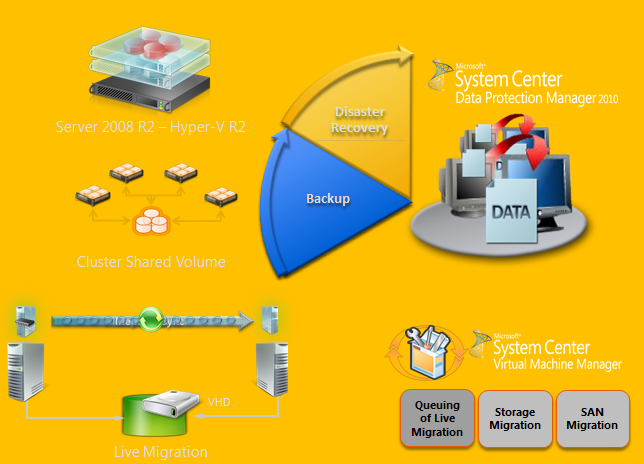
DPM design for Hyper-V :
- Incremental Backups Only – full only once
- No More Backup Window – online backups
- Application consistency via VSS
- Protect Live Migration VMs in CSV clusters
- Protect whole VM, recover individual items
- Auto Protection of new VMs
- Routine backups – nightly or more frequently
Strategy to Deply DPM 2010 in Hyper-V/CSV environment :
1. Plan:
- Identify Project Requirements and scope
- Simulate using Hyper-V Calculator
- Review Hyper-V design guidelines & Best Practices
- Acquire VSS Hardware Provider & check environment with SDPM SAN Testing Tool:
- Verify that the SAN supports hardware snapshots & is certified for DPM.
- http://blogs.technet.com/dpm/archive/2010/02/05/tested-hardware-vss-provider-table.aspx
- Install the VSS hardware provider
- Self Certifying your SAN. If your SAN is not in the certified list & you have a SAN, run the SCDPM SAN Testing Tool : StartCSVTests.cmd /run ( to be realeased yet )
- Validate a Pilot Environment
- Ready for Deployment
- Integration components should be updated on both VMs.
- Ensure that Live Migration is functional
2. Deploy : Protected CSV server
- Install all recommended prerequisites:
| General Prerequisite | Install the integration components on the guests. For more information, see Install a Guest Operating System (http://go.microsoft.com/fwlink/?LinkId=165041). |
| Microsoft Windows Server 2008 SP2 | Install Microsoft Windows Server 2008 SP2 OR Install the Microsoft Hyper-V prerequisites (http://go.microsoft.com/fwlink/?LinkID=133781). |
| Microsoft Windows Server 2008 R2 | Install the following on the host computer:KB975354 (http://support.microsoft.com/kb/975354)KB975921 (http://support.microsoft.com/kb/975921) |
- Failover Cluster Validation
- Enable Automount : Enable Auto mount on the host for successful child partition backups : MOUNTVOL /E
- Install Hardware Provider:Ensure that VSS hardware providers are installed : vssadmin list providers
- Validate Hardware snapshots
- Use DSConfig Tool to serialize backups (for software snapshots providers only) :
· Problem:With software snapshots, simultaneous triggering of VM backups (especially scale deployments) will cause backup jobs to time out and fail.
· Enable Per CSV LUN Serialization:This serialization limits the number of virtual machine backups happening on a single CSV LUN.Create a DataSourceGroups.xml file by running the DSConfig.ps1 script on any one node of a cluster containing CSV.Place the file in the DPM server at %PROGRAMFILES%\Microsoft DPM\DPM\Config.Repeat step 1 for every cluster that is protected by a DPM server.The DataSourceGroups.xml file needs to be updated only when virtual machines are added, deleted, or modified in the cluster and protection is configured for them.
3. Deploy : DPM 2010 server
- Enable Hyper-V Role on DPM Server :DPM supports item-level recovery (ILR), which allows you to do granular recovery of files, folders, volumes, and virtual hard disks (VHDs) from a host-level backup of Hyper-V virtual machines to a network share or a volume on a DPM protected server. You must have the Hyper-V role enabled on the DPM server to perform item-level recoveries. During item-level recovery, DPM has to mount the VHDs of the protected virtual machines
- Install DPM server pre-requisites
- Install DPM 2010
- Turn off “TCP Chimney offload”For better throughput, TCP Chimney Offload should be turned off.
- Allocate Storage Pool & Deploy Agents
- Datasourcegroups.xml file:
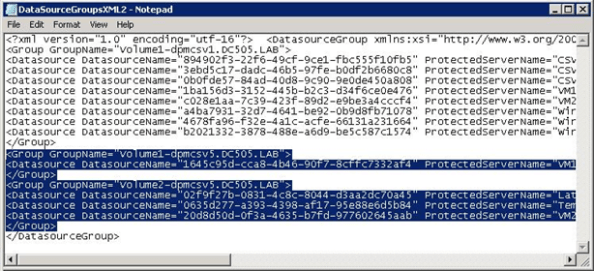
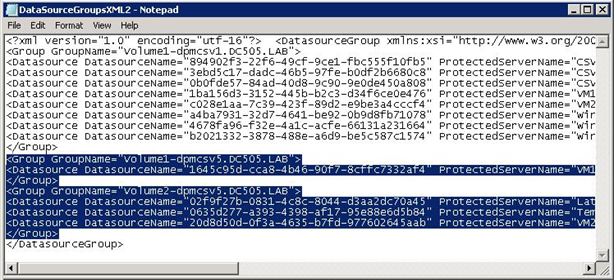
- Merge the DatasourceGroups.XML file for all CSVs protected by DPM server. This is applicable when software providers are used on the CSV cluster.
- Copy the <Group> tags from all the DataSourceGroup.xml files generated and add the text between the <DataSourceGroup> tags. The DataSourceGroups.xml file will now contain one <header> tag, one <DataSourceGroup> tag, and <Group> tags from all CSV clusters.
- Configure Protection Groups
- DPM2010 provides Datasource caching for faster enquiry.
- Remember to clear cache if new VMs have been added
- Enable AutoProtection:
Script to Auto-add VMs : http://blogs.technet.com/dpm/archive/2009/12/03/hyper-v-protection-with-dpm-2010-beta-how-to-automatically-protect-new-virtual-machines.aspx
Project Phoenix : MSDN Ultimate subscriptions to give away
Hi Everyone,
fellow MVPs Greg Low, Darren Gosbell , Arnie Rowland and Rod Colledge are giving away 7 MSDN Ultimate subscriptions.
Called Project Phoenix, it awards (among other things) Microsoft Visual Studio Ultimate with MSDN subscription to unemployed or underemployed developers who commit to developing a project using Microsoft tools for an eligible non-profit organisation. More details on the program can be found here.
Project Criteria;
- Client is an Australian or New Zealand non-profit, school or church,
- Solves a problem or satisfies a need for the client,
- Client desires the project and is supportive,
- Uses any combination of .NET 4.0, Windows Server 2008, SQL Server 2008, or Windows Phone 7,
- May be a new software solution, or an upgrade to an existing software solution,
- Additional consideration given projects that will be posted on Codeplex with a GPL license
An eligible developer may submit project proposal information here.
An eligible non-profit may submit a project proposal here. Eligible developers without a project proposal may select from one of the available projects listed below;
Windows Small Business Server “7” (SBS7)
Built on Windows Server® 2008 R2, this exciting new edition of the all-in-one solution server for small businesses will include Microsoft® Exchange Server 2010 SP1, Microsoft SharePoint® Foundation 2010, and Windows Software Update Services. Small business customers will find significant security and management enhancements over previous versions, as well as much richer features for providing file-and-print, email and Internet services.
Together with Windows SBS code name “Aurora” (available for download since 16 August), SBS7 is dedicated to providing small business customers with a highly manageable, low complexity solution to help cut costs, save time and be more efficient. SBS7 offers on premise email and collaboration suite functionalities that Aurora’s customers can add through online services.
Take advantage of advanced technologies
SBS7 also offers a great opportunity for small businesses to upgrade their servers and simultaneously take advantage of advancements in security, reliability, and connectivity technology. For this reason, SBS7 offers enhanced migration tools, extensive pre-migration checks, and prescriptive guidance included in the software.
Secure access to communications remotely
Furthermore, with SBS7, small businesses gain the freedom to securely access all of their communications from virtually any Web-browser or mobile device – getting more done wherever they are with the integrated Exchange Server 2010 and Microsoft Outlook® Web Access (OWA) capabilities.
Share and edit documents online
Customers using SBS7 will also have the opportunity to view, edit, and share Microsoft Office documents online with SharePoint Foundation 2010 and Microsoft Office Web Apps. As the online companion to Microsoft Word, Microsoft Excel(R), Microsoft PowerPoint(R), and Microsoft OneNote(R), Office Web Apps gives users the freedom to access documents from virtually anywhere.
Dell Streak will be available 1st October in Australia
Dell Streak’s unique size will help people discover new ways to enjoy the web and connect with friends
The Streak has front and rear-facing cameras, 2GB of internal memory (plus an included 16GB card) and access to turn-by-turn navigation and social networking apps.
Advantages over the iPad are the MicroSD slot, front and rear-facing cameras, and mobile phone capability.
Price : Outright at $649, or $0 upfront on a $59 Plan. if you’ve been waiting for it, go for it!
SPRINGBOARD SERIES TOUR NEAR TO YOU!
Microsoft Windows, Office and MDOP Deployment Workshops

Amsterdam – 25 Oct | Stockholm – 27 Oct | Helsinki – 29 Oct | Reading – 1 Nov | Rome – 3 Nov | Vienna – 4 Nov
The Microsoft Get On the Bus Tour is taking a winter hiatus to bring you a new tour – the Springboard Series Tour: Microsoft Windows, Office and MDOP Deployment Workshops! Amsterdam marks our first stop on a 6-city European tour, en route to TechEd Europe, in Berlin, Germany. Are you looking to plan, pilot or deploy Windows and Office? Our workshops will cover the Office 2010, key deployment strategies for Windows 7, the Microsoft Desktop Optimization Pack, as well as show you the value of getting trained and certified in these key products.
Learn why Windows 7 has received rave reviews from IT organizations and is setting records as the fastest selling operating system in history, and find out why so many IT Pros are ready to deploy Office 2010. Give us five hours, and you will have a clear understanding of the tools, tips and tricks you need now to jumpstart the successful deployment and management of your Windows desktop environment today. Come join members of the Windows and Office US Product Teams, as well as local Microsoft Technology Evangelists for technical training, professional networking, and real world guidance. Don’t miss your chance to attend a workshop in the 2010 Springboard Series Tour, register today at www.springboardseriestour.com.
Get your Tour updates first! Follow us on Twitter, @MSSpringboard
Group Policy Settings Reference for Windows and Windows Server
These spreadsheets list the policy settings for computer and user configurations included in the Administrative template files delivered with the Windows operating systems specified. You can configure these policy settings when you edit Group Policy objects (GPOs).
Internet Explorer 9 Beta release
Get Ready for a More Beautiful Web
Today, the Web is a communication hub. It’s how people connect with friends, colleagues, and customers. How information is shared and projects are completed. How business is done. Yet the Web experience is not as fast, rich, or accessible as it could be. The new Windows Internet Explorer 9 Beta browser changes that, by leveraging the power of your PC to deliver more vibrant, immersive Web experiences, coupled with unparalleled performance.
Now websites and Web applications can provide the same functionality you expect from the software installed on your PC. A new interface increases your viewing area, and enhanced integration with the Windows 7 operating system means you can pin websites and applications directly to the taskbar and create customized Jump Lists that put the tasks you use most often just one click away. And a robust set of built-in security, privacy, and reliability technologies makes browsing safer than ever.
Learn more about the Internet Explorer 9 Beta release and watch demos to see how it works. Join the Microsoft Partner Network to access exclusive training opportunities. Then download the beta to experience a faster, cleaner, and more beautiful Web for yourself.
Infrastructure Saturday – Nov 6th 2010 – Brisbane : free event
Join System Administrators, System Engineers, Architects and other IT Pro’s that work with Microsoft Server products for our ‘Infrastructure Saturday’ event. Infrastructure Saturday is an educational, informative & lively day filled with sessions from respected IT Pros, MVPs and other Community Members covering a wide variety of Microsoft server orientated topics. Infrastructure Saturday is FREE, open to the public and is your local chance to immerse yourself in Microsoft Infrastructure!
Infrastructure Saturday will be on November 6th from the Microsoft Brisbane offices in the Brisbane CBD. To register now for this event please visit the registration link, places are limited and will go fast. FREE Event
Where : Microsoft Brisbane
When : November 6th, 2010
Register : http://infrasat.eventbrite.com
PowerShell script to create AD Subnets and Sites
param ($Subnet, $SiteName, [String] $Location, [String] $Description, [switch]$Help)
{
""
Write-Host "Usage: .Create-ADSubnet.ps1 -Help"
Write-Host "Usage: .Create-ADSubnet.ps1 <Subnet> <SiteName> <Location> <Description>"
Write-Host "Ex: .Create-ADSubnet.ps1 10.150.0.0/16 Default-First-Site-Name Sydney FrenchsForest"
""
Break
}
if ($Subnet -eq $Null) {Write-Host "Provide a Subnet!" -fore Red; Help}
if ($Location -eq $Null) {Write-Host "Provide a Location!" -fore Red; Help}
if ($Description -eq $Null) {Write-Host "Provide a Description!" -fore Red; Help}
if ($SiteName -eq $Null) {Write-Host "Provide a Site Name!" -fore Red; Help}
{
$SiteNameRDN = $SiteName
}
else
{
$SiteNameRDN = "CN=$($SiteName)"
}
$ConfigurationNC = $RootDSE.configurationNamingContext
#$Description = $Subnet
$SubnetsContainer = [ADSI]"LDAP://CN=Subnets,CN=Sites,$($ConfigurationNC)"
$NewSubnet.Put("description", $Description)
$NewSubnet.Put("location", $Location)
$NewSubnet.SetInfo()
{
""
Write-Host "Error! Please check your input."
Write-Host "Error Message:"
""
}
else
{
""
Write-Host "Subnet Created Successfully."
""
}
Teched Australia 2010. What happens here
Recommended Books


System Center 2012 R2 Virtual Machine

System Center Virtual Machine Manager 2012 Cookbook


