
Archive
Build a great Windows 7 application : You could win a fully loaded HP Touchsmart tx2z Notebook!

Use Visual Studio 2008 and/or Visual Studio 2010 Beta 2 to build a great Windows 7 application, and then post an article on The Code Project. You could win a fully loaded HP Touchsmart tx2z Notebook!
Submit a great article explaining how you built an app for Windows 7 – complete with code – and if yours is the highest rated article by both The Code Project community and our judges, you could win a fully loaded HP Touchsmart tx2z Notebook!
Requirements
- Write a great article using the regular Code Project submission guidelines
- Your article should include screen shots and code samples
- Your article must use Visual Studio 2008 and/or Visual Studio 2010 Beta
- The app should run as a Windows client, and should take advantage of Windows-specific technologies/features found in Windows 7 (such as jumplists, thumbnails, etc.)
- You’ll need to tag your article with the key words "Windows 7”
- Post your article on The Code Project to automatically be entered in the contest
What You Can Win
Codeproject.com members can vote on your article. The articles that are highest-rated by members will be rated by our judges to determine the final winner. If your article wins, in addition to receiving one of our three great prizes, you’ll be highlighted in The Code Project’s weekly newsletter and on our contest page.
To upgrade DPM 2007 SP1 running Windows 2003 server to DPM 2010 Windows Server 2008
Follow these steps:
- Apply ALL hotfixes to the DPM 2007 SP1 first.
Update Type
Version
Release Date
Details
DPM 2010 – Beta
3.0.7336.0
09/25/2009
https://connect.microsoft.com/Downloads/DownloadDetails.aspx?SiteID=840&DownloadID=22070
DPM 2007 – Hotfix
02.00.8861.0000
11/05/2009
DPM 2007 – Hotfix
02.00.8851.0000
08/28/2009
DPM 2007 – Hotfix
02.00.8844.0000
06/04/2009
DPM 2007 – Hotfix
2.0.8836.0
04/14/2009
DPM 2007 – Hotfix
2.00.8824.0
02/16/2009
DPM 2007 – Hotfix
2.0.8811.0
01/09/2009
DPM 2007 – SP1
2.0.8793.0
12/19/2008
DPM 2007 – Hotfix
2.0.8111.0
07/31/2008
DPM 2007 – Feature Pack
2.0.8107.0
07/18/2008
DPM 2007 – Hotfix
DPM 2007 – Hotfix
2.0.5820.0
04/24/2008
DPM 2007 – Hotfix
DPM 2007 – Hotfix
DPM 2007 – Hotfix
01/09/2008
DPM 2007 – RTM
10/17/2008
- Backup the DPM database.
1. From the command prompt, run DPMBackup.exe –db
2. Browse to Program FilesMicrosoft Data Protection ManagerDPMVolumesShadowCopyDatabase Backups. The file name of the DPM database backup is DPMDB.bak. Copy it to the media to which you want. - Uninstall DPM and choose to retain data. ( important!!! )
1. Click Add or Remove Programs on the Control Panel, and then click Change or Remove Programs.
2. Under Currently installed programs, select Microsoft System Center Data Protection Manager 2007 and then click Change/Remove.
3. On the Uninstallation Options page, select the Retain data option, and then click Next.
4. On the Summary of Options page, click Uninstall.
5. When uninstallation is complete, click Close
- Uninstall Powershell.
1. In Control Panel, click Add or Remove Programs, and then click Change or Remove Programs.
2. Under Currently installed programs, select Windows Powershell and then click Change/Remove
- Upgrade the server to Windows Server 2008/Windows 2008 R2 ( remember DPM 2010 only installs on x64 ).
1. Make sure that the bit version of both operating systems are same. If not, then you need to do a clean installation for the x64 bits
- Delete the DPM database.
1. Open the Microsoft SQL Server Management Studio
2. Select the MS$DPM2007$ database, and then click Connect.
3. Expand Databases, right-click the DPMDB database, and then click Delete.
4. Click Yes to confirm the deletion
- Install DPM 2010.
- Restore the DPM database.
1. Browse to the backup Path.
2. From the command prompt, type DpmSync –restored –dbloc < DPMDB location> and then press ENTER

3. From the command prompt, type DpmSync -sync
Internet Explorer Security Patch
This cumulative security update resolves seven privately reported vulnerabilities and one publicly disclosed vulnerability in Internet Explorer. The more severe vulnerabilities could allow remote code execution if a user views a specially crafted Web page using Internet Explorer. This security update is rated Critical for all supported releases of Internet Explorer.
Affected Software
| Operating System | Component | Maximum Security Impact | Aggregate Severity Rating | Bulletins Replaced by This Update |
| Internet Explorer 5.01 and Internet Explorer 6 Service Pack 1 | ||||
|
Microsoft Windows 2000 Service Pack 4 |
Remote Code Execution |
Critical |
||
|
Microsoft Windows 2000 Service Pack 4 |
Remote Code Execution |
Critical |
||
| Internet Explorer 6 | ||||
|
Windows XP Service Pack 2 and Windows XP Service Pack 3 |
Remote Code Execution |
Critical |
||
|
Windows XP Professional x64 Edition Service Pack 2 |
Remote Code Execution |
Critical |
||
|
Windows Server 2003 Service Pack 2 |
Remote Code Execution |
Moderate |
||
|
Windows Server 2003 x64 Edition Service Pack 2 |
Remote Code Execution |
Moderate |
||
|
Windows Server 2003 with SP2 for Itanium-based Systems |
Remote Code Execution |
Moderate |
||
| Internet Explorer 7 | ||||
|
Windows XP Service Pack 2 and Windows XP Service Pack 3 |
Remote Code Execution |
Critical |
||
|
Windows XP Professional x64 Edition Service Pack 2 |
Remote Code Execution |
Critical |
||
|
Windows Server 2003 Service Pack 2 |
Remote Code Execution |
Critical |
||
|
Windows Server 2003 x64 Edition Service Pack 2 |
Remote Code Execution |
Critical |
||
|
Windows Server 2003 with SP2 for Itanium-based Systems |
Remote Code Execution |
Critical |
||
|
Windows Vista, Windows Vista Service Pack 1, and Windows Vista Service Pack 2 |
Remote Code Execution |
Critical |
||
|
Windows Vista x64 Edition, Windows Vista x64 Edition Service Pack 1, and Windows Vista x64 Edition Service Pack 2 |
Remote Code Execution |
Critical |
||
|
Windows Server 2008 for 32-bit Systems and Windows Server 2008 for 32-bit Systems Service Pack 2** |
Remote Code Execution |
Critical |
||
|
Windows Server 2008 for x64-based Systems and Windows Server 2008 for x64-based Systems Service Pack 2** |
Remote Code Execution |
Critical |
||
|
Windows Server 2008 for Itanium-based Systems and Windows Server 2008 for Itanium-based Systems Service Pack 2 |
Remote Code Execution |
Critical |
||
| Internet Explorer 8 | ||||
|
Windows XP Service Pack 2 and Windows XP Service Pack 3 |
Remote Code Execution |
Critical |
||
|
Windows XP Professional x64 Edition Service Pack 2 |
Remote Code Execution |
Critical |
||
|
Windows Server 2003 Service Pack 2 |
Remote Code Execution |
Critical |
||
|
Windows Server 2003 x64 Edition Service Pack 2 |
Remote Code Execution |
Critical |
||
|
Windows Vista, Windows Vista Service Pack 1, and Windows Vista Service Pack 2 |
Remote Code Execution |
Critical |
||
|
Windows Vista x64 Edition, Windows Vista x64 Edition Service Pack 1, and Windows Vista x64 Edition Service Pack 2 |
Remote Code Execution |
Critical |
||
|
Windows Server 2008 for 32-bit Systems and Windows Server 2008 for 32-bit Systems Service Pack 2** |
Remote Code Execution |
Critical |
||
|
Windows Server 2008 for x64-based Systems and Windows Server 2008 for x64-based Systems Service Pack 2** |
Remote Code Execution |
Critical |
||
|
Windows 7 for 32-bit Systems |
Remote Code Execution |
Critical |
||
|
Windows 7 for x64-based Systems |
Remote Code Execution |
Critical |
||
|
Windows Server 2008 R2 for x64-based Systems** |
Remote Code Execution |
Critical |
||
|
Windows Server 2008 R2 for Itanium-based Systems |
Remote Code Execution |
Critical |
**Server Core installation not affected. The vulnerabilities addressed by this update do not affect supported editions of Windows Server 2008 or Windows Server 2008 R2 as indicated, when installed using the Server Core installation option. For more information on this installation option, see the MSDN articles, Server Core and Server Core for Windows Server 2008 R2. Note that the Server Core installation option does not apply to certain editions of Windows Server 2008 and Windows Server 2008 R2; see Compare Server Core Installation Options.
About vulnerability in Internet Explorer
. There have been a very limited number of targeted attacks against a small number of corporations.
. Attacks seen to date are only effective against Internet Explorer 6.
. Attacks are NOT widespread.
. Thus far we are NOT seeing attacks focused on consumers.
It is important to note that all software has vulnerabilities and switching browsers in an attempt to protect against this one, highly publicised, but currently limited attack can inadvertently create a false sense of security. Moreover, IE8 has built-in security features, such as the SmartScreen filter, that other browsers do not have.
We strongly recommend those using Internet Explorer 6 or Internet Explorer 7 upgrade to Internet Explorer 8 as soon as possible to benefit from the improved security protections it offers.
Recomendation : those using Windows XP SP2 upgrade to Windows XP SP3.
Forefront Threat Management Gateway (TMG) 2010 Released
In the following sections I will list some of the new functionality that we have added into TMG and will cover some of our infrastructure investments.
Secure Web Gateway
Forefront TMG is a Secure Web Gateway (SWG) that improves security enforcement by integrating multiple detection technologies such as URL filtering, Anti Malware, and intrusion prevention into a single, easy-to-manage solution. We have seen a lot of interest in the features that comprise this solution, so here is some information on what they do and how:
URL Filtering: URL Filtering allows controlling end-user access to Web sites, protecting the organization by denying access to known malicious sites and to sites displaying inappropriate or nonproductive materials, based on URL categories. TMG features over 80 URL categories including security-oriented categories, productivity-oriented and liability-oriented categories. Forefront TMG uses Microsoft Reputation Services (MRS), a cloud-based categorization system hosted in Microsoft data center. To ensure the best bandwidth utilization and low latency, Forefront TMG has implemented a local URL cache.
Anti Malware: Stopping malware on the edge significantly decreases the possibility that a virus will hit a computer with anti-virus signatures that are not up-to-date or a test computer without an anti-virus to protect it. TMG has integrated the Microsoft Anti Malware engine to provide world class scanning and blocking capability on the edge.
Network Inspection System (NIS): NIS is a generic application protocol decode-based traffic inspection system that uses signatures of known vulnerabilities, to detect and potentially block attacks on network resources. NIS provides comprehensive protection for Microsoft network vulnerabilities, researched and developed by the Microsoft Malware Protection Center – NIS Response Team, as well as an operational signature distribution channel which enables dynamic signature snapshot distribution. NIS closes the vulnerability window between vulnerability disclosures and patch deployment from weeks to few hours.
In addition, we have introduced HTTPS scanning to enable inspection of encrypted sessions, eased the deployment and management with a set of easy to use wizards and significantly improved logging and reporting to provide full visibility into how your organization is accessing the web and whether it’s compliant with your organization’s policy.
VPN, Firewall, Email Protection and Infrastructure.
We have also made significant investments to ensure that we keep delivering top notch VPN and Firewall functionality. We made quality improvements in Web Caching and made sure it works well with the new Windows 7 BranchCache feature. We have added several new features, among them: Email Protection, ISP redundancy, NAP integration with VPN role, SSTP, VoIP traversal (SIP support), Enhanced NAT, SQL logging and Updated TMG Client (previously known as the Firewall Client). In addition TMG was built as a native 64bit product that supports Windows Server 2008 R2, and Windows Server 2008 SP2, allowing better scalability and increased reliability.
These improvements are in direct response to your requests and protection needs. We firmly believe that listening to your voice makes our product better! We are looking forward to hearing what you think about TMG 2010 as you test and deploy in your own environment.
So go ahead and download it today to try it out!
Ofiice DevCon : University Of Queensland (St. Lucia campus : 31st October-1st November
Office DevCon is the largest and most popular annual community-driven conference that allows Microsoft Office developers and power users to come together in one location to hear expert speakers present on a wide range of Microsoft Office-related topics.
2009 will be our third year, and we are planning to build on the unprecedented success of the first two years.
Come along and discover how to do things you never knew you could do with the Microsoft Office suite of products
Where and when?
This year, Office DevCon will be held at: University Of Queensland (St. Lucia campus) 31st October-1st November
What will be covered?

We have Microsoft and industry experts from around the world who will present advanced topics the following products.
- Access
- Word
- Excel
- PowerPoint
- InfoPath
- Groove
- SharePoint
- and more….
click here for more details
See you there….
Deleting windows.old after upgrading to windows 7
Deleting the windows.old folder manually
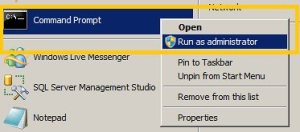
1) Open an elevated command prompt ( runas administrator )
- Click start
- Type: cmd
- right-click it under programs
- click Run As Administrator
2) Take ownership
- takeown c /F /A /R /D
3) grant yourself permission
- icacls c:windows.old /grant Administrators:F /T /L /Q
4) Delete the folder
Make sure you close any explorer or command windows that are looking at or inside the windows.old folder (except for the command window you are using). If you don’t, you will receive an error while performing this step.
- rd /S /Q windows.old
Free Seminar ; Windows 2008 R2 and Windows 7 : 16/September/2009
If you did not attend TechEd Australia in Gold Coast last week, you should attend this one : 16/09/2009 from 17:00 to 20:00
Sydney 1 Epping Rd. North Ryde NSW 2113 ( Microsoft Office)
Would you like to know the new features of Server 2008 R2? Windows Server 2008 R2 extends the award winning features of Windows Server 2008, and now comes with new features to enable organizations to increase reliability and flexibility .
These include new virtualization capabilities (Live Migration, Cluster Shared Volumes using Failover Clustering and Hyper-V), reduced power consumption, a new set of management tools and new Active Directory capabilities such as a "recycle bin" for deleted AD objects.
IIS 7.5 has been added to this release which also includes updated FTP server services. Security enhancements include the addition of DNSSEC support for DNS Server Service and encrypted clientless authenticated VPN services through DirectAccess for clients using Windows 7.
Windows Server 2008 R2 supports up to 64 physical processors or up to 256 logical processors per system. When deployed in a file server role, new File Classification Infrastructure services allow files to be stored on designated servers in the enterprise based on business naming conventions, relavance to business processes and overall corporate policies.
We will also talk about how Windows Server 2008 R2 works better together with Windows 7’s new features like branch caching, VPN etc, and Microsoft Exchange Server experts will talk about Exchange Server 2010 and how it integrates better with the new Active Directory control center in Server 2008 R2 . .
This seminar(s) is for people who like to learn about new technologies. All presentations will be delivered by Microsoft MVPs & MCTs who are experts in their field.
To attend these seminars is FREE but places are limited and all attendees have the chance to win copies of Windows Server 2008, WS08 R2 RC on dvd, and relevant MS Press books
Speakers :
Cem Erdal Ozkaya , MVP/MCT
Edvaldo Alessandro Cardoso, MVP/ MCT
Calling all Windows Server Virtualization experts
Submit your SME profile now!
Do you consider yourself a whiz in Windows Server 2008 R2 Server Virtualization? Do you want to participate in the development of the next round of Virtualization exams? Well you can! Microsoft are looking for volunteers to participate in blueprinting for Exam 70-659, TS: Windows Server 2008 R2, Server Virtualization.
Microsoft will be using the new MSL SME database to find participants for blueprinting as well as other phases of development for this exam. For your best chance of participating, create a SME profile by filling out the survey on the MSL SME site on Microsoft Connect. (See this post for more information.) If you have already created your SME profile, make sure that you update it to reflect your experience with R2 Virtualization experience.
Best luck!
Windows 7 and Windows 2008 R2 RTM.
When will I get Windows 7 RTM?
When you can get RTM depends on who you are….
For Partners & OEMs:
ISV (Independent software vendor) and IHV (Independent hardware vendor) Partners will be able to download Windows 7 RTM from Microsoft Connect or MSDN on August 6th. There is already a lot of momentum from ISVs and IHVs in the ecosystem today for Windows 7 as Mike Nash blogged last week. If you are a partner who has been working on Windows 7 for a while, now is the time to complete your testing with final version of Windows 7. For partners that haven’t gotten started yet with Windows 7, now is the time to get involved. You can also visit www.readyset7.com to learn more about getting ready for Windows 7.
Microsoft Partner Program Gold/Certified Members will be able to download Windows 7 RTM in English through the Microsoft Partner Network (MPN) Portal on August 16th. By October 1st, the remaining languages will become available to download.
Microsoft Action Pack Subscribers will be about to download Windows 7 RTM in English starting August 23rd. By October 1st, the remaining languages will become available to download.
OEMs will receive Windows 7 RTM software images beginning approximately 2 days after we officially RTM, as a little time is required to release and distribute these images. This will allow them to begin preparing images for new PCs to ship with Windows 7 on them. We know our OEMs are excited for Windows 7 and we can’t wait to hand them the final RTM bits!
For Business Customers:
If you are a Volume License (VL) customer with an existing Software Assurance (SA) license you will be able to download Windows 7 RTM in English starting August 7th via the Volume License Service Center (VLSC). The rest of the languages for Windows 7 RTM should be available within a couple of weeks after that.
Volume License customers without a SA license will be able to purchase Windows 7 through Volume Licensing on September 1st as we announced last week at WPC09. Mark these dates on your calendar and start making your deployment plans!
For IT Professionals:
There are a few ways you can get Windows 7 RTM. IT Professionals with TechNet Subscriptions will be able to download Windows 7 RTM in English on August 6th and remaining languages by October 1st.
IT Professionals at companies with Volume Licensing see above on how you can get Windows 7 RTM.
We have quite a bit of resources for IT Professionals to use to become experts on Windows 7 and to aid in their deployments. Those resources can be found at the Springboard Series.
For Developers:
Developers with MSDN Subscriptions will be able to download Windows 7 RTM in English on August 6th and remaining languages by October 1st.
To help developers who are developing applications for Windows 7 or updating existing applications to take advantage of new Windows 7 features, check out the Windows 7 for Developers Blog. Also, be sure to check out the Windows 7 Developers Guide on MSDN. Oh and there are also some fantastic videos on Channel 9 too!
For Beta Testers & Enthusiasts:
A special thank you to our beta testers is needed for their time and effort in helping make Windows 7 a solid release. The special pre-order offer we did offering Windows 7 Home Premium and Windows 7 Professional at almost 50% discount was done with our beta testers in mind. And many of you jumped at the chance to take advantage of this deal – thank you!
I know there have been some rumors going around about a “family pack” for Windows 7. We have heard a lot of feedback from beta testers and enthusiasts over the last 3 years that we need a better solution for homes with multiple PCs. I’m happy to confirm that we will indeed be offering a family pack of Windows 7 Home Premium (in select markets) which will allow installation on up to 3 PCs. As I’ve said before, stay tuned to our blog for more information on this and any other potential offers.
Beta testers will not automatically receive a free copy of Windows 7. Many beta testers are already subscribers to TechNet; those of you who fit that description will be able to download Windows 7 RTM shortly after RTM happens for free as part of your subscription.
However, if you don’t have TechNet and are waiting for GA (to either purchase Windows 7 or wait for your pre-order to arrive) you can continue to use the RC. In fact, you can continue to use it until it expires on June 1st, 2010 (expiration actually starts March 1, 2010, this is when the reboots start).
While our special pre-order offer with the near 50% has ended, Windows 7 can still be pre-ordered today from the various online retailers (including the Microsoft Store).
We are also going to release an evaluation of Windows 7 Professional for IT Professionals via the Springboard Series shortly after RTM. Over 40% of beta testers are IT Professionals and this will allow them to quickly access the RTM code and plan for deployments.
For Consumers:
Windows 7 will be in retail stores and shipping on new PCs starting October 22nd. If you pre-ordered Windows 7, it should be delivered sometime around the October 22nd timeframe (depends on the retailer).
Recommended Books


System Center 2012 R2 Virtual Machine

System Center Virtual Machine Manager 2012 Cookbook


