
Archive
Hyper-V quick Survey. Give your feedback to the hyper-v team
The Hyper-V team is conducting a survey and they want to hear from you!
https://www.instant.ly/s/G5bPn?s=bb
In this survey they:
- Ask for some basic information about how you are using virtualization
- Ask for feedback on Hyper-V in Windows Server 2012 R2
- Give you the option to participate in future Hyper-V surveys
Enhancing Operations Manager with Savision Dashboards
Several key IT trends have been reshaping the industry, notably Cloud and Big Data. As business innovations drive the need for enhanced systems, the data that IT must track grows exponentially and creates significant challenges. Without the right tools for visualizing data, significant and valuable insights remain unknown. In fact, the utter volume of data prevents organizations from capturing, analysing and presenting information that is significant…
Click here to read the full version of this article.
Microsoft Hyper-V Performance Whitepaper and Webminar
EXCLUSIVE Whitepaper: Microsoft Hyper-V Performance
Businesses worldwide are turning their attention to Microsoft’s Hyper-V platform when they’re looking at their private and hybrid cloud initiatives. Find specific and concrete advice in this whitepaper to help you design, build, and upgrade Hyper-V deployments.
Find out how you can get the best value from your Hyper-V deployments, register now for our webinars “Microsoft Hyper-V Performance Considerations” by IT expert Paul Schnackenburg. The webinars will be co-hosted by Savision’s Technical Sales Engineer, Justin Boerrigter.
During the webinar, you will find out how to design, build, and upgrade Hyper-V deployments to ensure that workloads have adequate resources and don’t experience performance issues. Get all the information you need on tools and techniques that will help you locate and remove resource bottlenecks when planning a Hyper-V fabric rollout.
Mark your calendar for one of these dates:
Thursday April 2nd- 9 AM CET / 5 PM AEST / 3 AM EST
Wednesday April 8th- 11:30 AM CET / 7:30 PM AEST/ 5:30 AM EST
If you are unable to find a convenient time to attend the webinars, sign up here to receive the on-demand version after April 8th.
Updating Hyper-V Hosts after Virtual Machine Manager UR4
In case you did not read the Microsoft KB, after applying Update Rollup 4 for Virtual Machine Manager (http://support.microsoft.com/kb/2992024), make sure you manually update all VMM Hyper-V hosts and the VMM Console.
Note: If this component is not updated, virtual machines may not be assigned an IP address for several minutes when the lease expires or after restarting the VM.
Install the updates in the following order:
1. Update Rollup 4 for the Administrator Console
2. Update Rollup 4 for the VMM Server
Let’s start. First, check if the VMM DHCP agent version is up date, as you will need to manually remove it before installing the new one:
-
From an elevated PowerShell Command Prompt window on the hyper-v host:
PS: >Get-WmiObject -Class win32_product -Filter ‘Name = “Microsoft System Center Virtual Machine Manager DHCP Server (x64)”‘ -
If result version is earlier than 3.2.7768.0, you will firstly uninstall the old version:
PS: >MsiExec.exe /X <IdentifyingNumber>
Note: <IdentifyingNumber> information should be retrieved from the output of the last command: Get-WmiObject -
Locate and copy the file Dhcpextn.msi and run it on each hyper-v host (follow the steps in the wizard)
Note: By default, this is C:\Program Files\Microsoft System Center 2012 R2\Virtual Machine Manager\SwExtn\DHCPExtn.msi. -
Double-click the DHCPExtn.msi to start the installation, and then follow the steps in the wizard.
Note:
Between these two installations, VMM Server might create one critical error log under the VMMLogs directory. This occurs because AdminConsole shares some DLLs with VMMServer, and version conflict could lead to the logging of the critical failure. To resolve this issue, install both of the updates on the VMM server that you use to start the VMM service.
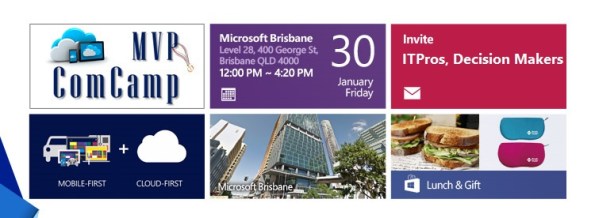
Essence of Cloud Computing with Azure and SQL Seminar. Register Now. Free Event. [Limited seats]
I am presenting two amazing sessions showing what’s new in Hyper-V vNext and how to migrate your workloads to Azure, from VMware, AWS and Hyper-v. Don’t miss out this unique opportunity! It is time again for the annual MVP event across Asia Pacific. Register now for this Free Event. [Limited seats]
 |
|||
 |
|||
 |
|||
 |
|||
 |
|||
 |
|||
 |
|||
 |
|||
 |
|||
 |
 |
 |
 |
 |
 |
 |
 |
 |
|||
7 Years as Microsoft Most Valuable Professional
My heartfelt thanks Microsoft. Once again and for the past 7 years, I am tremendously honoured to receive the distinguished Microsoft MVP award, particularly given the select group of experts who are recognized.

A big thank you to Ben Armstrong, Sarah Cooley and the Hyper-V team.
“The Microsoft MVP Award recognizes inspiring, trusted, and independent experts from around the world who voluntarily share their passion and knowledge of Microsoft products with others.
… MVPs represent nearly 100 countries, speak over 40 different languages, and are awarded in almost 90 Microsoft technologies. Together, they answer more than 10 million questions each year.
Of the more than 100 million social and technical community members worldwide, only small portion are recognized as MVPs. As part of their award experience, MVPs are invited to share their feedback through direct interactions with Microsoft product group teams.”
I’m really looking forward to 2015 as it is promising to be a very exciting year with the release of Windows Server and System Center vNext looking to be one of the best versions ever launched.
Note sent by Microsoft:
Thank you for your exceptional contributions to technical communities! It gives us great pleasure to present you with the Microsoft Most Valuable Professional Award for the technical expertise you generously provide to others. By sharing your knowledge, experience, and objective feedback, you inspire and help people to solve problems and discover new capabilities every day. We are honored to welcome you as a Microsoft MVP.
Steven Guggenheimer
Corporate Vice President
Once again, THANK YOU! It is great to be awarded for something you love to do and it is a great motivation to continue contributing to the community.
I also would like to thank Readify for their support. If you are passionate about technology as we, Readifarians are, check out what do here: http://readify.net
VSS Backups failing after KB3000853
I have been contacted by some people asking about backup issues they are experiencing on Windows Server 2012 . The issue is related with the Microsoft November update release KB3000853.
My recommendation is to remove the update until Microsoft fix the issue as it affected Microsoft and third party backup products.
As per Taylor Brown’s (Hyper-V Program Manager) blog,
“We are getting reports that some customers are seeing backup jobs fail after installing the latest Windows Updates including the November rollup (http://support.microsoft.com/kb/3000853).
We believe there is an issue with the KB3000853 update and are working to fix it as quickly as possible, in the interim downloading and applying http://support.microsoft.com/kb/2996928/ should address the problem”
http://blogs.msdn.com/b/taylorb/archive/2014/11/19/backup-jobs-failing-post-nov-rollup-install.aspx
What’s New in Hyper-V vNext ? Check out at the Infrastructure Saturday event in Brisbane
Saturday 22nd November
Infrastructure Saturday is a day long event for south east Queensland based IT Professional that work with Microsoft products. This event is an educational, informative & lively day filled with sessions about Microsoft technologies.
Location: Microsoft office, Brisbane, QLD. http://www.infrastructuresaturday.com/
Topics covered in my Session: What’s New in Hyper-V vNext?
- New Virtual Machine Upgrade Process
- New Integration Components installation method
- Secure Boot for Linux
- Distributed Storage Quality of Service (QoS)
- Hyper-V Backup
- Hyper-V Virtual Machine Configuration
- Cluster OS Rolling Upgrade

TechEd Australia 2014 Melbourne and Sydney editions
This year TechEd Australia will be held in Melbourne (Oct, 7th – Oct 8th) and in Sydney (Oct, 27th – Oct 28th)
I will be speaking about Azure Remote App on both editions and if you come along and tweet about my session you will enter into a draw to win a copy of my book along with Savision Polo.
It is an interactive demo. I will be using Hyper-V to show how to build a custom RemoteApp image as well as demo the RemoteApp client on different devices.
Bring scale, agility and global access to your business applications. Azure RemoteApp helps employees stay productive anywhere, and on a variety of devices – Windows, Mac OS X, iOS, or Android. Integrate Azure RemoteApp with your company’s existing on-premise infrastructure and bring your own Remote Desktop Session Host, or deploy Azure RemoteApp using our pre-built app collections for a stand-alone cloud service. Quickly ramp up and provide seasonal workers, vendors, or large groups of new employees access to company applications without paying for new servers and expensive on-premise infrastructure.
Melbourne Edition
Date: Tuesday, October 7
- Time:9:40 AM – 10:40 AM
- Room: Datacentre and Infrastructure Management
- Session Type: Breakout
- Session Code:DCI301
- Session Levels:300
Sydney Edition
Date:Monday, October 27
- Time:10:10 AM – 11:10 AM
- Room:Datacentre & Infrastructure Management
- Session Type:Breakout
- Session Code:DCI301
- Session Levels:300
It’s time for a new Windows. Announcing Windows 10 : One Product with a tailored experience for each device
Windows 10 represents the first step of a whole new generation of Windows. Windows 10 unlocks new experiences for customers to work, play and connect. Windows 10 embodies what our customers (both consumers and enterprises) demand and what we will deliver
Microsoft promise that Windows 10 will deliver the right experience on the right device at the right time. It will be our most comprehensive platform ever
more details about what Windows 10 will have for these customers, check out this blog post on the Windows for your Business blog.

Check out the Windows 10 Video here: http://www.youtube.com/watch?feature=player_embedded&v=84NI5fjTfpQ
And form Windows Server and System Center perspective:
Infrastructure upgrades: Rolling upgrades for Hyper-V clusters to the next version of Windows Server without downtime for your applications and workloads. This includes support for mixed versions as you transition your infrastructure.
Networking: New components for our software-defined networking stack that enable greater flexibility and control, including a network controller role to manage virtual and physical networks.
Storage: New synchronous storage replication that enhances availability for key applications and workloads plus storage Quality of Service to deliver minimum and maximum IOPS in environments with workloads with diverse storage requirements.
Remote Desktop: Enhanced application compatibility with OpenGL and OpenCL support.
Identity and Access Management: New scenarios to reduce the risk profile of administrators with elevated rights, including time-based access with fine-grained privileges, and new application publishing capabilities.
The DOWNLOAD it is not yet available but if you want to download the bits or try them on Azure, it will be published here http://go.microsoft.com/fwlink/?LinkID=404281
Recommended Books


System Center 2012 R2 Virtual Machine

System Center Virtual Machine Manager 2012 Cookbook


 Cloudtidings.com