
Archive
FREE Microsoft MVP Event Australia and New Zealand. March 2014. Register Now
The FREE MVP Community Camp (ComCamp) is a six-day event with both Live Webcasts and In-Person Seminars. MVPs from nine countries will deliver webcasts available to anyone anywhere to learn trends and techniques from these industry leaders; the in-person seminars will be available in 22 cities across seven countries with tracks providing opportunities to connect with others in the same expertise/interest area and to have a number of technology hands-on experiences.
Delivered by MVPs who not only possess the expert knowledge in their field but also have been influential technical leaders to IT community and audiences. Each session is 60 minutes long and includes Q&A to help you get an instant feedback on questions you have had during the session. Between each session, 15 minutes break is given for MVPs and community members to network, share their thoughts on topics presented and share technical experiences.
There are sessions happening in the principal cities of Australia : Sydney, Brisbane, Melbourne, Perth and Adelaide and New Zealand. Make sure you register early to secure your spot.
Registration links:
Monitoring Hyper-V and VMware workloads. Integrating SCVMM with SCOM. Veeam MP
The System Center 2012 VMM cookbook has a Chapter 10 (as a plus for the readers), which is not on the paperback/Kindle version. It is mentioned in the “What This Book Covers” section of the book and if you brought the book you will be able to download the chapter for free.
Chapter 10, Integration with System Center Operations Manager 2012 SP1, provides tips and techniques to allow administrators to integrate SCOM 2012 with SCVMM when monitoring the private cloud infrastructure.
In a hybrid hypervisor environment (for example, Hyper-V, VMware), using Operations Manager management packs (MPs) (for example, Veeam MP), you can monitor the Hyper-V hosts and the VMware hosts, which allow you to use only the System Center Console to manage and monitor the hybrid hypervisor environment
What we cover in chapter 10 :
- In this chapter, we will cover:
- Installing System Center Operations Manager 2012 SP1
- Installing management packs
- Managing Discovery and Agents
- Configuring the integration between Operations Manager 2012 and VMM 2012
- Enabling reporting in VMM
- Monitoring VMware vSphere infrastructure from the Operations Manager using management packs
With management packs, you can extend Operations Manager (OpsMgr) and its possibilities. On a hybrid hypervisor environment, where there is a mix of Hyper-V and VMware ESXi servers, the Veeam MP extends the OpsMgr for monitoring, alerting, and for undertaking remedial actions on VMware vSphere. Veeam MP uses vSphere API to gather information to allow monitoring and reporting against all layers of the VMware stack, which include layers from the underlying hardware though network, storage, hosts, clusters, datacenters, up to vCenter. Examples of the key metrics for the VMware admins include latency, CPU ready, disk and memory pressure against a host.
For the Chapter 10, Veeam Management Pack for VMware (SCOM) s required. There is a new version 6.5 which can download from here: http://www.veeam.com/vmware-microsoft-esx-monitoring-resources.html
Enjoy reading !
To buy the book
http://www.packtpub.com/microsoft-system-center-virtual-machine-manager-2012-cookbook/book
Hyper-V is the #1 Hypervisor in Latin America
Hyper-V is ranked number one in Latin America for x86 virtualization. The graphic below shows the adoption since 2008. Looking at that, I can see that it will grow more and more, as Windows 2012/R2 roll out increases.
Best-in-class features, performance, flexibility, simplified IT administration and cloud ready OS, allied with costs saving , I am sure are the drivers behind this adoption. Plus when you add System Center, you can take advantage of unified compute resources, data storage and networking administration which span physical, virtual and cloud environments.
Microsoft has closed the gap with its closest competitor : VMware. The adoption of IT virtualization infrastructure is an example of how Latin America is one of the emerging markets that will shape what IDC calls the “Third IT Platform.”

According to IDC, in 2014 emerging markets will see almost 100% more smart connected devices shipped than in developed markets. They will also see their cloud computing spending increase seven-fold, and, in terms of Big Data, they will account for more than 40% of the ‘digital universe’ in 2014.
System Center 2012 Operations Manager. How to quickly become more efficient
Recently when working on a System Center 2012 R2 project I found some very useful videos that will help you speed your learning curve on Operations Manager and will help you become more efficient.
System Center 2012 Operations Manager Dashboards: Visualizing Alert Data. Richard Pesenko, Microsoft Senior Support Escalation Engineer who works on Operations Manager support team, published a video out that walks you all through visualizing alert data in OpsMgr 2012.
Video URL: http://www.youtube.com/watch?v=lKVvjeQAGm0&feature=player_embedded
Private Cloud Demo Extravaganza : Deep Application Diagnostics & Insight with System Center 2012. how to analyze and isolate a problem impacting an application using System Center 2012. Adam Hall and Symon Perriman show you System Center 2012 Operations Manager along with some of its features:
- Application advisor web component
- Understand the problem distribution analysis
- Navigate problem reports to see the line of code that caused the problem
- View detailed events and alerts from a component of the application
- See which transactions happened when the problem occurred
- Understand related events to a particular issue
- View the application diagnostics at the developer level
Video URL: WMV | MP4 | WMV (ZIP) | PSP
Private Cloud Demo Extravaganza 12: Enabling Application Performance Monitoring with System Center 2012 : How to enable Application Performance Monitoring (APM) with System Center 2012. Adam Hall and Symon Perriman show you System Center 2012 Operations Manager along with some of its features:
- Discover an application
- Configuration an application for APM
- Use a template to add a monitoring Management Pack (MP)
- Enable a .NET APM configuration
- Create a new MP
- Search and filter to discover applications across servers
- Set custom thresholds
- Review exception options
System Center 2012R2 enables at-scale management of major Windows Server 2012 R2 capabilities.
Utilizing the Windows Server 2012 R2 and System Center 2012 R2, which powers the Cloud OS vision, organizations can quickly and flexibly build and manage modern applications across platforms, locations, and devices, unlock insights from volumes of existing and new data, and support end-user productivity wherever and on whatever device they choose.
System Center 2012 R2 delivers unified management across on-premises, service provider and Windows Azure environments, in a manner that’s simple and cost-effective, application focused, and enterprise-class. System Center 2012 R2 offers exciting new features and enhancements across infrastructure provisioning, infrastructure monitoring, application performance monitoring, automation & self-service, and IT service management.
Clique here to download the full 180 day trial
Need more information about System Center 2012 R2? See the product details page.
- System Center 2012 R2 effectively manages the scale and performance that Windows Server 2012 R2 offers. Building on System Center 2012, this release enables at-scale management of major Windows Server 2012 R2 capabilities, including running VM snapshots, dynamic VHDX resize, and Storage Spaces.
- System Center 2012 R2 also extends software-defined networking in Windows Server 2012 R2 with provisioning and management support for a multitenant VPN gateway to enable seamless extension of datacenter capacity. System Center 2012 R2 will continue to help you provision and manage a flexible hybrid IT environment that adapts dynamically to changing business needs, including migrating workloads to Windows Azure Virtual Machines and managing them consistently.
Windows Server 2012 R2 key capabilities
Microsoft announced on October 18th that the final release of Windows Server 2012 R2, Hyper-V 2012 R2 and System Center 2012 R2 are now generally available.
Windows Server 2012 R2 delivers significant value around seven key capabilities:
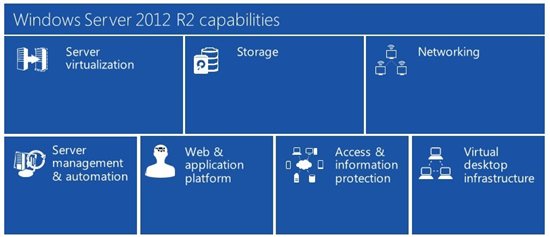
- Server virtualization. Whether you are looking to expand virtual machine mobility, increase virtual machine availability, handle multi-tenant environments, gain bigger scale, or gain more flexibility, Windows Server 2012 R2 with Hyper-V gives you the platform and tools you need to increase business agility with confidence. Plus, you can also benefit from workload portability as you extend your on-premises datacenter into a service provider cloud or Windows Azure.
- Storage.Microsoft designed Windows Server 2012 R2 with a strong focus on storage capabilities, including improvements in the provisioning, accessing, and managing of storage and the transfer of data across the network that resides on that storage. The end result is a storage solution that delivers the efficiency, performance, resiliency, availability, and versatility you need at every level.
- Networking.Windows Server 2012 R2 makes it as straightforward to manage an entire network as a single server, giving you the reliability and scalability of multiple servers at a lower cost. Automatic rerouting around storage, server, and network failures enables file services to remain online with minimal noticeable downtime. In addition, Windows Server 2012 R2 provides the foundation for software-defined networking, out-of-the box, enabling seamless connectivity across public, private, and hybrid cloud implementations.
- Server management and automation. Datacenter infrastructure has become more and more complex. Multiple industry standards are confusing hardware vendors. Customers are looking for guidance on how to best automate their datacenter while adopting a standards-based management approach supporting their multi-vendor investments. Windows Server 2012 R2 enables IT professionals to offer an integrated platform to automate and manage the increasing datacenter ecosystem. Features within Windows Server 2012 R2 enable you to manage many servers and the devices connecting them, whether they are physical or virtual, on-premises or in the cloud.
- Web and application platform. Even greater application flexibility, helping you build and deploy applications either on-premises, in the cloud, or both at once, with hybrid solutions that can work in both environments. Windows Server 2012 R2 provides the tools you need to build, provision, and manage multi-tenant environments while still supporting your large enterprise or the many customers hosted within your service provider infrastructure.
- Access and information protection. Users need to be able to access this information from anywhere, share it where appropriate, and achieve maximum productivity with the assets they have. Windows Server 2012 R2 helps you accommodate these changes through exciting new remote access options, significant improvements to Active Directory and Active Directory Federation Services, and the introduction of policy-based information access and audits with Dynamic Access Control, and new scenarios to help customers provide access to corporate resources for users from their own devices. With these new capabilities, you can better manage and protect data access, simplify deployment and management of your identity infrastructure, and provide more secure access to data from virtually anywhere across both on-premises well managed devices and new consumer orientated form factors.
- Virtual Desktop Infrastructure. VDI technologies in Windows Server 2012 R2 offer easy access to a rich, full-fidelity Windows environment running in the datacenter, from virtually any device. Through Hyper-V and Remote Desktop Services (RDS), Microsoft offers three flexible VDI deployment options in a single solution: Pooled Desktops, Personal Desktops, and Remote Desktop Sessions (formerly Terminal Services). With Windows Server 2012 R2, you get a complete VDI toolset for delivering flexible access to data and applications from virtually anywhere on popular devices, while also helping to maintain security and compliance.
You can find more info here: http://blogs.technet.com/b/windowsserver/archive/2013/10/18/announcing-the-general-availability-of-windows-server-2012-r2-the-heart-of-cloud-os.aspx
Windows 2012 R2 and Windows 8.1 released to MSDN and TechNet subscriptions
A few hours ago, Microsoft released an communication starting that today (September 10/09/2013) , Windows 8.1, Windows 8.1 Pro and Windows Server 2012 R2 RTM builds are now available for download to the developer and IT professional communities via MSDN and TechNet subscriptions. You can download it here: http://www.msdn.com
More on Windows 2012 R2:
- What’s New in Hyper-V in Windows Server 2012 R2
This topic describes the new and changed functionality of the Hyper-V role in Windows Server 2012 R2 Preview. - What’s New in Hyper-V Network Virtualization in Windows Server 2012 R2
This topic describes the new or changed features and functionality in Hyper-V Network Virtualization in Windows Server 2012 R2 Preview. - What’s New in Hyper-V Virtual Switch in Windows Server 2012 R2
This topic provides information about the new features in Hyper-V Virtual Switch in Windows Server 2012 R2 Preview
The Windows 8.1 RTM Enterprise edition will be available through MSDN and TechNet for businesses later this month.
VMM 2012 book. Review by Vijay Tewari, Principal Group Program Manager at Microsoft Corp
I just got the following email from Vijay with a review of my book. It is rewarding to see that coming from Vijay.
System Center 2012, SP1, Virtual Machine Manager (VMM) is the foundation of the Microsoft Private Cloud. Windows Server 2012, Hyper-V is chockfull of capabilities that are very valuable for customers looking to deploy Hyper-V at scale and virtualize literally any workload. VMM is the management infrastructure that enable customers to deploy and manage Hyper-V at scale. Alessandro’s book on VMM, SP1 is packed with useful tips and tricks that can really help you to get the most out of VMM. This is not just any book on VMM, it is your Swiss army knife for deploying and operating VMM. The chapter on installation itself is worth its weight. Thanks Alessandro!!!!Vijay TewariPrincipal Group Program Manager, System Center Virtual Machine ManagerMicrosoft Corp
To buy it see :
My sessions at Microsoft TechEd New Zeeland 2013
This year I will be presenting 3 sessions at TechEd New Zeeland. Come to my sessions to learn how System Center can empower your cloud deployment and management, plus you can win a signed copy of my book: System Center 2012 VMM. (1 book per session) . See you there!
My Sessions:
| MDC412
Thursday 11:55am |
Availability Strategies for a Resilient Private Cloud
Your private cloud should be designed to be protected from downtime. This session will cover the breath of features available to reduce and protect from both planned and unplanned downtime, such as: live migration, storage migration, Failover Clustering, Cluster Aware Updating, and Hyper&-V Replica.
|
| MDC417
Friday |
Managing Clouds with System Center
This session will take you through the architecture and steps to create and manage an Private/Hybrid Cloud. We will talk about multi-tentant, charge back, network virtualisation and new features of System Center. This session will address the ideal architecture design and requirements and will be full of tips. |
| MDC421
Friday |
Managing and Monitoring your hybrid datacenter with VMM and Operations Manager
is session will cover the integration with VMM and Operations Manager, taking you through all the required steps and requirements. Which management packs? How to monitor Hyper-V and VMware hypervisors. Which information/reports are available ? |
My Microsoft Teched Australia 2013 speaking sessions
This year I will be presenting 4 ILL sessions at TechEd Australia, but you can also find me at the Microsoft Showcase : Datacenter and at the Insight booth in the Exhibition Centre.
Take time to visit Insight booth and learn about what we can do to help your business and to enter on a draw to win a Microsoft Surface or a signed copy of my book: System Center 2012 VMM.
My Sessions:
| AZR-I201
Wednesday 11:15 – 12:45 |
Getting to Know Windows Azure IaaS, Part 1
Whether you build apps or support the infrastructure that runs the apps, the cloud can be a really big place. For some, it’s a natural evolution for their application and infrastructure to embrace the power and scale of the cloud. For others, it’s a journey that has to begin with a single step. Windows Azure provides that first step with a scalable, flexible platform for deploying your applications your way. With our Infrastructure as a Service platform (IaaS) called Windows Azure Virtual Machines, you get the flexibility to choose between Windows and Linux with full control over the operating system configuration and installed software, matched with the portability of Hyper-V disk images. Windows Azure Virtual Machines provide the perfect environment for meeting all of your Infrastructure-as-a-Service needs. To learn more about our Infrastructure as a Service platform, we invite all developers and IT professionals to join Matt Hester as he introduces you to the Microsoft Cloud Platform, dives deep into Windows Azure Virtual Machines, and helps walk you through a hands-on demonstration of the power of IaaS on the Windows Azure platform. This is part 1 of 2. Please plan on attending both WAD-IL201 and WAD-IL202 to complete the lab. The lab requires you to connect to the Windows Azure Portal, where you will provision three separate virtual machines in the cloud and configure them each via a Remote Desktop client connection. All participants need to have access for Windows Azure prior to the lab. You can register for a FREE 90-day trial of the Windows Azure prior to the lab. You can sign up for your FREE trial here: http://aka.ms/IaasBootCamp. |
| AZR-I202
Wednesday |
Getting to Know Windows Azure IaaS, Part 2
Whether you build apps or support the infrastructure that runs the apps, the cloud can be a really big place. For some, it’s a natural evolution for their application and infrastructure to embrace the power and scale of the cloud. For others, it’s a journey that has to begin with a single step. Windows Azure provides that first step with a scalable, flexible platform for deploying your applications your way. With our Infrastructure as a Service platform (IaaS) called Windows Azure Virtual Machines, you get the flexibility to choose between Windows and Linux with full control over the operating system configuration and installed software, matched with the portability of Hyper-V disk images. Windows Azure Virtual Machines provide the perfect environment for meeting all of your Infrastructure-as-a-Service needs. To learn more about our Infrastructure as a Service platform, we invite all developers and IT professionals to join Matt Hester as he introduces you to the Microsoft Cloud Platform, dives deep into Windows Azure Virtual Machines, and helps walk you through a hands-on demonstration of the power of IaaS on the Windows Azure platform. This is part 2 of 2. In order to attend this session you need to attend WAD-IL201 first. The lab requires you to connect to the Windows Azure Portal, where you will provision three separate virtual machines in the cloud and configure them each via a Remote Desktop client connection. All participants need to have access for Windows Azure prior to the lab. You can register for a FREE 90-day trial of the Windows Azure prior to the lab. You can sign up for your FREE trial here: http://aka.ms/IaasBootCamp. |
| MDC-I315
Friday |
Microsoft System Center 2012 – Orchestrator: Overview and Automation of IT Process
This lab guides you through several process automation examples, providing hands-on experience with the concepts explained in the course manual and provides real-world context. In this exercise, you are introduced to the interfaces available with Orchestrator. Create a Runbook to perform actions such as working with File Management Objects, monitor a folder for the accumulation of more than 5 log files, move the files to an archive folder and log an event for each file archive operation, using the Runbook Tester Console to Validate Runbooks. This lab also covers the creation of a Runbook to perform the actions, such as automate recovery of a Windows Service based on alert detection from a unit monitor in System Center Operations Manager to address the intermittent Windows service failures. It also highlights advanced concepts and techniques that can be employed when creating runbooks in Orchestrator. |
| MDC-I321
Thursday |
Microsoft System Center 2012: Network Virtualization
This lab provides a step-by-step description for how to build, configure and implement Hyper-V Network Virtualization using Windows Server 2012 and System Center 2012 SP1. You create a multi-tenant virtual network on shared physical network including multiple subnets and virtual routes using the NVGRE configuration. |
Recommended Books


System Center 2012 R2 Virtual Machine

System Center Virtual Machine Manager 2012 Cookbook


 Cloudtidings.com