
Archive
Leveraging the power of Azure to build your Hyper-V disaster recovery plan: Free Webinar @Savision
High availability and disaster recovery are key components of an Enterprise’s IT environment. Disaster recovery should not be seen as an “IT Pro” business enabler, but something that is of vital importance to any organization.

All the above is valid when talking about local datacenters, MPLS networking connections, fibre channel interfaces between servers and storage solutions… but what happens when your virtual machines are “somewhere in the cloud”? How do you deal with disaster recovery in that case? Or even better, what about using “the cloud” as your disaster-recovery solution?
To find out, don’t miss our upcoming webinars, presented by MVP & MCT Peter de Tender and co-hosted by Savision’s CTO Rob Doucette, that will explain how:
-You can leverage on the power of Microsoft Azure for building a Hyper-V based datacenter disaster recovery plan.
-You can migrate your in-house VM’s to Microsoft Azure, guaranteeing uptime and availability of the machine and the applications to your end-users.
Not using Hyper-V yet? No worries, Azure Site Recovery can also act as failover for your VMware or physical host platform.
Learn from Peter De Tender, independent technical speaker, valued Microsoft Infrastructure Architect, Microsoft Certified Trainer and Windows IT Pro MVP, about the core features of Azure Site Recovery, extended with insights on how Savision can assist you in monitoring the ASR topology by showing real-time feedback.
Register for the webinars:
Tuesday, September 29, 2015 11:30 am EDT | 5:30 pm CEST
Thursday, October 8, 2015 2:00 pm EDT | 8 pm CEST
If you still haven’t, you can also download Savision’s complimentary whitepaper, written by MVP & MCT Peter de Tender on leveraging the power of Azure.
Download the whitepaper.
Windows 10 IT Pro Readiness Powered by MVPs. *free* live webcasts @ANZMVP #Win10MVP
Windows 10 IT Pro Readiness, Powered by MVPs
The MVP Award Program and the Windows IT Pro teams are pleased to offer a series of free live webcasts worldwide to provide awareness and first hand guidance about Windows 10 Enterprise for IT Pros. The webcasts will be delivered by Microsoft MVPs from each of the participating countries. Windows 10 IT Pro Readiness is a great opportunity for you to learn the latest features for the IT Pros focused on Windows 10 Enterprise, and also connect with top Windows MVP experts. ·The webcasts will be delivered during the week of October 12 to 17 2015. ·Each webcast will last from 2 to 3hrs, depending on content delivery and the interaction from the attendees. The Windows Team is empowering the MVPs with technical content and a specific private training so each MVP delivering the session is fully equipped with content, and guidance to better support you as an attendee of the webcast. We hope you are able to join us in this great global initiative!
Agenda & Registration – September 14 Webcast Title: Windows 10 IT Pro Readiness – Powered by MVPs
| Reg. Link | Country / Region | Language | Date | Start Time | Time Zone |
| LATAM | Spanish | 14-Oct | 4:00PM | (UTC -06:00) Mexico City | |
| Australia New Zealand | English | 13-Oct | 5:00PM | (UTC +10:00) Sidney | |
| Brazil | Portuguese | 16-Oct | 6:00PM | (UTC -03:00) Brasilia | |
| China | S-Chinese | 15-Oct | 8:00PM | (UTC +08:00) Beijing | |
| France | French | 13-Oct | 6:00PM | (UTC +01:00) Paris | |
| Germany | German | 16-Oct | 4:00PM | (UTC +01:00) Berlin | |
| Japan | Japanese | 14-Oct | 8:00PM | (UTC +09:00) Tokyo | |
| Korea | Korean | 14-Oct | 7:00PM | (UTC +09:00) Seoul | |
| Southeast Asia | English | 16-Oct | 7:00PM | (UTC +08:00) Kuala Lumpur | |
| Spain | Spanish | 14-Oct | 8:00PM | (UTC +01:00) Madrid | |
| Taiwan | T-Chinese | 14-Oct | 7:00PM | (UTC +08:00) Taipei | |
| USA / Canada | English | 12-Oct | 10:00AM | (UTC -08:00) Pacific Time | |
| Turkey | Turkish | 15-Oct | 7:00PM | (UTC +02:00) Istanbul | |
| Egypt | Hebrew | 17-Oct | 7:00PM | (UTC +02:00) Cairo |
Microsoft TechNet Update #Brisbane : Internet of Things, Windows 10 and Microsoft Cloud OS. Free event
This is a one day event filled with the latest on Microsoft technologies broken down into 2 streams. The first stream will be all about Windows 10 and the second stream will focus on the Cloud OS and Azure. The agenda for the day is below!
| 9:00am – 10:00am | Keynote – Getting to the value of the Internet of Things | |
| 10:00am – 10:30am | Break | |
| Stream 1 – Windows 10 | Stream 2 – Microsoft Cloud OS | |
| 10:30am – 11:30am | Windows 10 – What does the new OS mean for Enterprises? | Microsoft Azure Active Directory |
| 11:40am – 12:40pm | Windows 10 – IoT | Extending Enterprise Networks to Azure using ExpressRoute |
| 12:40pm – 1:30pm | Lunch | |
| 1:30pm – 2:30pm | Windows 10 for Mobile Devices: What’s Next? | Foundation for the Software Defined Datacenter |
| 2:40pm – 3:40pm | Windows 10 – Deployment | Getting started with Microsoft Azure IaaS |
| 3:50pm – 4:50pm | Windows 10 Security – What’s new? | Windows Azure Pack Overview |
| 5:00pm – 5:15pm | Close, survey & prize draw | |
|
*Please note that this agenda is subject to modifications at any time prior to the event date. All registered attendees will be notified of any such changes. |
||
Event Details
Date: Tuesday September 24th 2015 Registration: Please click here to register for this event Location: Pullman Hotel King George Square Brisbane
What are your prefered Operations Manager Management Pack? What are the TOP 5?
The System Center community is large and continually growing. For new users that are just getting to grips with the new software, there is an abundance of additional management packs that need to be installed before getting the full benefit. These Management Packs (MPs) take the form of updates from Microsoft, free software from 3rd party vendors, and paid-for solutions from 3rd party vendors.
We want to know what your top 5 must-have MPs are in each category. Whether you are an IT Manager, Administrator, consultant, or MVP, this is your chance to share your experience and let others know what MP’s everyone should have. We will publish the results in a later blog highlighting the top 5 System Center MPs. Whether you are a new user with Microsoft System Center or a seasoned professional, the survey is completely anonymous
N.B. All Management Packs included were available on Microsoft Pinpoint or Microsoft Technet at time of writing: Vendor Management Packs, Microsoft Management Packs
Matthew Carr
Posted by Savision https://www.savision.com/resources/blog/vote-your-top-system-center-management-packs
High availability and disaster recovery
High availability and disaster recovery are key components of an Enterprise’s IT environment. While more and more companies are adopting Hyper-V on Server 2012 R2 for their private cloud solution, Savision’s newest whitepaper, written by Microsoft MVP Peter de Tender, will explain how:
-You can leverage on the power of Microsoft Azure for building a Hyper-V based datacenter disaster recovery plan.
-You can migrate your in-house VM’s to Microsoft Azure, guaranteeing uptime and availability of the machine and the applications to your end-users.
Not using Hyper-V yet? No worries, Azure Site Recovery can also act as failover for your VMware or physical host platform.
Learn from Peter De Tender, independent technical speaker, valued Microsoft Infrastructure Architect, Microsoft Certified Trainer and Windows IT Pro MVP, about the core features of Azure Site Recovery, extended with insights on how Savision can assist you in monitoring the ASR topology by showing real-time feedback

#AzureCon : Unleashed possibilities. FREE EVENT @ANZMVP
AzureCon
Unleashed possibilities
Be the first to hear about the latest Azure innovation. Find new ways to address your IT challenges and enable scenarios only possible with the cloud
Customers take the stage
Hear from startups and enterprises who are accelerating, differentiating, and transforming their business with the cloud. See what they’re up to with Azure. And see what you can do next.
Access to the experts
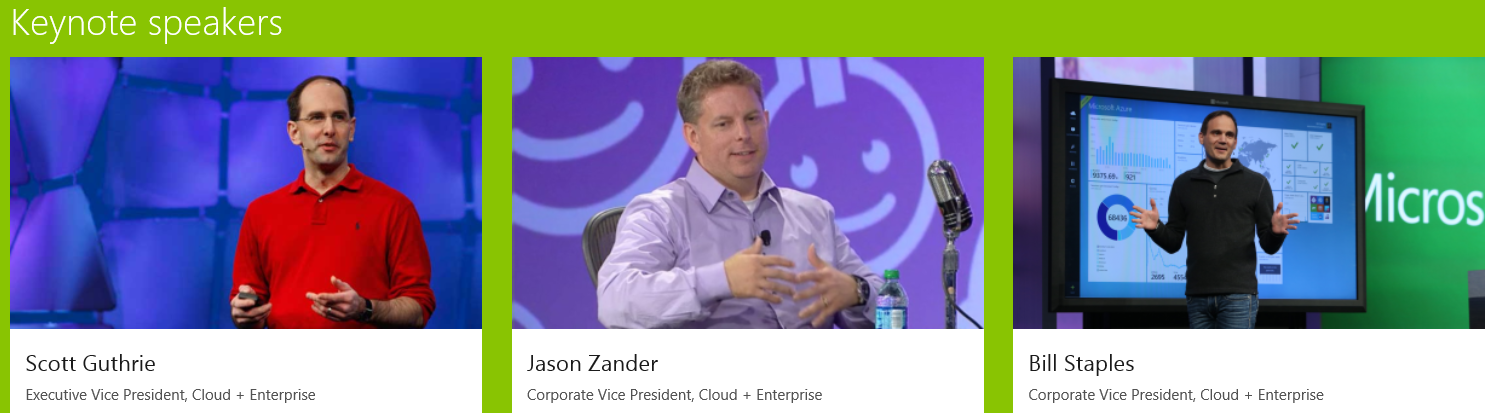
Get unfiltered access to top Azure engineers and community members. And hear the latest from Scott Guthrie, Jason Zander, Bill Staples, Mark Russinovich, Scott Hanselman, and others.
Customizable learning
Choose from more than 50 technical videos and learn about new Azure features and existing capabilities. Whether you’re just getting started or want to dive deep, we’ve got you covered.
September 29, 2015
Be the first to see what’s next. Attend the free, virtual event.
Join Live Q&As and interact with the architects and engineers who are building the latest features… Register here
Modern Infrastructure: Provisioning private clouds and virtualized data centers. September 8th @Microsoft Brisbane
What’s New in System Center VMM 2016?
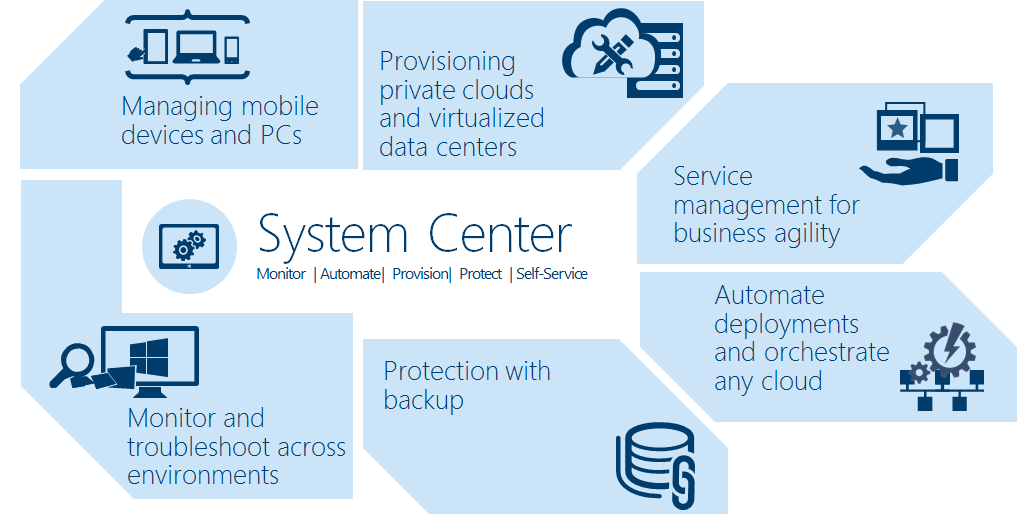
System Center 2016 will continue to speed time to value with new provisioning, monitoring and automation capabilities designed for your software-defined datacenter. Optimized for both traditional management and private cloud environments.
Tuesday 8 September I will be presenting an event at Microsoft Brisbane about the new features in System Center VMM and the rich enhancements provided with Microsoft Azure Operational Insights and Automation. Learn best practices for using VMM to manage your datacenter fabric. Come and see how other customers are using System Center.
We will also have a sneak peek of Containers and management of Windows Server Containers using PowerShell.
- When
- Tuesday, 8 September 2015 from 6:00 PM to 8:00 PM (AEST)
- Where
- Microsoft Brisbane – Level 28. 400 George st. Brisbane 4000 AU – View Map
What’s New in Windows Server 2016 Hyper-V Tuesday, 11 August 2015 @Microsoft Brisbane
This month I am talking about what’s in in Hyper-V. There are lots of new features and possibilities with Hyper-V in Windows 10 and the Windows Server Technical Previews. Come to this session to get the details of all the new features (i.e Storage QoS Enhancements, Shielded Virtual Machines, Nano Server , Production checkpoint = Application consistent checkpoint , Hot add/remove of network interface cards of virtual machine, Hot/add of disks used by cluster nodes and many other features).
Learn about how you can play with it. If you have an Windows 10 device bring it and we will play with Hyper-V hand on.
- When
- Tuesday, 11 August 2015 from 6:00 PM to 8:00 PM (AEST)
- Where
- Microsoft Brisbane – 400 George St. Level 28. Brisbane, QLD 4000 AU – View Map
- Register here: https://www.eventbrite.com.au/e/whats-new-in-windows-server-hyper-v-tickets-18012035483
Challenges of Cloud Adoption
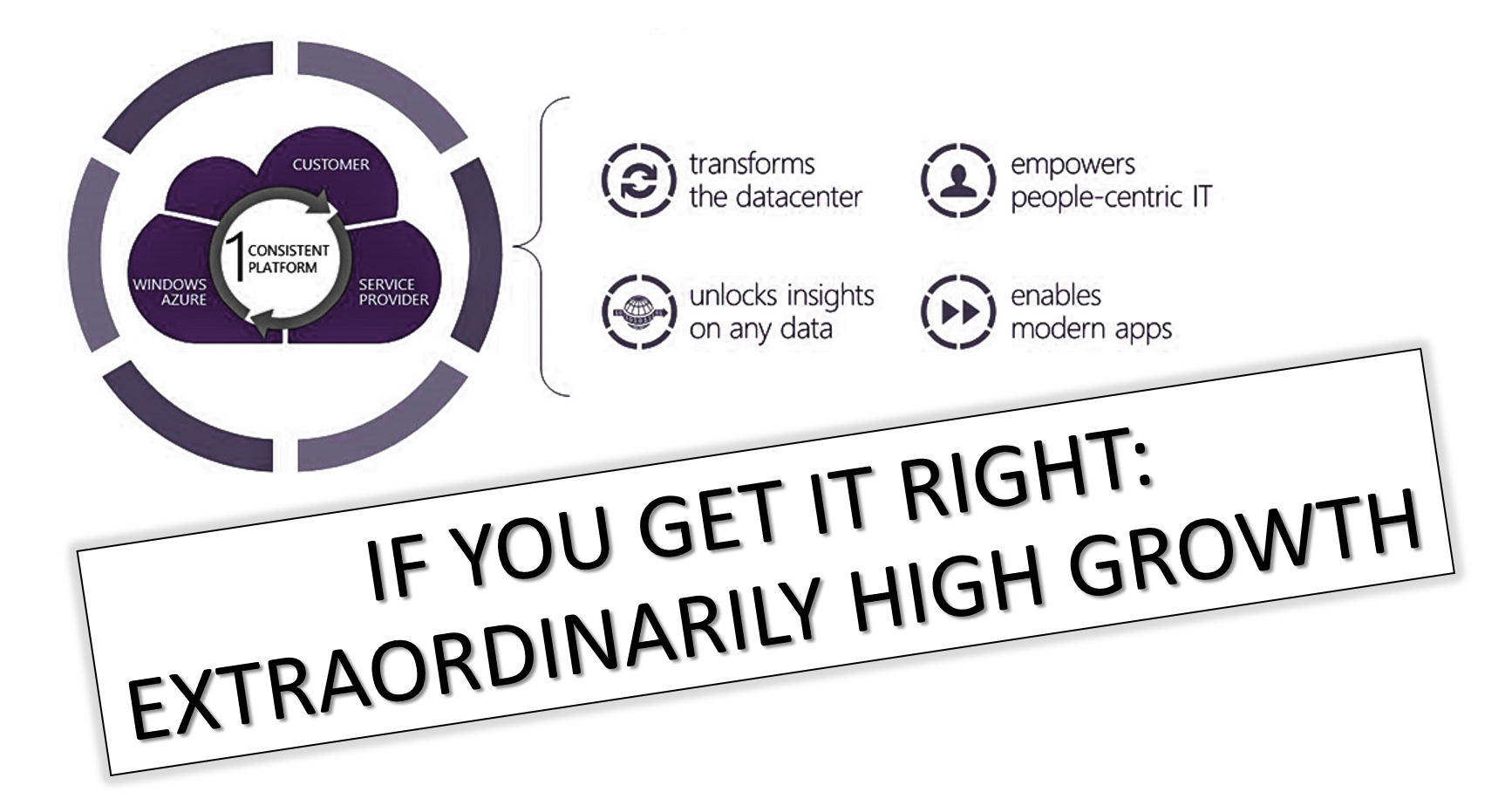
The Cloud approach addresses elastic scale, agility, costs and time to market, by allowing organizations not only to deploy a solution quickly but also to scale up/down based on demand. Cloud adoption is sky rocketing, there’s no doubt about it. However, when it comes to investments in the Cloud, how are you planning and assessing business and IT requirements?
- Is your current IT infrastructure and resources meeting the required business SLA’s?
- How you foreseeing capacity issues?
- Are you connecting IT resources to business outcomes and unifying IT processes with business cycles?
- How does your business maintain the system availability and resilience?
- How are you maximizing the utilization of the resources within your IT infrastructure?
With this whitepaper, we will help you find the answer to those questions, covering the challenges in deployment, management and automation phases with some tips and considerations.
Download the whitepaper
You can also register for Savision’s complimentary webinar, presented by MVP Alessandro Cardoso on Adopting the Cloud. The webinar will be presented by MVP Alessandro Cardoso, and will be co-hosted by Savision’s co-founder and VP of Product Management, Dennis Rietvink.
Register for the webinar:
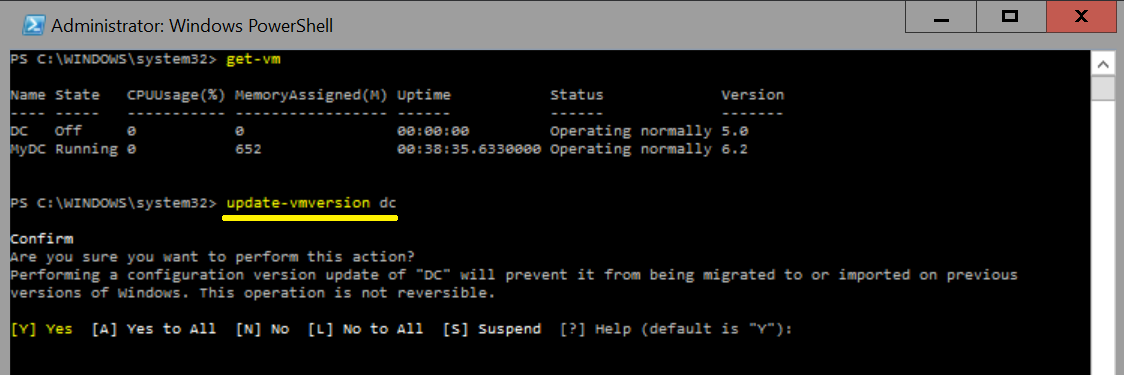
Upgrading to Windows 2016 Hyper-V. What about the Virtual Machine Configuration?
Well, at some point we will all upgrade to Windows 2016 Server. Server aside, what happens with the virtual machines itself?
One of the good advantages of the upgrade process is that it will not automatically upgrade the Virtual Machine configuration file. The virtual machine configuration version represents what version of Hyper-V the virtual machine’s configuration, saved state, and snapshot files it is compatible with.
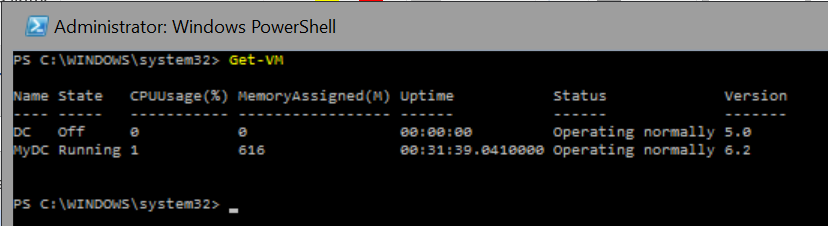
After installing Windows Server 2016 and then importing or migrating (moving) a Virtual Machine from Windows Server 2012R2 the configuration version will remain the same: in Windows Server 2012R2 the VM configuration version is 5 and my advice for you is that you keep it as version 5 it the workload is important for you and you don’t want any risk. It is not clear yet if it will be possible to upgrade the virtual machine from Technical Preview to RTM.
On the positive side, by not upgrading the VM configuration version, the VM can be moved back to a server running Windows Server 2012 R2, if required. On the negative side, you will not have access to new VM features until you manually upgrade the virtual machine configuration version.
- Version 5 VM’s can run on both Windows Server 2012 R2 and Windows Server 2016.
- Version 6 VM’s can run ONLY on Windows Server 2016.
Also, in Windows 2016 Server the configuration changed from file (XML) and BIN + VSV extensions to VMCX (Virtual Machine Configuration) and VMRS (Virtual Machine Runtime State). The new format are also more resistant to storage corruption and more effective in r/w changes to VM configuration.
Summary of the VM configuration version
- Server 2012 R2 has VM configurations version 5
- Server 2016 TP1 – version 6.0
- Server 2016 TP2 – version 6.2
Recommended Books


System Center 2012 R2 Virtual Machine

System Center Virtual Machine Manager 2012 Cookbook


 Cloudtidings.com