
Archive
Windows 2012 Hyper-V VHDX Disk format : Why should you convert your VHD to VHDX and how (Step by Step)
Although this topic is not new I had some readers asking me about it. So here we go…
Windows 2012 Hyper-V has a new disk format : VHDX.
VHDX principal features
- Storage capacity up to 64 terabytes (TBs). With the VHDX format we can to create larger virtual hard disks ( up to 64TB). The VHD format has a 2 TB limit to VHD’s.
- Corruption protection during power failures
- Optimal structure alignment for large-sector disks (4K sector aligned virtual hard disk), which increases the performance. Why Windows Server 2012 Hyper-V VHDX 4K Alignment Is So Important
- Trim/Unmap – Space efficiency on VHDX files as well as the host disk
- Thin provisioning
- Ability to store custom metadata about the file that the user might want to record, such as operating system version or patches applied
You can convert a VHD into VHDX and vice versa. As long the size limit for the VHD is respected:
- Shutdown the Virtual Machine
- Double check if there is NO Snapshots
- Double check if there is NO replication enabled
- On the Hyper-V Manager, on the left pane select Edit Disk…

- Click on Next
- On the Edit Virtual Disk Wizard, type the name and location of your existing VHD file or click on Browse to locate
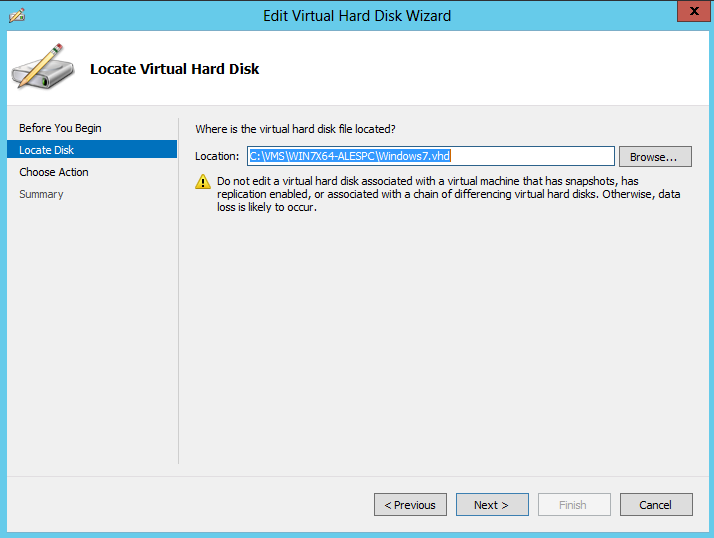
- Click on Next
- On the Choose Action page select Convert and then click Next

- On the Choose Disk Format page select VHDX and click Next

- On the Choose Disk Type page select Disk type : Fixed or Dynamic and then click Next
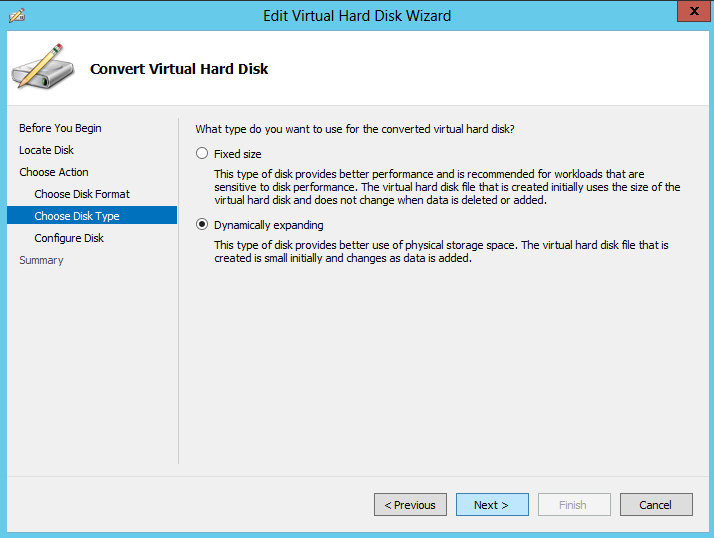
- On the Configure Disk page type the destination path and then click Next

- On the Summary page, click Finish to start the process. The process time depends on the VHD size.
MCSE: Private Cloud preparation materials (System Center, Windows 2012….)
For those who are preparing for the Private Cloud, Florian Klaffenbach, Solution Expert – Microsoft & Cloud Computing, prepared a list of links for System Center 2012,Windows Server 2012, Study Guides, Labs and more…
Have a look here: http://datacenter-flo.de/?p=48
Windows Server 2012: Free Online Technical Training
If you are too busy to attend an on site training, here is your chance to get updated with Windows 2012:
Designed to provide you with the key details of Windows Server 2012. The seven modules in this course, through video and whitepaper, provide details of the new capabilities, features, and solutions built into the product. With so many new features to cover, this course is designed to be the introduction to Windows Server 2012. After completing this course, you will be ready to dive deeper into Windows Server 2012 through additional Microsoft Virtual Academy (MVA) courses dedicated to each topic introduced in this “Technical Overview.”
Modules:
- Server Virtualization. This module looks at all of the new server virtualization features and capabilities in Windows Server 2012 Hyper-V, focusing on scenarios including scale and performance, with a lot of attention given to how Windows Server 2012 greatly expands support for host processors and memory. Mobility and availability are addressed with Hyper-V Replica. This module serves as a lead-in to the Windows Server 2012: Server Virtualization course.
- Management & Automation. This module focuses on the new features in Windows Server 2012 that are designed to simplify the server management experience. It provides an overview of standards-based management with Windows Management Framework (WMF), Windows PowerShell 3.0, and the new Server Manager. This module serves as a lead-in to the Windows Server 2012: Management & Automation course.
- Networking. This module provides a closer look at the features of Windows Server 2012 that facilitate more efficient and cost-effective networking management. The module covers topics including Hyper‑V Network Virtualization, network interface card (NIC) teaming, IP address management (IPAM) and Quality of Service (QoS). After completing this module, you will have a clear understanding of all of the new networking-related features that Windows Server 2012 introduces, and will be able to dive deeper into the key networking enhancements in the Windows Server 2012: Networking course.
- Storage. This module introduces several new storage features and capabilities in Windows Server 2012, including Storage Spaces, SMB 3.0, advancements at the file system and storage layers of the storage stack, and improvements to how you can cluster storage. This module serves as a lead-in to the Windows Server 2012: Storage course.
- Identity and Access. This module looks at the challenges facing today’s organizations as they strive to give workers access to data and information—across varied networks and devices—while still keeping costs down. This module focuses on three enhancements that help organizations to meet these challenges: Dynamic Access Control, Active Directory Domain Services (AD DS), and DirectAccess. By the end of this module, you will be able to dive deeper into the key identity and access enhancements in the Windows Server 2012: Identity and Access course.
- Virtual Desktop Infrastructure. Windows Server 2012 Remote Desktop Services (RDS) provides a single infrastructure to enable both virtual and session-based desktops and RemoteApp programs. This module looks at the enhancements that Windows Server 2012 brings to RDS, including centralized publishing of RemoteApp and desktops, intelligent updating, RemoteFX enhancements, and User Profile disks. By the end of this module, you will be able to dive deeper into Virtual Desktop Infrastructure (VDI) enhancements in the Windows Server 2012: Virtual Desktop Infrastructure course.
- Web and Application Platform. This module explores how Windows Server 2012 supports modern applications by delivering an application platform that provides high performance and supports high-density applications. The module also describes new capabilities in Windows Server 2012 that support delivery of modern applications. The module explains how the new capabilities in Windows Server 2012 tackle the challenges of multitenant high-density websites, high-performance web applications, and consistent and repeatable configurations. By the end of this module, you will be able to dive deeper on these topics in the Windows Server 2012: Web and Application Platform course.
To get started : http://www.microsoftvirtualacademy.com/tracks/windows-server-2012-technical-overview
Windows 2012 RoadShow Virtualisation event in Sydney : November 19th. Register now
Hurry! Limited seats available.
Join us for the ‘Windows Server 2012 Roadshow : Virtualisation’. Unique opportunity to get knowledge from the best and understand how to build your own Private Cloud, as the Microsoft Most Valuable Professional show you his tips with the latest release.
Get a chance to talk about the challenges to build your Private Cloud and the new features included in Windows 2012 and SCVMM 2012 SP1 that will help your business get into the Private Cloud.
Topics will include:
- Scenarios for Server Virtualization
- Hyper-V Enhancements, Mobility and Flexibility, System Center VMM 2012 SP1, plus:
- Windows Server 2012 – Networking
Connect from anywhere, more working and less waiting, better network management via cost-aware networking. Sound interesting? This session provides a general overview, including many of the improvements to DirectAccess, BranchCache, and general networking improvements in Server 2012.
- Windows Server 2012 – High Availability & Virtualisation
Do you need your applications and systems to be online all the time. Well listen closely. We will be covering the enhancements to Windows Server 2012 that will help keep your applications and systems online all the time. We will be covering a range of High Availability enhancements in Windows Server 2012. We will discuss, Hyper-V Replicas, Live Storage Migration, Disk De-Duplication and Network Teaming just to name a few.
You will not leave disappointed from this session. With so much to cover, you will not want this presentation to end.
Target audience
Decision makers, IT Professionals, IT Managers.
Cost Details
FREE. Event supported by Microsoft and Dell
Registration and venue details
Sydney
Free Windows 2012 RoadShow event in Sydney : November 19th. Don’t miss out
Hurry! Limited seats available.
Join us for the ‘Windows Server 2012 Roadshow’. Unique opportunity to get knowledge from the best and understand how to build your own Private Cloud, as the Microsoft Most Valuable Professional show you his tips with the latest release.
Get a chance to talk about the challenges to build your Private Cloud and the new features included in Windows 2012 and SCVMM 2012 SP1 that will help your business get into the Private Cloud.
Topics will include:
- Scenarios for Server Virtualization
- Hyper-V Enhancements, Mobility and Flexibility, System Center VMM 2012 SP1, plus:
- Windows Server 2012 – Networking
Connect from anywhere, more working and less waiting, better network management via cost-aware networking. Sound interesting? This session provides a general overview, including many of the improvements to DirectAccess, BranchCache, and general networking improvements in Server 2012.
- Windows Server 2012 – High Availability & Virtualisation
Do you need your applications and systems to be online all the time. Well listen closely. We will be covering the enhancements to Windows Server 2012 that will help keep your applications and systems online all the time. We will be covering a range of High Availability enhancements in Windows Server 2012. We will discuss, Hyper-V Replicas, Live Storage Migration, Disk De-Duplication and Network Teaming just to name a few.
You will not leave disappointed from this session. With so much to cover, you will not want this presentation to end.
Target audience
Decision makers, IT Professionals, IT Managers.
Cost Details
FREE. Event supported by Microsoft and Dell
Registration and venue details
Sydney
- November 19th 2012 – Dell Australia, 14 Aquatic Drive, Frenchs Forest. Capacity : 50 seats
Registration Link : https://ws2012rocks.msregistration.com/abstract.aspx?id=7d701162-706c-474e-a801-3ad70ab0658f&Eventid=196
Evaluate Windows 2012. Take Free, Online Windows Server 2012 Courses

You can evaluate the Windows Server 2012 trial for 180 days, with no feature limits. Experience the next level of Microsoft’s server platform, including new virtualization and cloud capabilities, enhanced manageability, an exciting new open application and web platform, and the ability to provide access to data and applications from virtually anywhere on any device. Learn more about Evaluation Versions and Upgrade Options for Windows Server 2012.
Download Windows Server 2012 NOW : http://technet.microsoft.com/en-us/evalcenter/hh670538.aspx?wt.mc_id=TEC_108_1_5
Take Free, Online Windows Server Courses
Microsoft Virtual Academy (MVA) offers new Windows Server 2012 courses covering topics such as virtualization, server management and automation, networking, storage, and more. Check back regularly as new modules like identity and access, web and application platform management, and Virtual Desktop Infrastructure (VDI) are added.
http://www.microsoftvirtualacademy.com/colleges/windowsserver2012
Windows 8 available for download
Windows 8 and Windows 8 Enterprise RTM 90-Day Evals Available Now Open!
System Requirements
Windows 8 works on the same hardware that powers Windows 7:
- Processor:1 gigahertz (GHz) or faster
- RAM:1 gigabyte (GB) (32-bit) or 2 GB (64-bit)
- Hard disk space:20 GB
- Graphics card: Microsoft DirectX 9 graphics device with WDDM driver
Additional requirements to use certain features:
- To use touch, you need a tablet or a monitor that supports multitouch.
- To access the Windows Store and to download and run apps, you need an active Internet connection and a screen resolution of at least 1024 x 768.
- To snap apps, you need a screen resolution of at least 1366 x 768.
- Internet access (ISP fees might apply)
Download the 32-bit (x86) version: |
Download the 64-bit (x64) version: |
Clustering Hyper-V and Installing a Highly Available Virtual Machine Manager Cluster
Interesting TechNet webcast : how to create a Hyper-V host cluster and install a highly available cluster by using Virtual Machine Manager, a component of Microsoft System Center 2012
Get hands-on : The Cloud OS Signature Events Sep/5 to Oct/11
Get hands-on with the new technology, and learn how to manage and build your modern data center with the Microsoft Cloud OS platform:
- Windows Server 2012
- Windows Azure
- Visual Studio 2012
- System Center 2012
Pick your track and register for the event today. http://www.microsoft.com/enterprise/events/signature/#fbid=8R-XXnFl8p2
IT Pro Agenda:
| Time | Duration | IT Professional Agenda |
|---|---|---|
| 8:30am-9:00am | 30 min | Registration. Visit the Microsoft Partner Pavilion |
| 9:00am-10:00am | 60 min | Keynote: Moving from Private and Public to Hybrid Cloud; Windows Server 2012, System Center 2012, Windows Azure and Visual Studio 2012 |
| 10:00am-10:15am | 15 min | Break. Visit the Microsoft Partner Pavilion |
| 10:15am-11:15am | 60 min | Windows Server 2012 Virtualization Enhancements
|
| 11:15am-11:30am | 15 min | Break. Visit the Microsoft Partner Pavilion |
| 11:30am-12:30pm | 60 min | Windows Server 2012 Storage Enhancements
|
| 12:30pm-12:45pm | 15 min | Recap of the Morning. Account Team Introductions. What’s Next. |
| 12:45pm-1:30pm | 45 min | Lunch. Visit the Microsoft Partner Pavilion |
| 1:30pm-2:30pm | 60 min | Overview of Windows Azure Infrastructure as a Service (IaaS) and Hands On Lab
|
| 2:30pm | Closing Remarks and Raffle Giveaway. | |
| 2:30pm-4:00pm | 90 min | Hands On Lab |
Counting down for August 15th…Windows 2012 #Hyperv. Reasons to upgrade…
It is next week : August 15th that Windows 2012 will be available for download for MSDN subscribers. Are you ready to deploy it?
Enhancements in Hyper-V and Windows Server 2012 , on network (Teaming, Hyper-V Extensible Switch), multi-tenancy security, higher performance and flexibility.
The performance improvements in Windows Server 2012 over the Server 2008 R2, are huge :
- Increases in the number of logical processors on server hardware, to 160 from 64;
- Increases in the amount of physical memory, to 2TB from 1TB;
- Increases in the number of virtual processors per host server, to 1,024 from 512;
- Increases in the number of virtual processors per virtual machine, to 32 from four;
- Increases in the amount of memory per virtual machine, to 1TB from 64GB;
- Increases in the number of active virtual machines, to 1,024 from 384;
- Increases in the maximum number of virtual nodes in a single server cluster, to 64 from 16;
- Increases in and in the total number of virtual machines, to 4,000 from 1,000
- New virtual disk version : VHDX ( with a built-in feature for preventing data corruption)
- Virtual fiber channel ( making possible to offer the HBA in the host as a virtual HBA to the Virtual Machines)
- SMB file shares to store Virtual Machines
- Hyper-V Replica ( makes possible to create a replica of VMs on other Hyper-V hosts, even in – remote locations ) – ESSENTIAL in DR solutions.
Plus, true live storage migration, shared-nothing live migration, improvements in Dynamic memory… and counting.
Windows Server 2012 will also be available in the desktop version : Windows 8. You can install the Hyper-V on Windows 8 by navigating to the Control Panel and selecting Turn Windows features on or off and select the Hyper-V Platform option.
Note: One of the requirements of running Hyper-V on the Windows 8 edition is that the processor needs to support SLAT (Second Level Address Translation), otherwise Hyper-V will not available.
Resuming, Windows Server 2012 has a lot of improvements and quite a lot of new functionality as well! So, enjoy the upgrade!
Recommended Books


System Center 2012 R2 Virtual Machine

System Center Virtual Machine Manager 2012 Cookbook


 Cloudtidings.com