
Archive
TechNet Live! Meetings: Private Cloud Focused
All the details are below along with how you can register for these events. look forward to seeing many of you there!
Title: Delivering the Private Cloud with Microsoft Technologies
Date: Friday. 28th of October 2011 11:00am – 12:15PM (AEDT)
Speaker – Jeff Alexander
Registration: Click Here
Event Overview
Let’s face it. Everyone is talking about Cloud Computing and how it’s bringing a fundamental shift in the way that IT services are delivered. This is certainly true and there are many spins on what cloud is and how it can help your business. In this session, Jeff Alexander from Microsoft Australia will discuss what a “Private Cloud” is and how you can use it to deliver IT as a service. In fact you may already have many of the building blocks in place that make up a private cloud and not even realise. This session will cover the Microsoft technologies that deliver the private cloud as well as the components that make up the infrastructure.
Title: System Center Virtual Machine Manager 2012: What’s in it, and how it enables building the Private Cloud
Date: Friday, 11th of November 2011 11:00am – 12:15PM (AEDT)
Speaker – Jeff Alexander
Registration: Click Here
Event Overview
SCVMM 2012 is designed to deliver industry leading virtual machine management, deployment, and configuration for services in private cloud environments. It features deep investments in server application virtualization, service design, and service modelling all of which can be used to build an on-premises private cloud. This session will include an overview of key SCVMM 2012 key new features that include SCVMM Fabric Creation and Management, Network and Storage support, Private Cloud Creation and Delegation, and Service Creation. Attendees will gain an understanding of VMM 2012 supported scenarios, along with an understanding of how to use these capabilities to build an on-premise private cloud.
Title: Cloud Management with System Center App Controller 2012
Date: Friday, 25th of November 2011 11:00am – 12:15PM (AEDT)
Speaker – Jeff Alexander
Registration: Click Here
Event Overview
As organizations move to deploying services and applications in the cloud, it is important that they have a common management experience for deployment, visibility and control in a manner that is abstracted from the underlying cloud. This session provides an overview of System Center App Controller 2012 and how it enables self-service of both public and private cloud infrastructures.
Title: System Center Operations Manager 2012: Technical Overview
Date: Friday, 9th of December 2011 11:00am – 12:15PM (AEDT)
Speaker – Jeff Alexander
Registration: Click Here
Event Overview

The next release of Operations Manager will introduce many exciting new and enhanced features sets to help organizations efficiently and effectively monitor their environments across their compute, network, storage infrastructure, while assuring attainment of service levels across their applications. In this session we’ll discuss how Operations Manager 2012 helps to monitor your existing infrastructures as well as cloud resources to deliver infrastructure as a service.
I hope to see you at these events and look forward to sharing this information with you
Running Windows 8 Preview as Hyper-V Windows 2008R2 Virtual Machine
If you are planning to run Windows 8 as a Virtual Machine under your current Hyper-V Windows 2008R2 server, here is an update that enables the Windows Developer Preview or Windows Server Developer Preview to be hosted in a Hyper-V virtual machine on Windows Server 2008 R2:
Hotfix: http://support.microsoft.com/default.aspx?scid=kb;EN-US;2526776
Without this hotfix you may experience one or more of the following issues:
- The Windows Developer Preview or Windows Server Developer Preview virtual machine stops responding.
- The Windows Server 2008 R2 host computer displays a stop error message and restarts automatically. This behavior brings down all other running virtual machines together with the host computer
Hyper-V Replica Setup (Step by Step)
Let’s start by configuring the Hyper-V Replica on the Recovery Server
( Quick note: Hyper-V Replica it is only possible on Windows 8 Server version. It does not exist on Desktop Version )
1. Open the Hyper-V Manager, under Replication Configuration, Select Enable this computer as replica server2. Specify Authentication mode :Integrated Windows(Kerberos) or Certificate
3. Configure Authorization list :
– Type the name of the primary server
– Specify the location to be used as primary VM Configuration (can be local or an smb share)
4. Configure the Firewall by adding the inbound rule for the used ports
5. Enable Remote WMI
Now let’s configure the Primary Server
1. Open the Hyper-V Manager and Select the VM to replicate and click on Settings. Under Management, Replication
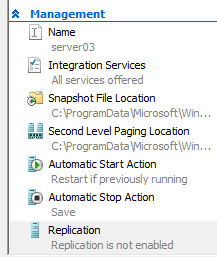
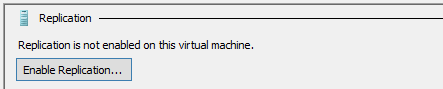
2. Specify the Recovery Server Name to replicate to ( e.g. hypervreplica.mylab.local)
3. Specify the Autentication mode ( selected when you configured the Recover Server )
4. Specify if Compression will be enabled or disabled
5. Select the VHD’s that will be excluded of the process
6. Select the Replication Parameters:
– Recovery ( in hours )
– Application Consistent frequency
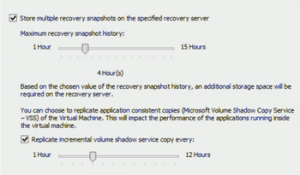
7. Select the Initial Replication Mode:
– Over Network : once sucessfully connection established, the primary server will sends the VHD files to the Recovery Server. ( can be scheduled )
– Off the Network : ( my recomendation ) The Hyper-V Replica will copy the VHD’s to a specified location which can be an external Hard Disk. You can after that copy the files back to the storage location specified during the Recovery Server Setup
– Using Backup
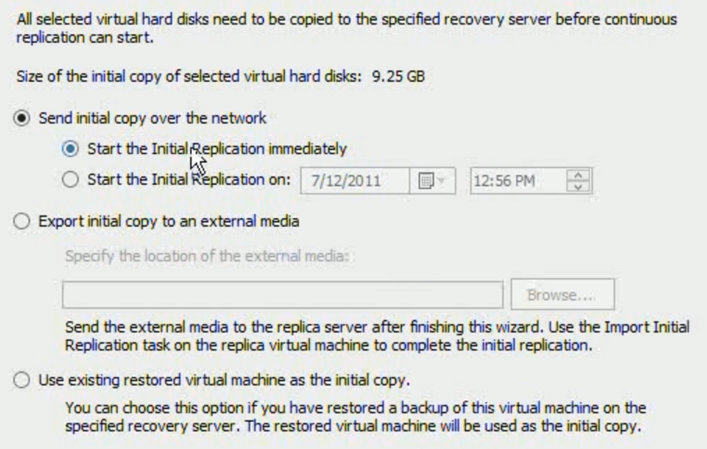
That’s it. The VM will then be created (powered off) on the recovery server once finished and after that the Primary Server, based on replication frequency will send the changes to the Recovery Server
Virtualization and Management: Community Evaluation Program for the Microsoft System Center 2012 Private Cloud
Whoever might be interested…
Microsoft would like to invite you to participate in Microsoft System Center 2012 Private Cloud Community Evaluation Program which will provide a structured approach to creating your Private Cloud environment and a well-managed datacenter.
Members of this community will evaluate the pre-release versions of Microsoft®System Center 2012 with guidance from the product team and through sharing of experiences and best practices among a community of peers.
To join the program, please fill out the application available here. This will help the CEP team gather relevant information about your organization and your environment. Accepted members will be invited to the program portal on Microsoft Connect by October 25. Once you have been added to the site, you will be notified of upcoming meetings and have access to product downloads and evaluation materials.
For more information on this and other available programs, visit theCommunity Evaluation Program Home Page on Microsoft Connect.
Virtualization Career Training
Microsoft Technical Evangelists Symon Perriman and Rick Claus are hosting an online conference on Virtualization Career Training with Microsoft Learning
Virtualization Career Training
On Tuesday, October 4th Technical Evangelists Symon Perriman and Rick Claus are hosting an online conference on Virtualization Career Training with Microsoft Learning. This half day virtual event (8am – 11am PST) will offer a Level100to 200 introduction for anyone who wants to learn more about Microsoft Virtualization and how it can help their career. It is free and public so sign up for this warm-up for the Jump Start event on October 6th.
·Module 1 – Technology: Learn about Microsoft’s virtualization technologies, how they work, and the future roadmap to the Cloud!
·Module 2 – Career: Understand the importance of virtualization and Private Cloud, and how it can make or break an IT Professional’s career!
·Module 3 – Certification: Get prepared for your next steps towards a virtualization career by understanding and preparing for the Microsoft 70-659 Technical Specialist exam,Windows Server 2008 R2, Server Virtualization.
Learn More: http://mctreadiness.com/MicrosoftCareerConferenceRegistration.aspx?pid=270
Register: http://mctreadiness.com/MicrosoftCareerConferenceRegistration.aspx?pid=288
Instructor Bios: http://mctreadiness.com/MicrosoftCareerConferenceRegistration.aspx?pid=287

Virtualization Exam 70-659 Training
On Thursday October 6th Technical Evangelist Symon Perriman and Technical Instructor Philip Helsel will host an online 8-hour deep dive training event forthe Microsoft 70-659 Technical Specialist exam, Windows Server 2008 R2, Server Virtualization. This virtual event runs from 8am to 5pm PST and will include presentations, demos and live Q&A with the attendees. It costs $99 to attend, but includes a free exam voucher worth $150! It is public so sign up for some great training to help improve your career here:http://mctreadiness.com/MicrosoftCareerConferenceRegistration.aspx?pid=272. Register early to make the most of a weekly virtualization coaching newsletter!
·Module 1 – Installing and Configuring Host and Parent Settings
·Module 2 – Configuring Child Settings
·Module 3 – Managing and Monitoring Virtual Environments
·Module 4 – Ensuring High Availability and Recoverability
·Module 5 – Performing Migration
·Module 6 – Configuring Remote Desktop (RD) Role Services Infrastructure
Technologies that we will cover include: Windows Server 2008 R2, Hyper-V, System Center Virtual Machine Manager (VMM), System Center Operations Manager (OpsMgr), System Center Data Protection Manager (DPM), Windows Server Backup, Failover Clustering, Remote Desktop Services, Active Directory, Microsoft Assessment & Planning Toolkit (MAP), Virtual Machine Servicing Tool (VMST), Windows Server Update Services (WSUS) & more!
Learn More: http://mctreadiness.com/MicrosoftCareerConferenceRegistration.aspx?pid=274
Register: http://mctreadiness.com/MicrosoftCareerConferenceRegistration.aspx?pid=272
Exam Information: http://www.microsoft.com/learning/en/us/Exam.aspx?ID=70-659
Thanks!
Microsoft
Windows 8 Server : native support for NIC Teaming
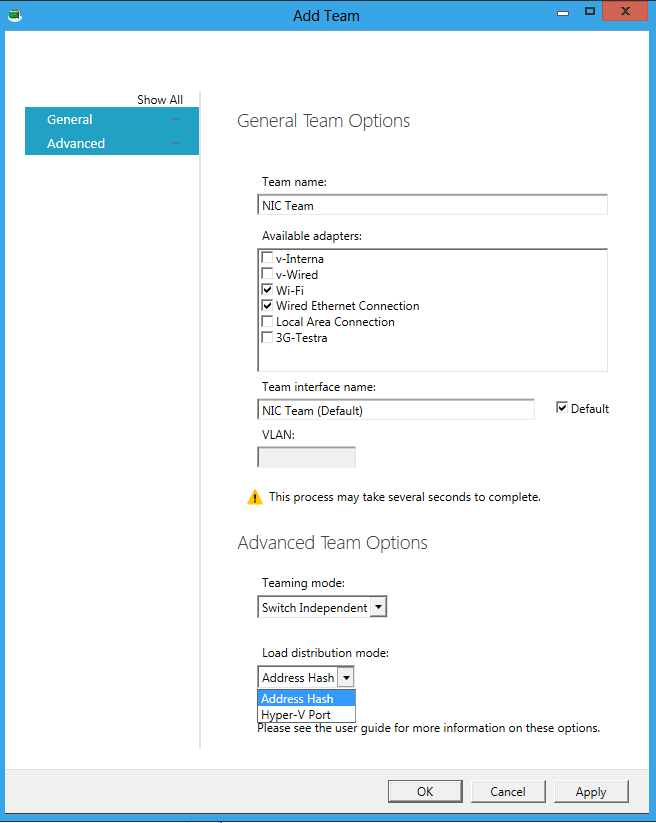
Windows 8 will come with native NIC Teaming, which means that we don’t need to pre-install or configure any software provided by the NIC vendor for the NIC TEAMING work.
Now you can team 2 or more NIC’s even if they are from different vendors configured as NIC Teaming and better, you can expose that NIC to Hyper-V Virtual Machines. This is really cool and one of the most wanted features.
The scenarios for application of the feature in production are infinite now, especially In High Availability environments. But please be aware that is the preview version! Much more still to come!
As an example, I installed Windows 8 with the NIC teaming configured using the Wireless NIC and the Wired NIC, then I went to the Hyper-V Manager and I created an Virtual Switch pointing to the NIC Team. How cool is that?
System Center Virtual Machine Manager 2012. What’s new in the RC version?
Microsoft is about to launch the SCVMM 2012 for those who tried the beta version and as myself enjoyed, we will now be able to try also the Release Candidate version.

To download : http://technet.microsoft.com/en-us/evalcenter/gg678609
My recommendation to managege for up to 150hosts:
2 Processor, Dual-Core, 4GB Ram ( minumum ), 40 GB free space. Remember SCVMM 2012 requires Standard,Entrepise or Datacenter version of SQL Server ( you CAN’T use SQL express anymore ) and you must use a case-insensitive instance of SQL Server
As with the previous release there are a number of improved features for you to take advantage of. With this release you will be able to do:
- Setup Upgrade
- *New in RC -Upgrade- Setup will support the following upgrade paths
- VMM 2008 R2 SP1 > VMM for System Center 2012 RC > VMM for System Center 2012 RTM
- VMM for System Center 2012 RC > VMM for System Center 2012 RTM
- *New in RC -Upgrade- Setup will support the following upgrade paths
- Fabric Management
- Hyper-V and Cluster Lifecycle Management – Deploy Hyper-V to bare metal server, create Hyper-V clusters, orchestrate patching of a Hyper-V Cluster
- *New in RC:
- ISO or CD-based OSD for environments with DHCP without WDS
- OSD will now convert dynamic to fixed type of VHD destination
- All network adapters on host can be configured during provisioning
- *New in RC:
- Ability to bypass cluster validation during cluster creation
- Run cluster validation reports on-demand
- New cluster status tab to view an aggregated status, plus the cluster validation report
- Ability to see current CSV owner in the properties of the cluster
- *New in RC:
- Third Party Virtualization Platforms – Add and Manage Citrix XenServer and VMware ESX Hosts and Clusters
- Network Management – Manage IP Address Pools, MAC Address Pools and Load Balancers
- *New in RC:
- Simplification of the logical networks in the Fabric workspace
- Ability to see IP addresses that are in use from a IP pool
- Added support for Microsoft Network Load Balancer
- Gateway and DNS are no longer mandatory fields for logical networks
- Load balancer can now support affinity to logical networks
- *New in RC:
- Storage Management – Classify Storage, Manage Storage Pools and LUNs
- *New in RC
- Create persistent sessions to iSCSI array and logon initiator to array
- Better scalability of storage operations – LUN create, snapshot, clone, masking, and unmasking
- Option to create storage groups per cluster (BETA only supported creation of storage group per node in a cluster)
- Enablement of MPIO feature when provisioning a new Hyper-V server
- Automatic MPIO device claim
- Support for arrays that implement OnePortPerView
- *New in RC
- Update Management- Keep your SCVMM Fabric Servers (SCVMM roles, hosts, and clusters) up-to-date with patches.
- *New in RC:
- Share a WSUS root server between System Center Configuration Manager 2007 R2/ System Center Configuration Manager 2012 Beta
- Hyper-V Cluster Orchestration- Nodes put into VMM Maintenance Mode can be set to trigger Maintenance Mode in Operations Manager.
- *New in RC:
- Hyper-V and Cluster Lifecycle Management – Deploy Hyper-V to bare metal server, create Hyper-V clusters, orchestrate patching of a Hyper-V Cluster
- Resource Optimization
- Dynamic Optimization – proactively balance the load of VMs across a cluster
- Power Optimization – schedule power savings to use the right number of hosts to run your workloads – power the rest off until they are needed.
- *New in RC:
- Set Operations Manager Mode for powered down hosts
- *New in RC:
- PRO – integrate with System Center Operations Manager to respond to application-level performance monitors.
- *New in RC:
- Support added for System Center Operations Manager 2012 Beta
- VMM will ship two sample PRO Packs: Cluster scale out and Service scale out MPs
- *New in RC:
- Cloud Management
- Abstract server, network and storage resources into private clouds
- Delegate access to private clouds with control of capacity, capabilities and user quotas
- Enable self-service usage for application administrator to author, deploy, manage and decommission applications in the private cloud
- Service Lifecycle Management
- Define service templates to create sets of connected virtual machines, OS images and application packages
- *New in RC:
- Service Designer and Specialization UI enhancements
- Added ability to use Service Template Patterns
- *New in RC:
- Compose operating system images and applications during service deployment
- *New in RC:
- IP-based provisioning
- New application instance view
- *New in RC:
- Scale out the number of virtual machines in a service
- Service performance and health monitoring integrated with System Center Operations Manager
- Decouple OS image and application updates through image-based servicing
- *New in RC:
- Streamlined ability to enable OS VHD updates to a Service Template
- Publish updated Service Templates in order to update Service Instances
- *New in RC:
- Leverage powerful application virtualization technologies such as Server App-V
- Define service templates to create sets of connected virtual machines, OS images and application packages
I hope you enjoy as much as I enjoyed!
Post comments about your SCVMM 2012 experience!
Windows 8 : Hyper-V’s “Live Storage Move”
Hyper-V’s “Live Storage Move” capability helps your VMs to be fairly independent of the underlying storage. With this, you could move the VM’s storage from one local drive to another, to a USB stick, or to a remote file share without needing to stop your VM.
This feature is helpfull for fast deployments, when for you need example a VM quickly, you can then start one from a VM library maintained on a file share and then move the VM’s storage to another local drive.
Other good example will be when the physical disk is full. You will then quickly be able to move the VM’s storage to other drive.
For storage, you can add multiple hard disks to the IDE or SCSI controllers available in the VM. You can use Virtual Hard Disks (.VHD or .VHDX files) or actual disks that you pass directly through to the virtual machine. VHDs can also reside on a remote file server, making it easy to maintain and share a common set of predefined VHDs across a team.
More info: http://blogs.msdn.com/b/b8/archive/2011/09/07/bringing-hyper-v-to-windows-8.aspx
Windows 8 Desktop Client version will have Hyper-v x64-bit VM’s
Microsoft announced that the upcoming Windows 8 desktop version will have Hyper-v which will support x64-bit VM’s
Hyper-V requires a 64-bit system that has Second Level Address Translation (SLAT). SLAT is a feature present in the current generation of 64-bit processors by Intel & AMD.
You’ll also need a 64-bit version of Windows 8, and at least 4GB of RAM. Hyper-V does support creation of both 32-bit and 64-bit operating systems in the VMs.
Plus, Hyper-V’s dynamic memory allows memory needed by the VM to be allocated and de-allocated dynamically (you specify a minimum and maximum) and share unused memory between VMs.
As for user experience with VMs, Windows provides two mechanisms to peek into the Virtual Machine: the VM Console and the Remote Desktop Connection.
The VM Console (also known as VMConnect) is a console view of the VM. It provides a single monitor view of the VM with resolution up to 1600×1200 in 32-bit color. This console provides you with the ability to view the VM’s booting process.
Features or applications that depend on specific hardware will not work well in a VM. For example, Windows BitLocker, Measured Boot, games or applications that require processing with GPUs, also, applications relying on sub 10ms timers, i.e. latency-sensitive high-precision apps such as live music mixing apps, etc. could have issues running in a VM.
The root OS is also running on top of the Hyper-V virtualization layer, but it is special in that it has direct access to all the hardware. This is why applications with special hardware requirements continue to work unhindered in the root OS but latency-sensitive, high-precision apps could still have issues running in the root OS.
SCVMM 2012 Storage and Load Balancer Provider downloads
In SCVMM 2012, in
order to have Storage and Load Balance integration you will need the Provider.
For the Storage you
will need the SMI-S provider and for the Load Balance you will need their
custom provider.
If you are looking for
the download links for the SCVMM 2012 Storage and Load Balance Providers, here
is the list:
| Type | Manufacturer | Version | Link/Instructions | Additional Information |
| Load Balancer | F5 | 3.0.0.175 | Click here | Registration required |
| Citrix | 0.9.0 | Click here | ||
| SMI-S Provider | NetApp | 4.0 X2 | Click here | Registration required |
| EMC | 4.2.1 | Click here | Registration required |
|
| HP | 9.3 | Built-in to HP StorageWorks CommandViewEVA |
Requires SMI-S CIMOM to enabled |
|
| Dell | Click here for MD32x0/i and MD36x0/i Storage Array |
Registration required |
Storage : SMI-S Provider tested for vs.1.4
| Vendor |
| Brocade |
| Dell |
| EMC Corporation |
| Hewlett-Packard |
| Hitachi |
| Huawei Symantec |
| IBM |
| LSI, Engenio Storage Group |
| PMC-Sierra |
Source : http://www.snia.org/ctp/
Recommended Books


System Center 2012 R2 Virtual Machine

System Center Virtual Machine Manager 2012 Cookbook


 Cloudtidings.com