
Archive
Microsoft MVP 2012 Award
I would like to share you you all
For the 4th year I got award by Microsoft : Most Valuable Professional in Virtual machine expertise : https://mvp.support.microsoft.com/profile/Alessandro
Microsoft Letter: “Congratulations! We are pleased to present you with the 2012 Microsoft® MVP Award! This award is given to exceptional technical community leaders who actively share their high quality, real world expertise with others. We appreciate your outstanding contributions in Virtual Machine technical communities during the past year.”
I would like to thank the Microsoft Virtualization Team in Redmond led by Ben Armstrong for the credit and support and also my MVP Roseanne Stamell and specially to my wife and kids for their unconditional support.
It’s really amazing to be recognized for something you do by pleasure! Being part of the community, sharing knowledge and experience, writing in blogs, helping in forums and speaking in events it’s for real!!!! You can’t imagine how much I learn from doing this!!
Again thank you all for the support !
Happy 2012!
Technical Consultant of the Year
I am thrilled!
Today, I awarded the Technical Consultant of the year by my employer : Dell Australia.
This award is certainly an honor. I truly do appreciate the recognition and I would like to thank my managers, Allan and Kiwa for all their support.
You know, I really enjoy my work 🙂
free training: Failover Clustering with Hyper-V: Designing a Highly-Available Infrastructure for the Private Cloud
Tuesday, December 6th from 8am-11am PST. Microsoft is are offering a free training: Failover Clustering with Hyper-V: Designing a Highly-Available Infrastructure for the Private Cloud
Register here: http://mctreadiness.com/MicrosoftCareerConferenceRegistration.aspx?pid=287
Join Symon Perriman (Technical Evangelist for Private Cloud) and Elden Christensen (Principal Program Manager Lead for Clustering) to understand how Windows Server 2008 R2 Failover Clustering with Hyper-V provides critical infrastructure for any datacenter with VM high-availability and mobility. This event will provide an introduction to clustering, then focus on the design, deployment and management considerations for your virtualized datacenter or Private Cloud. Topics include hardware, validation, deployment, host clustering, guest clustering, virtualization, live migration, multi-site clustering, System Center Virtual Machine Manager 2008 & 2012, and offers a wealth of best practices. No prior clustering knowledge is needed.
Agenda:
· Introduction to Clustering – Learn the basics of Windows Server 2008 R2 Failover Clustering
· Hyper-V High-Availability – Dive into best practices, tips and tricks to provide VM high-availability and mobility
· Private Cloud High-Availability – Enhance the datacenter with integration from SCVMM (2008 R2 and 2012) and multi-site clustering
Register here: http://mctreadiness.com/MicrosoftCareerConferenceRegistration.aspx?pid=287
Hyper-V. New Linux Integration Services 3.2
This release includes the following features:
-
Synthetic Mouse Support: Finnaly ! The virtualized mouse device is no longer bound to the VMConnect window, and can now be used with a RDP session, which means that you no longer need to install a separate package to get integrated mouse support, and will not have to worry about the mouse being captured by the virtual machine.
-
Merged Device Drivers: We now present a single device driver for both IDE and SCSI devices (hv_storvsc).
-
Windows 8 Fix: The synthetic network device (hv_netvsc) can now be used with a Windows 8 host, eliminating the hang on boot that was previously seen.
-
SCVMM Fix: This release fixes the issue as described inKB2586286.
-
Improved Setup Experience: Users now only need to run install.sh (as root) to automatically detect the correct architecture and install the appropriate drivers
In addition, :
- The driver applied to guest virtual machines running Red Hat Enterprise Linux Server 6.1 (architecture x 86 and x 64) and CentOS 6.0 (architecture x 86 and x 64). For earlier version should be used components integration version 2.1
- In fact, it’s modified drivers in the Linux kernel 3.2, but can work with the Linux kernel 2.6.32, shipped with Red Hat and CentOS
BIG NOTE: Microsoft is working with the sponsors of the Linux distros and in the future a list of officially supported distributions will be expanded.
You can download them directly from here: http://www.microsoft.com/download/en/details.aspx?id=28188
Microsoft Virtualization Free E-Book
Microsoft Press has just released an updated Free Ebook: Understanding Microsoft Virtualization Solutions, 2nd Edition. Get your free copy today!
TechNet Live! Meetings: Private Cloud Focused
All the details are below along with how you can register for these events. look forward to seeing many of you there!
Title: Delivering the Private Cloud with Microsoft Technologies
Date: Friday. 28th of October 2011 11:00am – 12:15PM (AEDT)
Speaker – Jeff Alexander
Registration: Click Here
Event Overview
Let’s face it. Everyone is talking about Cloud Computing and how it’s bringing a fundamental shift in the way that IT services are delivered. This is certainly true and there are many spins on what cloud is and how it can help your business. In this session, Jeff Alexander from Microsoft Australia will discuss what a “Private Cloud” is and how you can use it to deliver IT as a service. In fact you may already have many of the building blocks in place that make up a private cloud and not even realise. This session will cover the Microsoft technologies that deliver the private cloud as well as the components that make up the infrastructure.
Title: System Center Virtual Machine Manager 2012: What’s in it, and how it enables building the Private Cloud
Date: Friday, 11th of November 2011 11:00am – 12:15PM (AEDT)
Speaker – Jeff Alexander
Registration: Click Here
Event Overview
SCVMM 2012 is designed to deliver industry leading virtual machine management, deployment, and configuration for services in private cloud environments. It features deep investments in server application virtualization, service design, and service modelling all of which can be used to build an on-premises private cloud. This session will include an overview of key SCVMM 2012 key new features that include SCVMM Fabric Creation and Management, Network and Storage support, Private Cloud Creation and Delegation, and Service Creation. Attendees will gain an understanding of VMM 2012 supported scenarios, along with an understanding of how to use these capabilities to build an on-premise private cloud.
Title: Cloud Management with System Center App Controller 2012
Date: Friday, 25th of November 2011 11:00am – 12:15PM (AEDT)
Speaker – Jeff Alexander
Registration: Click Here
Event Overview
As organizations move to deploying services and applications in the cloud, it is important that they have a common management experience for deployment, visibility and control in a manner that is abstracted from the underlying cloud. This session provides an overview of System Center App Controller 2012 and how it enables self-service of both public and private cloud infrastructures.
Title: System Center Operations Manager 2012: Technical Overview
Date: Friday, 9th of December 2011 11:00am – 12:15PM (AEDT)
Speaker – Jeff Alexander
Registration: Click Here
Event Overview

The next release of Operations Manager will introduce many exciting new and enhanced features sets to help organizations efficiently and effectively monitor their environments across their compute, network, storage infrastructure, while assuring attainment of service levels across their applications. In this session we’ll discuss how Operations Manager 2012 helps to monitor your existing infrastructures as well as cloud resources to deliver infrastructure as a service.
I hope to see you at these events and look forward to sharing this information with you
Running Windows 8 Preview as Hyper-V Windows 2008R2 Virtual Machine
If you are planning to run Windows 8 as a Virtual Machine under your current Hyper-V Windows 2008R2 server, here is an update that enables the Windows Developer Preview or Windows Server Developer Preview to be hosted in a Hyper-V virtual machine on Windows Server 2008 R2:
Hotfix: http://support.microsoft.com/default.aspx?scid=kb;EN-US;2526776
Without this hotfix you may experience one or more of the following issues:
- The Windows Developer Preview or Windows Server Developer Preview virtual machine stops responding.
- The Windows Server 2008 R2 host computer displays a stop error message and restarts automatically. This behavior brings down all other running virtual machines together with the host computer
Hyper-V Replica Setup (Step by Step)
Let’s start by configuring the Hyper-V Replica on the Recovery Server
( Quick note: Hyper-V Replica it is only possible on Windows 8 Server version. It does not exist on Desktop Version )
1. Open the Hyper-V Manager, under Replication Configuration, Select Enable this computer as replica server2. Specify Authentication mode :Integrated Windows(Kerberos) or Certificate
3. Configure Authorization list :
– Type the name of the primary server
– Specify the location to be used as primary VM Configuration (can be local or an smb share)
4. Configure the Firewall by adding the inbound rule for the used ports
5. Enable Remote WMI
Now let’s configure the Primary Server
1. Open the Hyper-V Manager and Select the VM to replicate and click on Settings. Under Management, Replication
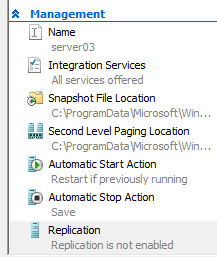
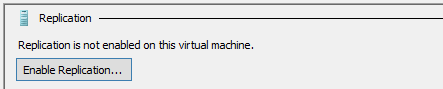
2. Specify the Recovery Server Name to replicate to ( e.g. hypervreplica.mylab.local)
3. Specify the Autentication mode ( selected when you configured the Recover Server )
4. Specify if Compression will be enabled or disabled
5. Select the VHD’s that will be excluded of the process
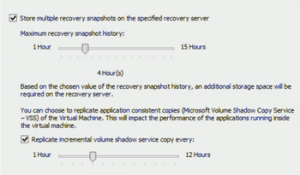
6. Select the Replication Parameters:
– Recovery ( in hours )
– Application Consistent frequency
7. Select the Initial Replication Mode:
– Over Network : once sucessfully connection established, the primary server will sends the VHD files to the Recovery Server. ( can be scheduled )
– Off the Network : ( my recomendation ) The Hyper-V Replica will copy the VHD’s to a specified location which can be an external Hard Disk. You can after that copy the files back to the storage location specified during the Recovery Server Setup
– Using Backup
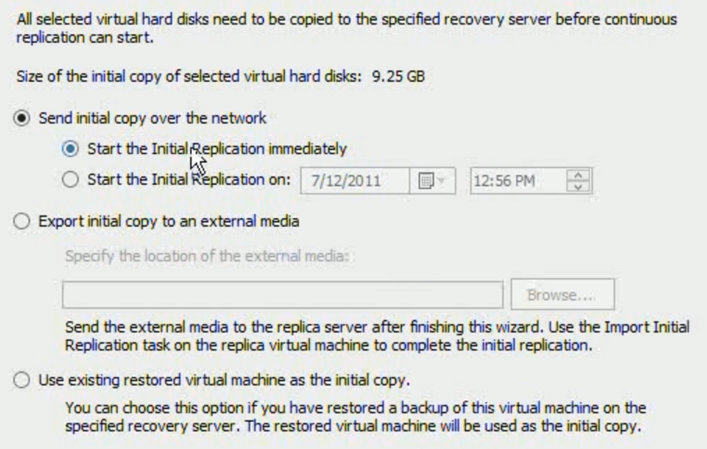
That’s it. The VM will then be created (powered off) on the recovery server once finished and after that the Primary Server, based on replication frequency will send the changes to the Recovery Server
Virtualization and Management: Community Evaluation Program for the Microsoft System Center 2012 Private Cloud
Whoever might be interested…
Microsoft would like to invite you to participate in Microsoft System Center 2012 Private Cloud Community Evaluation Program which will provide a structured approach to creating your Private Cloud environment and a well-managed datacenter.
Members of this community will evaluate the pre-release versions of Microsoft®System Center 2012 with guidance from the product team and through sharing of experiences and best practices among a community of peers.
To join the program, please fill out the application available here. This will help the CEP team gather relevant information about your organization and your environment. Accepted members will be invited to the program portal on Microsoft Connect by October 25. Once you have been added to the site, you will be notified of upcoming meetings and have access to product downloads and evaluation materials.
For more information on this and other available programs, visit theCommunity Evaluation Program Home Page on Microsoft Connect.
Next Release of Windows Intune
Next Release of Windows Intune Available October 17th
Windows Intune brings together Windows Intune cloud services and upgrade rights to Windows 7 Enterprise to help businesses simplify PC management and security while getting the benefits of a modern operating system. At Microsoft’s Worldwide Partner Conference in July, we announced the beta for the next release of Windows Intune. Our next release of Windows Intune, which includes new features and updates to the July 2011 Beta, will be available on October 17, 2011.
Here is a quick reminder of just a few of the features that will be included in the next version:
- Software Distribution: Deploy most Microsoft and third-party updates or applications to PCs nearly anywhere over the Internet.
- Remote Tasks: Remotely perform the tasks such as full scans, quick scans, updating malware definitions, and restarts on Windows Intune managed PCs from the administration console.
- Read-Only Access: Provide select administrators with read-only access to the administration console so they can view PC information as needed, but not perform any configuration tasks.
- Enhanced Reporting: Create hardware reports based on new hardware filters for common hardware characteristics; create and save report parameters to make it easy and efficient to run a report again in the future.
For a full list of features—plus step-by-step guidance and video demonstrations to help you explore, deploy, and utilize Windows Intune in your organization—visit the Windows Intune Resource Zone on Springboard and check the Springboard Series Blog on October 17. You can also try the Windows Intune cloud service free for 30 days.
Recommended Books


System Center 2012 R2 Virtual Machine

System Center Virtual Machine Manager 2012 Cookbook


 Cloudtidings.com