
Home
> Uncategorized > Deleting windows.old after upgrading to windows 7
Deleting windows.old after upgrading to windows 7
Deleting the windows.old folder manually
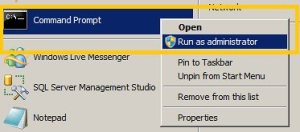
1) Open an elevated command prompt ( runas administrator )
- Click start
- Type: cmd
- right-click it under programs
- click Run As Administrator
2) Take ownership
- takeown c /F /A /R /D
3) grant yourself permission
- icacls c:windows.old /grant Administrators:F /T /L /Q
4) Delete the folder
Make sure you close any explorer or command windows that are looking at or inside the windows.old folder (except for the command window you are using). If you don’t, you will receive an error while performing this step.
- rd /S /Q windows.old
Categories: Uncategorized
Comments (0)
Trackbacks (0)
Leave a comment
Trackback
Recommended Books


System Center 2012 R2 Virtual Machine

System Center Virtual Machine Manager 2012 Cookbook


 Cloudtidings.com